Managing the Vector Database
The Vector Database powers Vault AI functionality by storing approved content and documents as vectors, which allow Agentic Media and Agentic Text Monitoring to quickly understand context and meaning. Other agents do not rely on the database. From the AI Configurations page, admins can monitor Vector Database refresh status for CLM content and Text Monitoring documents, download history logs, retry failed records, and initiate additional refreshes for the PI and compliance documents used by Agentic Text Monitoring.
Unlike CLM content, PI and compliance documents do not receive automatic database updates — the database must be manually refreshed whenever these documents are added or updated.
Who can use this feature?
- Admin Users — Browser
- Monitoring Refresh History
- Retrying Failed Records
- Refreshing the Vector Database
- Downloading Refresh Logs
- A Veeva AI license is required
Configuring the Vector Database for
 Admin Users
Ensure Configuring Vault AI in CRM is complete.
Admins initiating full database refreshes require Read access to Spark Queues. This permission is found in the Admin tab of their permission set.
Monitoring Refresh History as
Admin Users
To view database refresh history:
- Navigate to Admin > Configuration > CRM AI Management > AI Configurations.
- View the Vector Database Sync table. The table displays records for all refresh jobs from the last ten days. At least one recent refresh record for every document type displays, regardless of the refresh date.
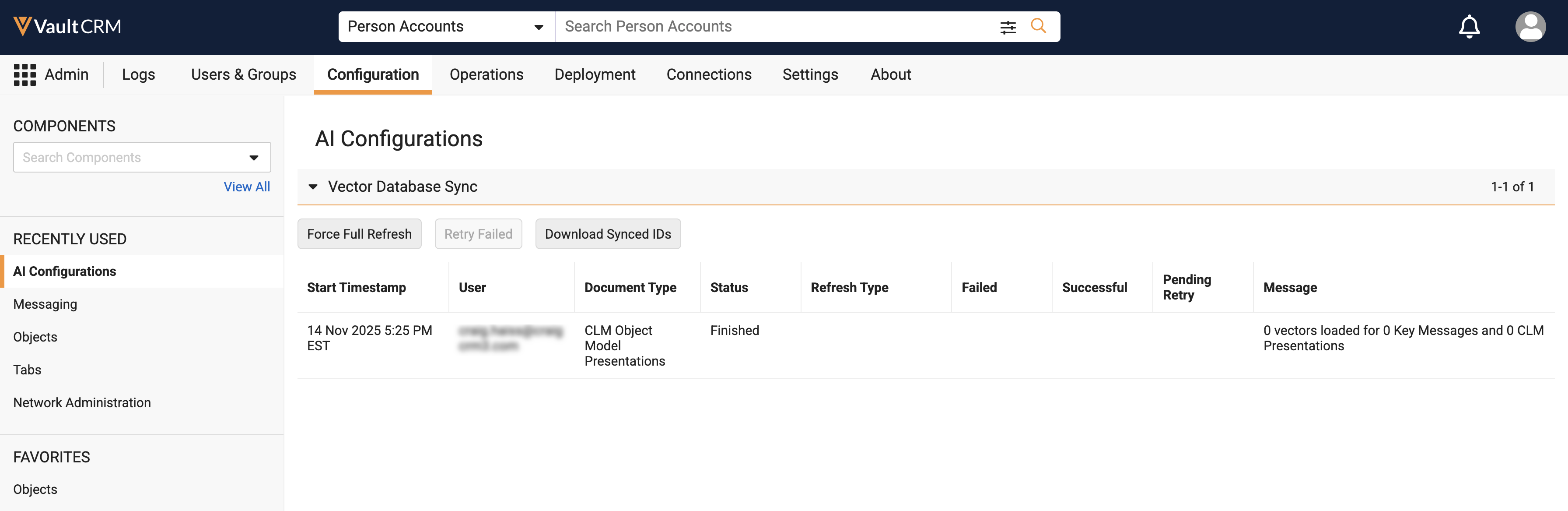
- Review the following columns:
- Start Timestamp — The start date and time of the refresh job
- User — The user who initiated the job
- Document Type — The category of content processed
- Status — The current operational state of the job
- Refresh Type — The method used for the refresh (Full Refresh, Incremental Refresh, or Retry Failed). This field is blank for historical records.
- Failed — The number of documents or record IDs that failed to process, displayed as a hyperlink
- Successful — The number of documents or record IDs that completed successfully, displayed as a hyperlink
- Pending Retry — The total number of failed documents currently awaiting a retry for that document type, displayed as a hyperlink
- Message — Log messages, status updates, or error reasons
Retrying Failed Record as
Admin Users
Retry Failed reprocesses failed records (Pending Retry state) without running a complete refresh. This button is selectable only when documents are in a Pending Retry state after failure to update.
- Navigate to the Vector Database Sync table.
- Select Retry Failed.
- Select the checkboxes for the appropriate content to retry. Checkboxes are selectable only for content or document types with records in a Pending Retry state.
- Select Continue.
The refresh is added to the Vector Database Sync table as a new row with the type set to Retry Failed. Successfully processed records are automatically removed from future Pending Retry history files.
Automatic Database Updates for CLM Presentations in Pending Retry
As CLM Presentations are approved, expired, or their metadata is updated, the Vector Database updates automatically after the CLM job completes. The following behaviors apply to CLM content in a Pending Retry state:
- If an automatic database update expires a document in the Pending Retry status, the document is removed from the retry list.
- If an automatic database update changes the metadata of a document in the Pending Retry status, the document is captured in the Failed CSV log and remains eligible for retry.
Refreshing the Vector Database as
Admin Users
Because automatic database updates are not supported for compliance or PI documents, the Vector Database must be manually refreshed whenever these documents are added or updated.
Vector sync jobs advance continuously without losing progress.
When an admin initiates a Full Refresh, the system only vectorizes documents that do not already exist in the Vector Database. The process deletes vectors for any documents that no longer exist or have expired. For documents already in the database, the system rebuilds the metadata without re-processing the document content, which saves LLM and vector embedding costs. For Compliance and PI Documents, the system compares file versions and IDs, only creating new vectors if the file has changed.
If CLM Vector Scope is set to Product in AI Settings, also run a full refresh after updating scoped products or changing the CLM Vector Scope to All.
- Navigate to Admin > Configuration > CRM AI Management > AI Configurations.
- Select Force Full Refresh.
- Select
To initially populate the Vector Database with CLM presentations, select CLM Presentations. After initialization, the Vector Database is automatically updated for CLM content changes when the PromoMats/MedComms sync runs.
Avoid running additional full refreshes; this can result in extra token usage and avoidable Agentic Media downtime.
- To refresh the Vector Database after adding compliance or PI documents, select Compliance Documents, PI Documents, or both
- Select Continue.
- Select Continue in the confirmation pop-up to start the refresh process.
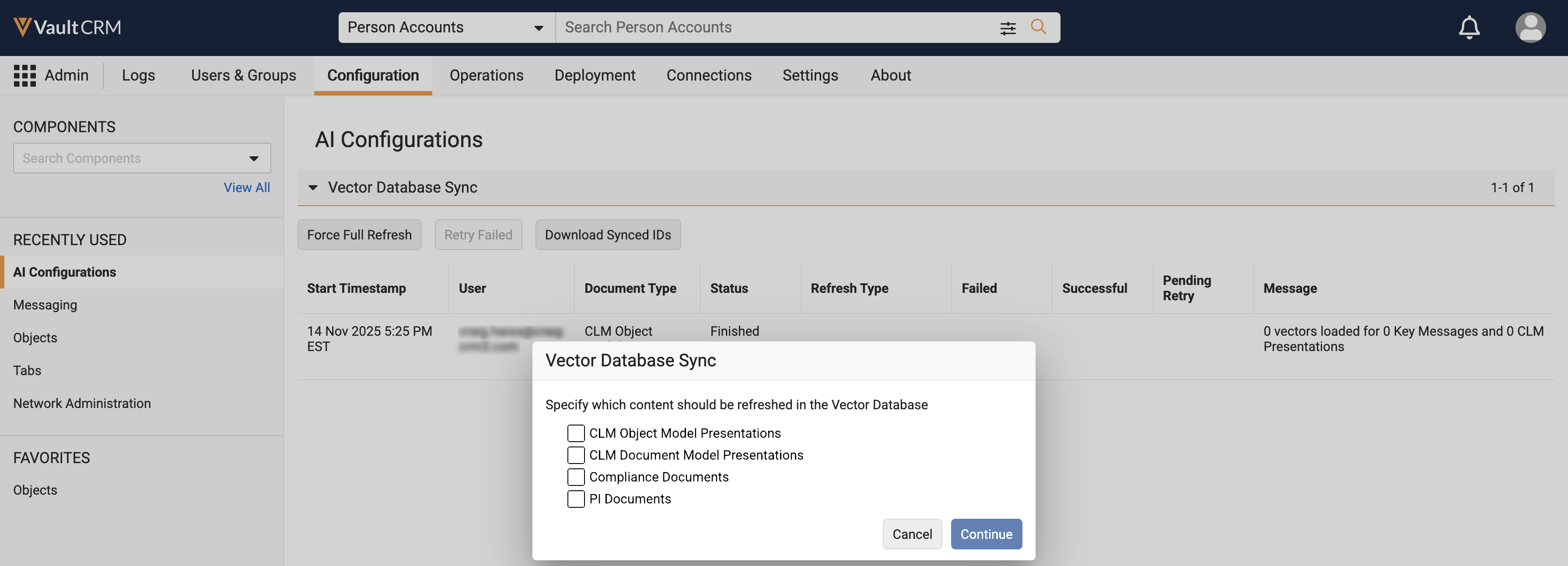
If a vectorization job is actively running for a specific document type, the Force Full Refresh button remains selectable, but the checkbox for that actively processing document type is disabled.
After updating scoped products or changing the CLM Vector scope, select the checkbox for CLM content.
Downloading Refresh Logs and Synced IDs as
Admin Users
Admins can download information on documents or records in the sync job, including all of the IDs for the total documents that are currently processed, or IDs with a status of Successful, Failed, or Pending Retry.
Select the Download Synced IDs button and select the checkboxes for the appropriate document types to export a list of all IDs currently synced to the Vector Database. Checkboxes are disabled if a job for that document type has started or is about to start. A separate CSV file downloads for each selected document type.
From the Vector Database Sync table, select the hyperlinked number in the Successful, Failed, or Pending Retry column for a specific job to download a CSV file with more information:
- Successful — Downloads a file with all successfully logged document IDs
- Failed — Downloads a file with all failed document IDs and their internal error reasons
- Pending Retry — Downloads a file with all currently failed document IDs for that document type, up to the last Full Refresh
CSV files are retained for ten days beyond the job date. Pending Retry counts and retry capabilities remain active even after the corresponding CSV file is no longer available.
Considerations for
Admin Users
Before refreshing the Vector Database, ensure end users are not actively using AI features in Vault CRM, as they may receive inaccurate responses during a refresh. Perform the database refresh prior to enabling AI for end users or during a designated maintenance window.

