Creating and Managing X-Pages Studio Connections in X-Pages Studio
To deploy pages, Studio admins can connect an X-Pages Studio domain to any number of Vault CRM vaults. Each connection is stored as a Vault CRM Connection. Studio admins can create multiple connections using the same user when multiple teams share an environment, for example, Medical and Sales. Available connection types include Sandbox or Production.
Connections can be in one of the following states:
- Pending - Connection created in X-Pages Studio but not yet finalized in Vault CRM
- Connected - Connection between X-Pages Studio and Vault CRM is active
- Revoked - Connection between X-Pages Studio and Vault CRM is no longer active
See Creating and Managing X-Pages Studio Connections in Vault CRM for more information on Vault CRM Admins and connection management in Vault CRM.
Domain connections created after the 26R1.4 Production Release (July 16, 2026) use an updated method to authenticate with Vault CRM that no longer requires a licensed integration user. Domain connections established before the 26R1.4 Production Release are considered legacy connections and will continue to function - no action is needed from users. Integration user credentials for legacy connections can not be edited.
Who can use this feature?
- Studio Admins - Browser
- Creating an X-Pages Studio Connection
- Managing an X-Pages Studio Connection
- Downloading a Studio Connection File
- Managing Test Users for an X-Pages Studio Connection
- Users do not require an additional license
Configuring X-Pages Studio for
 Studio Admins
To configure this feature, ensure Configuring X-Pages Studio is complete.
Creating an X-Pages Studio Connection as
Studio Admins
To create a connection:
- Navigate to X-Pages Studio > Connections.
- Select New Connection.
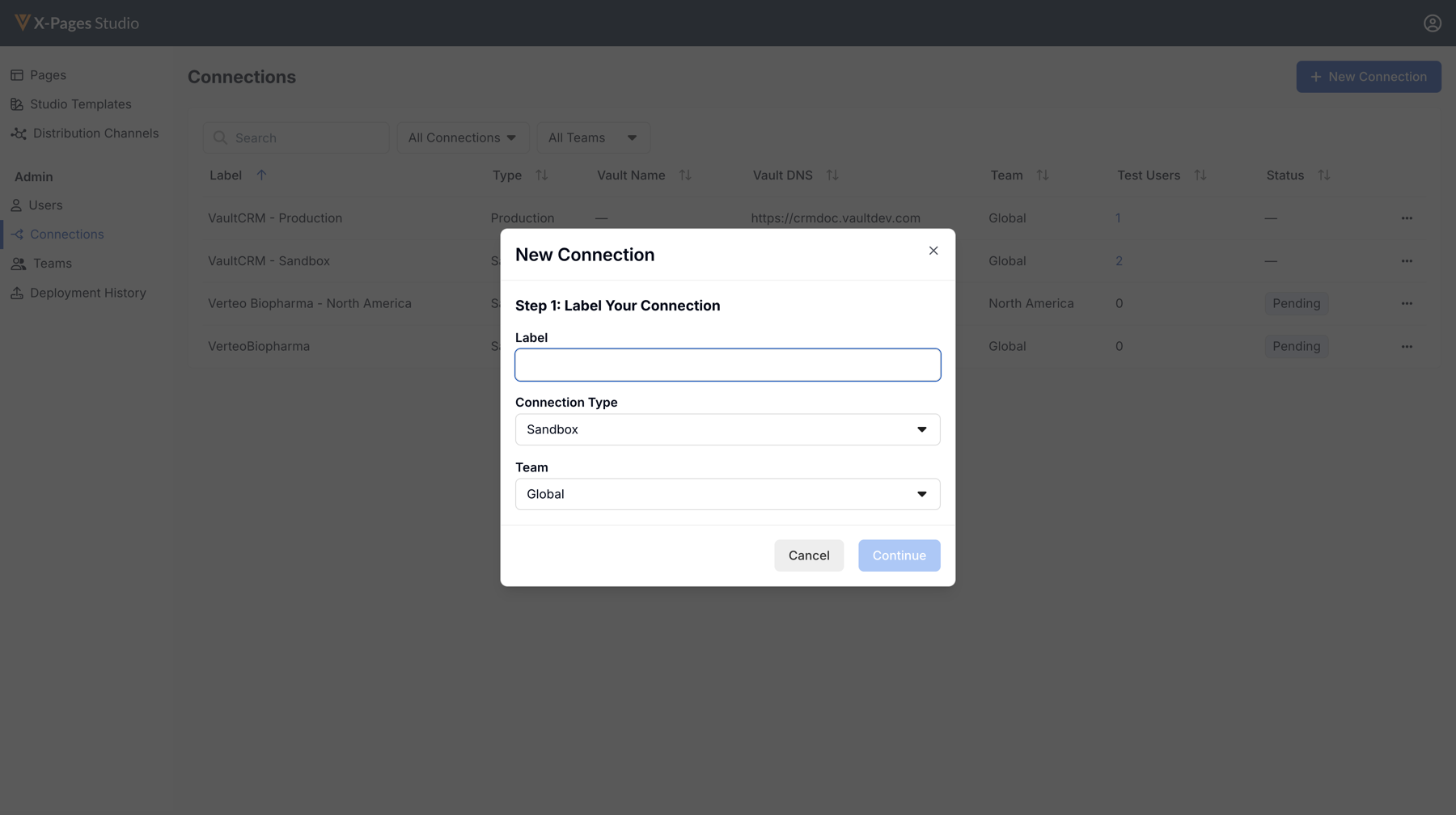
- Enter the following information:
- Label - Must be unique, max 50 characters
- Connection Type - Select Sandbox or Production
- Team - Select a team (default is Global). See Creating and Managing X-Pages Studio Teams for more information.
- Select Continue to save the connection in the Pending state.
- Select Download Connection File to download a file specific to this connection within the Studio domain.
- Share the Studio Connection File with the Vault CRM admin to complete the Vault CRM connection.
- Select Done.
When a connection is created, the connection is in the Pending state until completed by a CRM admin.
Completing an X-Pages Studio Connection
To activate a Pending connection, a Vault CRM admin must upload the Studio Connection File in Vault CRM. See X-Pages Studio Administration for more information.
Once the file is successfully uploaded, the connection moves to the Connected state and is available for deployment.
Managing an X-Pages Studio Connection as
Studio Admins
The Edit Connection modal displays different information depending on the connection type.
For connections in the Connected or Revoked state, the Connected Vault CRM section displays the following read-only information:
- The connection state
- Name of the connected Vault
- DNS address of the connected Vault
For connections in the Pending state, the Connected Vault CRM section displays a message indicating that the connection is still pending. A Download Connection File button is also displayed.
For legacy connections (connections created before the 26R1.4 Production Release), the Integration Users section displays the integration username. Integration user credentials cannot be edited.
Editing an X-Pages Studio Connection
To edit an connection:
- Navigate to X-Pages Studio > Connections.
- Select Edit Connections from the menu for the corresponding connection.
- Update the available fields.
- Select Done.
Deleting an X-Pages Studio Connection
Deleting a connection removes it from the Connections table and deletes all associated test users.
To delete a connection:
- Navigate to X-Pages Studio > Connections.
- Select the connection's corresponding All Actions menu.
- Select Delete.
- Confirm the deletion.
Downloading a Studio Connection File as
Studio Admins
X-Pages Studio admins can download a Pending connection’s Studio Connection File at any time. This is useful if the original file was lost or needs to be shared again.
To download a Studio Connection File:
- Navigate to X-Pages Studio > Connections.
- Select the connection's corresponding All Actions menu.
- Select Download Connection File.The file downloads with the connection label as the file name.
Managing Test Users for an X-Pages Studio Connection as
Studio Admins
Test users can only be added to connections in the Connected state or for legacy connections. Connections in the Pending or Revoked state do not support test users.
Adding Test Users to an X-Pages Studio Connection
To add a test user to a connection:
- Navigate to X-Pages Studio > Connections.
- Select View Test Users from the All Actions menu of a connection.
- Select Add Test User.
- Enter the following information:
- Username - Test user’s user name
- Password - Test user’s password
- Select Save. The Test User's credentials are verified. If the test user’s credentials cannot be verified, an error displays. Once the test user’s credentials are verified, the test user is saved. The Testing Group is the test user's Application Profile. This field is not editable.
- Select Done.
Viewing Test Users for an X-Pages Studio Connection
To view test users for a connection:
- Navigate to X-Pages Studio > Connections.
- Select View Test Users from the All Actions menu of a connection.
- Select Done.
Deleting Test Users from an X-Pages Studio Connection
To delete a test user for a connection:
- Navigate to X-Pages Studio > Connections.
- Select View Test Users from the All Actions menu of a connection.
- Select the user's corresponding delete icon.
- Select Done.

