Repurchasing EPPV Targets
Under postmarketing surveillance regulations, when a product treatment is resumed (indicated by new purchase/sales data) after a previous EPPV target cancellation, organizations are required to reactivate safety monitoring. The Repurchase Target feature automates this regulatory requirement while preserving historical data and maintaining a robust audit trail.
Who can use this feature?
- Business Admin Users - Browser
- Managing EPPV Repurchase Targets
- Users do not require an additional license
Configuring EPPV Repurchase Targets for
 Business Admin Users
To configure this feature, ensure Configuring Business Event Tracking is complete.
Managing EPPV Repurchase Targets as
Business Admin Users
To preserve compliance records and allow organizations to track a target's transition between active, canceled, and repurchased states over time, Vault CRM performs the following actions when a repurchase occurs.
- Generates a new business_event_target__v record for the account
- Links the new target to the original canceled target via the previously_canceled_target__v relationship field
- Bypass standard duplicate validation checks, which normally prevent multiple targets for the same Account-Business Event combination
- Permanently locks the original canceled target to prevent editing and maintain data integrity
Bulk Dataloading Repurchases
Administrators can process bulk repurchases by updating the repurchase_date__v on canceled target records using dataloading tools. To prevent data loading mistakes, the system prevents setting a repurchase date on targets that are active or completed.
Executing a Repurchase from the Target Record
To execute a repurchase from the target record:
-
Navigate to Business Admin > Objects > Business Event Targets.
-
Select the canceled target.
-
Select Repurchase Target from the All Actions menu.
-
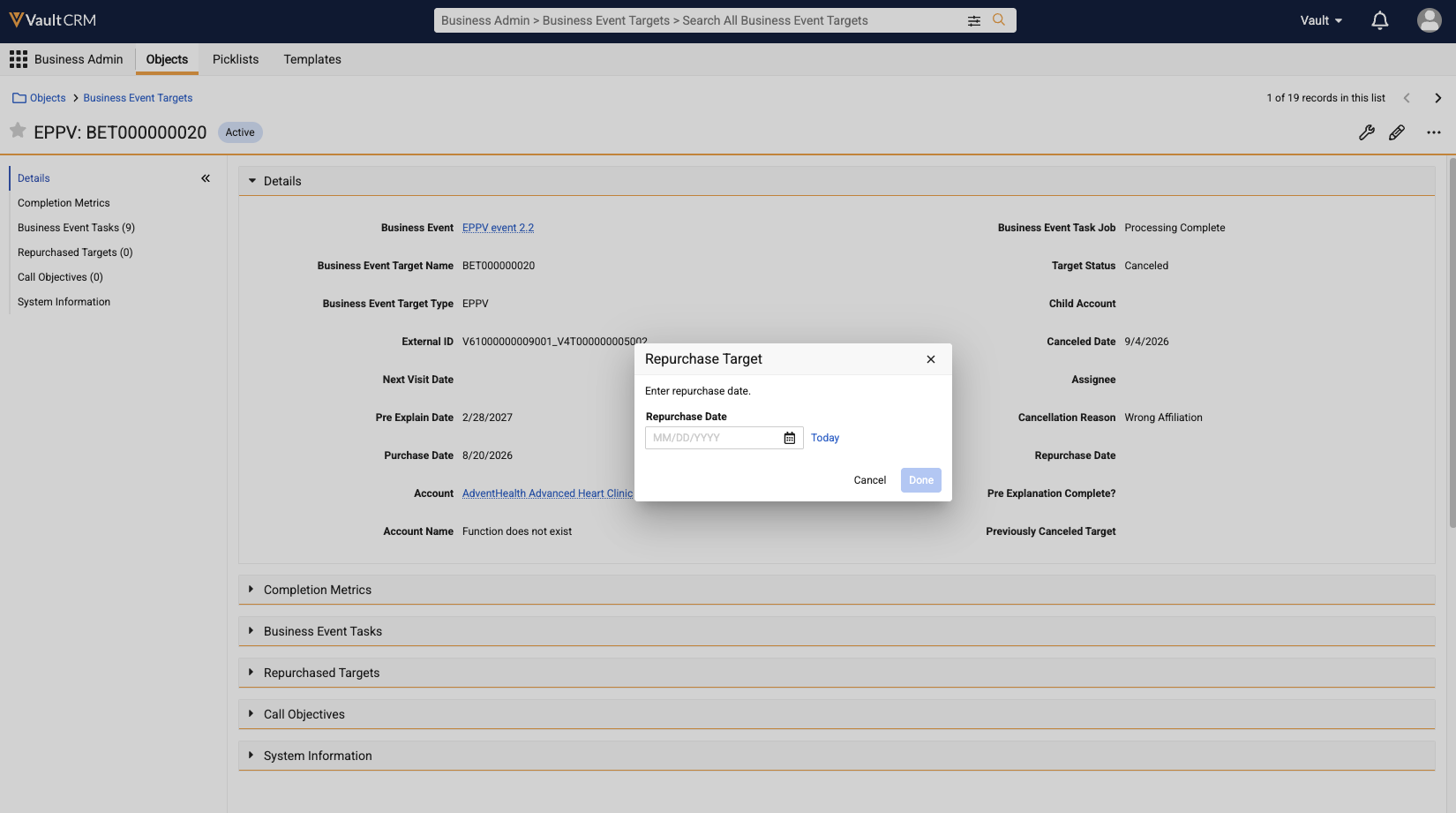
Enter the Repurchase Date.
The repurchase date must be on or after the associated product's launch date and cannot be in the future.
-
Select Done.
Upon completion, Vault CRM stamps the entered date into the original target's repurchase_date__v field and automatically generates the new EPPV target record. The new target record automatically inherits the following fields from the original canceled target:
- business_event__v
- account__v
- child_account__v (if applicable)
- pharmacy__v (if applicable)
- assignee__v
- previously_canceled_target__v (populated with the ID of the original canceled target)
When the daily Business Events Job runs, it identifies the newly repurchased target and determines which tasks need to be created based on historical pre-explanation status.
When an end user completes a pre-explanation task, the pre_explanation_complete__v value on the parent target is automatically updated.
Target History Locking
To prevent retrospective data manipulation, once a canceled target is repurchased, the original canceled target record is locked.
- The repurchase_target__v and reopen_target__v actions are permanently disabled and hidden on the original canceled target
- The original record cannot be modified
- Any manual update, API call, or bulk data load modification to the locked original target is rejected

