Canceling Cases in Patient CRM
Patient CRM users can cancel a case directly from Case Details. This is useful when a case is duplicated or created inadvertently.
Cases can be canceled while in any active state. Cases in a terminal state, for example, Solved or Closed, can not be canceled. Users must enter a public comment to capture the cancellation reason on the Activity Feed. Once canceled, the case is removed from default list views and becomes read-only.
Who can use this feature?
- End Users - Browser
- Canceling Cases
- Viewing Canceled Cases
- Restarting a Patient Journey Step
- Users require a Patient CRM License
Configuring Canceling Cases in Patient CRM for
 End Users
To configure this feature, ensure Configuring Patient CRM is complete.
Canceling Cases as
End Users
End users can cancel a case from Case Details when the case is in a non-terminal state..
To cancel a case:
- Navigate to the Patient Center tab.
- Navigate to the appropriate Case.
- Expand the Case Lifecycle Status menu.
- Select Cancel Case.
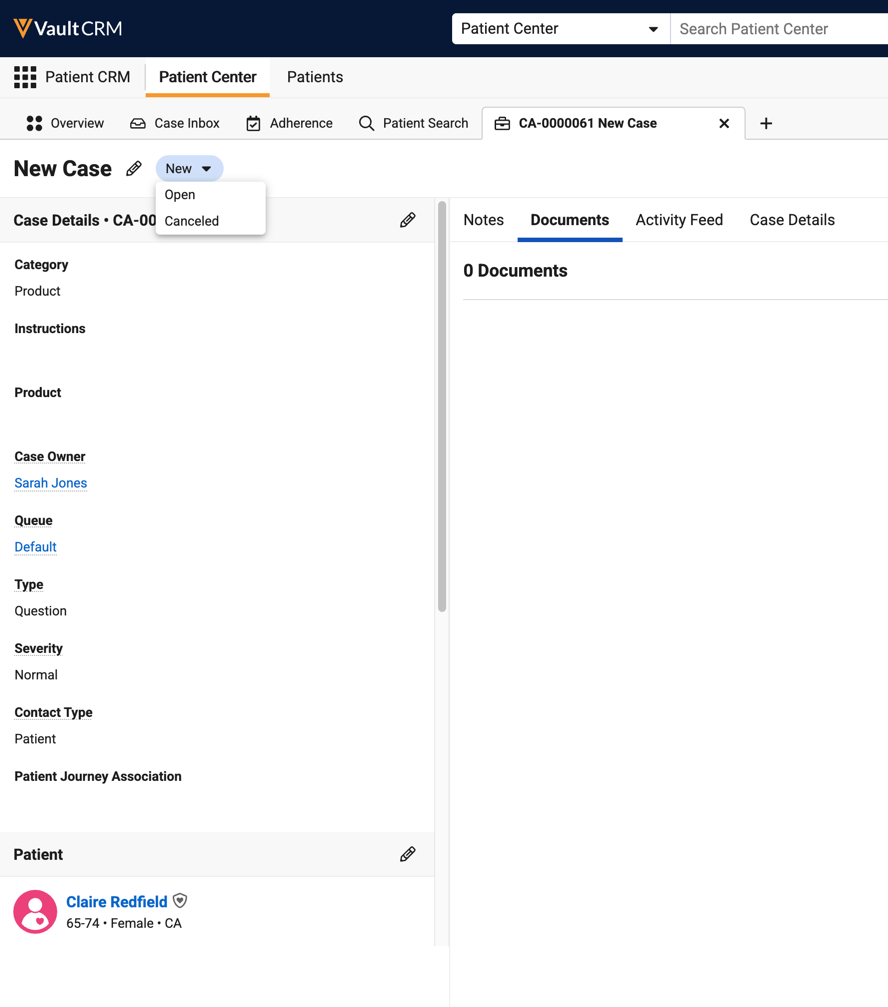
- Complete the Cancel Case modal:
- Enter an explanation in the Case Comment field
- Select Save
- Select Save.
Once canceled, case fields become read-only and the Activity Feed displays the Case’s cancellation reason.
When a Patient Journey is canceled or discontinued, all associated cases in non-terminal states are automatically canceled. A system-generated case comment with the reason and date are stamped on all affected cases.
Viewing Canceled Cases as
End Users
Canceled cases do not display in the My Cases, they can only be accessed by a direct URL, Vault Search, or via Associated Cases on a Patient Journey.
When viewing the Associated Cases section of a Patient Journey, canceled cases are reflected in the total case count. They are not included in the open case count. The Canceled status displays next to the associated case along with its last modified date.
Inbound Emails for Canceled Cases
When a new inbound email is received for a canceled case, it is treated as an unassociated email and routed to the shared mailbox to be processed as a new email. End users do not have visibility into the new email via the canceled case as Patient CRM does not create an association between the two. See Replying to Emails in Patient CRM for more information.
On the backend, when an email is received for a canceled case, a Message Node object links the email to the canceled case’s email thread for audit purposes.
Restarting a Patient Journey Step as
End Users
End users can restart Patient Journey Steps for manually canceled cases to ensure Patient Journey progression. If the Patient Journey Step’s associated case was automatically canceled as a result of the Patient Journey being discontinued or canceled, the step can not be restarted.
To restart an eligible Patient Journey Step:
- Navigate to the Patient Center tab.
- Navigate to the appropriate Patient record.
- Navigate to the Patient Journey sub-tab.
- Select the canceled Patient Journey Step.
- Select Restart.
Linking a Patient Journey to a Case
Users cannot link a Patient Journey to a canceled Intake Case.
The Patient Intake tab’s visibility and behavior after a case is canceled depends on whether a Patient Journey Association exists:
- If an association exists and the Patient Intake tab is in read-only mode, the tab remains read-only
- If an association does not exist and the Patient Intake tab is in edit more, the tab is hidden
Depending on whether a Patient Journey Association exists determines if the Patient Intake tab is displayed:
- If a Patient Journey Association exists and the Patient Intake tab is in read-only mode, the Patient Intake tab remains remains read-only after the case is canceled
- If a Patient Journey Association does not exist and the Patient Intake is in edit mode, the Patient Intake tab is hidden after the case is canceled.

