Associated Cases in Patient CRM
End users can view the Associated Cases section of a Patient Journey for a complete list of cases related to the same product as the journey. This ensures ad hoc interactions and non-journey related cases are still visible within Patient CRM, providing a robust picture of the patient’s relationship with the product.
Who can use this feature?
- End Users – Browser
- Viewing Associated Cases
- Users require a Patient CRM License
Configuring Associated Cases for
 End Users
To configure this feature:
- Ensure Configuring Patient CRM is complete.
- Navigate to Admin > Users & Groups > Permission Sets.
- Select the appropriate permission set.
- Select the Objects tab.
-
Grant the following permissions:
Object Object Permission Object Types Fields Field Permission Case (case__v) R patient_crm__v is_ad_hoc__v Edit - case_subject__v
- state__v
- case_owner__v
- product__v
Read Patient Journey (patient_journey__v) R n/a product__v Read
Viewing Associated Cases as
End Users
To view cases associated with a patient, navigate to the Associated Cases section of the appropriate Patient Detail page.
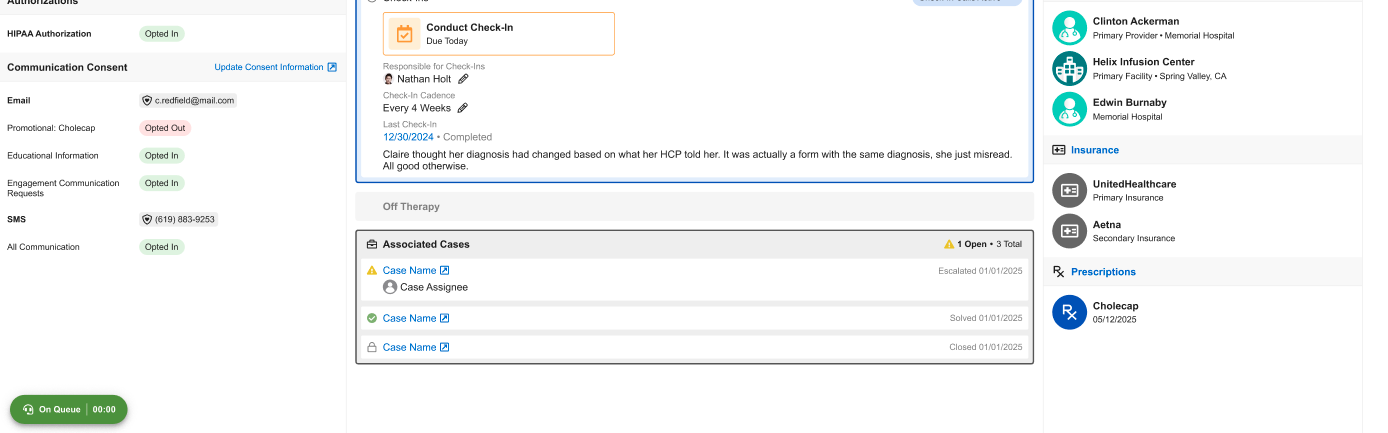
This section automatically populates with cases where the product of the case matches the product of the associated Patient Journey, even if the case is not linked to a specific journey phase.

