Canceling Cases in Service Center
Service Center reps can cancel a case directly from Case Details. This is useful when a case is duplicated or created inadvertently.
Cases can be canceled while in any active state. Cases in a terminal state, for example, Solved or Closed, can not be canceled. Users must enter a public comment to capture the cancellation reason on the Case Timeline. Once canceled, the case is removed from default list views and becomes read-only.
Who can use this feature?
- Service Center Reps - Browser
- Canceling Cases
- Viewing Canceled Cases
- Users do not require an additional license
Configuring Canceling Cases in Service Center for
 Service Center Reps
To configure this feature, ensure Configuring Service Center is complete.
Canceling Cases as
Service Center Reps
Service Center Reps can cancel a case from Case Details when the case is in a non-terminal state.
To cancel a case:
- Navigate to the Service Center tab.
- Navigate to the appropriate case.
- Expand the Case Lifecycle Status menu.
- Select Cancel Case.
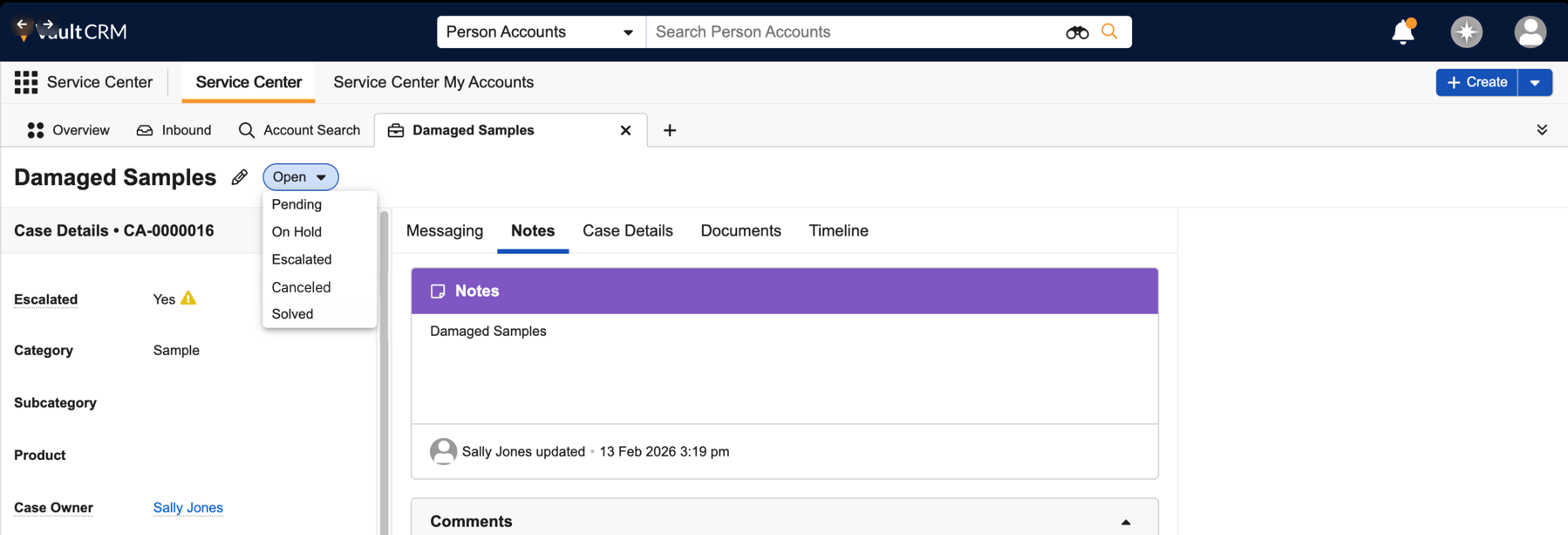
- Complete the Cancel Case modal:
- Populate the Case Comment field in the Cancel Case modal
- Select Save
- Select Save.
Once canceled, case fields become read-only and the Activity Feed displays the Case’s cancellation reason.
For cases created from an email thread, the message_state__v field on the corresponding message_node__v record is updated to reflect the Closed state.
Viewing Canceled Cases as
Service Center Reps
Canceled cases do not display in the My Cases

