Formatting Account Name by Country
Admins can configure Vault CRM to automatically format account names as Last Name First Name for specific countries or locales. This ensures names for person accounts in Japan, Korea, Taiwan, and Hong Kong are displayed and stored according to local conventions, improving data consistency and user experience.
For example, a user creates a new account for Dr. Clinton Ackerman. Because the enable_country_state_language_cda__v Veeva Setting is set to Yes and the value in the country_cda__v field on the account__v object is included in the configured list for the Last Name First Name Veeva Setting, Vault CRM saves the account name as Ackerman Clinton.
Who can use this feature?
- End Users — Browser, iPad, iPhone
- Formatting Account Name by Country
- Users do not require an additional license
Configuring Formatting Account Name by Country for
 End Users
To configure this feature:
- Ensure Configuring Accounts is complete.
- Navigate to Business Admin > Settings > Veeva Settings > Global Veeva Settings.
- Select Edit.
- Select the countries that should use the Last Name First Name format from the picklist in the Last Name First Countries Veeva Setting. By default, this setting contains the following: Japan (jp__v), South Korea (kr__v), Taiwan (tw__v), Hong Kong (hk__v).
- Select Save.
-
Enable the enable_country_state_language_cda__v Veeva Setting to use the country_cda__v field when determining the country. (This step is optional.)
The Veeva Setting is profile-specific. If no profile-specific setting is defined, the global setting is used.
Configuring this feature may impact queries against the name__v field on the account__v object since the queries require a local sorting value.
Formatting Account Name by Country as
End Users
The name__v field on the account__v object automatically displays using the proper format based on the country for the account. Vault CRM checks either the country_cda__v field or country_code__v field (depending on the enable_country_state_language_cda__v Veeva Setting) when a user creates or modifies a person account.
- If the value in the country_cda__v field or country_code__v field on the account__v record is included in the Last Name First Countries Veeva Setting, Vault CRM saves the name__v field on the account__v object as Last Name First Name
- If the value in the country_cda__v field or country_code__v field on the account__v record is not included in the setting, or if the setting is blank, Vault CRM saves the name__v field on the account__v object in the standard First Name Last Name format
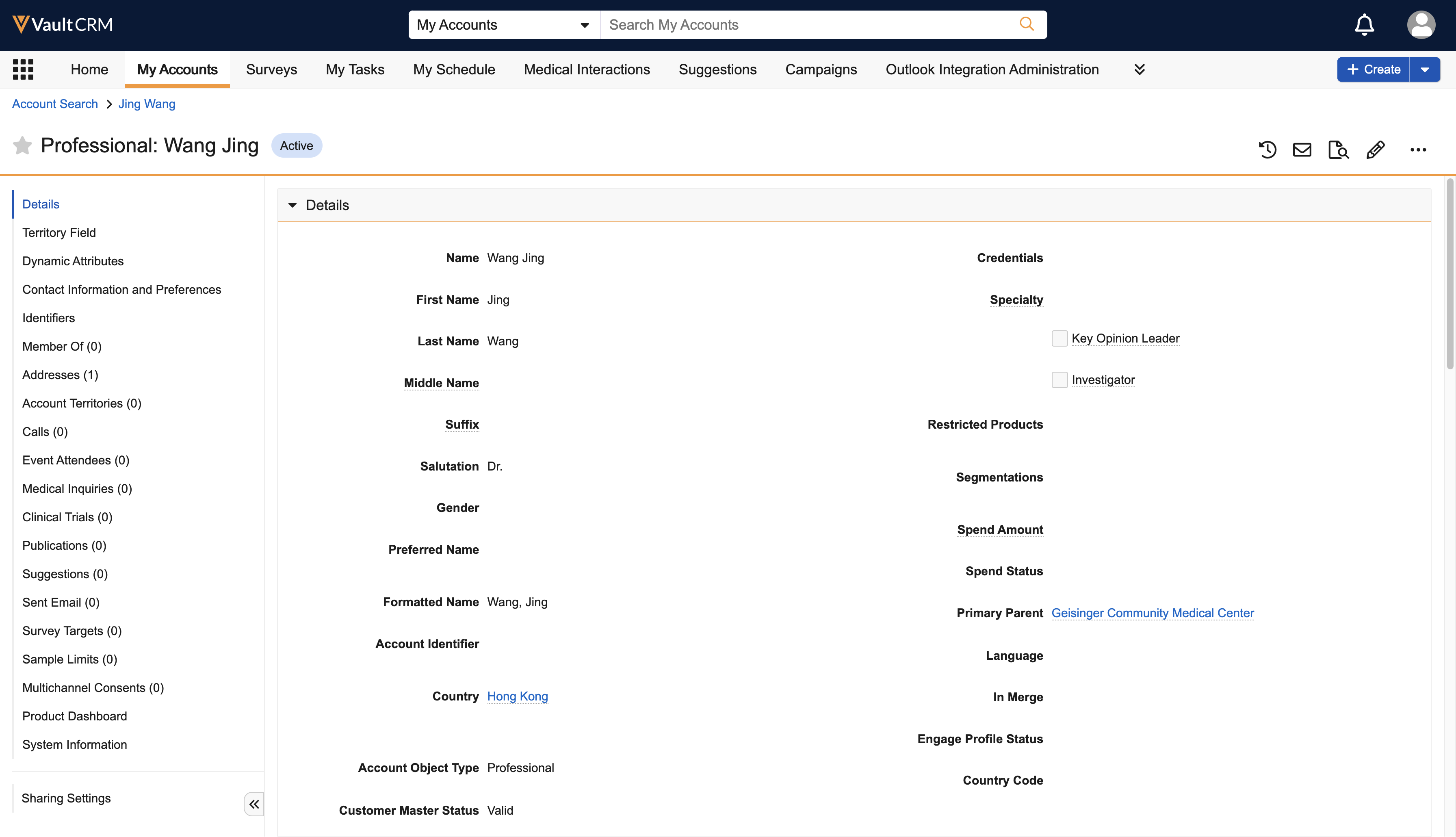
Users can reformat existing accounts by editing the first_name_cda__v, last_name_cda__v, name__v, or country__v field on the account__v object. Vault CRM updates the formatting when the user saves the change.

