Creating Rule-Based Targeting Assignments
Targeting records in Align can be created using Targeting rules. These are a subset of the aln_account_rule__v object. Users can set up a single Targeting rule per Multichannel Cycle. This rule is used to identify Accounts matching the target criteria and create records for the following objects:
- mc_cycle_plan__v
- mc_cycle_plan_target__v
- mc_cycle_plan_channel__v
- mc_cycle_plan_product__v
Users can add Channel Groups within each Multichannel Cycle Channel section.
Who can use this feature?
- Align Operational Users - Browser
- Creating Targeting Rules
- Processing Accounts
- Viewing Targeting Rule Results
- Creating Targeting Exclusions
- Users require an Align License
Configuring Rule-Based Targeting Assignments for
 Align Operational Users
To configure this feature:
-
Ensure the following features are configured:
- Navigate to Admin > Configuration > Objects.
-
Place the Account Rules related object section on layouts for the following objects:
- aln_field_force__v
- aln_field_force_model__v
Creating Targeting Rules as
Align Operational Users
To create a targeting rule:
- Edit the appropriate aln_account_rule__v or aln_account_rule_model__v records.
- Select Display in Lists for the rule_type__v field.
- Select Save.
- Select the All Actions menu.
-
Select Create Cycle Targeting Rule.
Users cannot add Targeting rules through the Align Data Loader.
- Select an mc_cycle__v record assigned to the Field Force or Field Force model. Only cycles without an assigned Targeting rule can be selected.
The Targeting rule automatically inherits the cycle's start and end dates. These dates also set the lifetime for all Targeting records created by this rule.
The Channels section is populated with an expandable section for each cycle channel assigned to the rule's Cycle. These channel sections can be removed from this page. Removed channel sections can be added back in with the Add Cycle Channel button, but this button remains unusable while the rule has a section for each cycle channel under the cycle.
Channel Groups
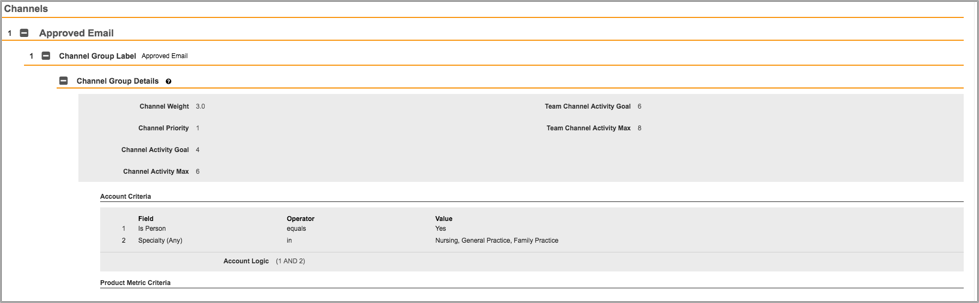
Channels Groups represent a set of goals and products assigned to Accounts meeting the channel groups' criteria. An Multichannel Cycle Channel section can have multiple channel groups, each with a distinct set of activities, products, and criteria, but a given Account can only match a single group within the same cycle channel section. The activity values and the products assigned to a channel group are used to create the cycle plan channel and cycle plan product records assigned to a specific target. See the Assignment Preview Page section of this document for more information.
Channel groups are assigned a priority value within the same Multichannel Cycle Channel section, however, Accounts matching a higher priority channel group are not evaluated against the criteria for a lower priority Multichannel Cycle Channel group. The highest priority a channel group can have is 1.
Within the Multichannel Cycle Channel group's Channel Details section, users can do two things:
- Specify the activity goal and activity max values for Multichannel Cycle Plan Channels created by this channel group
- Specify the criteria an Account must meet to qualify for this Multichannel Cycle Channel group. The criteria can be based on values stored on the account__v record or in product_metrics__v records assigned to this Account. This section is identical to the criteria in the standard Account rules.
If a Multichannel Cycle Channel has products assigned to it, users can add Product Groups to the Multichannel Cycle Channel group.
Channel groups are stored in the targeting_channel__v object.
Product Groups
Product groups represent a set of product-based goals assigned to Accounts matching the product group's criteria in addition to the channel group's criteria. A channel group assigned to a cycle channel containing products automatically includes a cycle product section for each product assigned to the same cycle channel. Each cycle product section can have multiple product groups, each with its distinct set of activities and criteria, but a given Account can only match a single product group within the same cycle product section. The activity values assigned to a product group are used to create the cycle plan product records assigned to a specific target. See the Targeting Assignment Preview section for more information.
Product groups are assigned a priority value within the same cycle product section, however, Accounts matching a higher priority product group are not be evaluated against the criteria for a lower priority product group. The highest priority an MC Cycle Channel product group can have is 1. Product group priorities only apply within the same channel group section; an Account can match any number of product groups, potentially for the same product, as long as they each belong to a cycle channel. Accounts cannot match multiple product groups under different channel groups in the same MC Cycle Channel section because they cannot match multiple channel groups within the same MC Cycle Channel section.
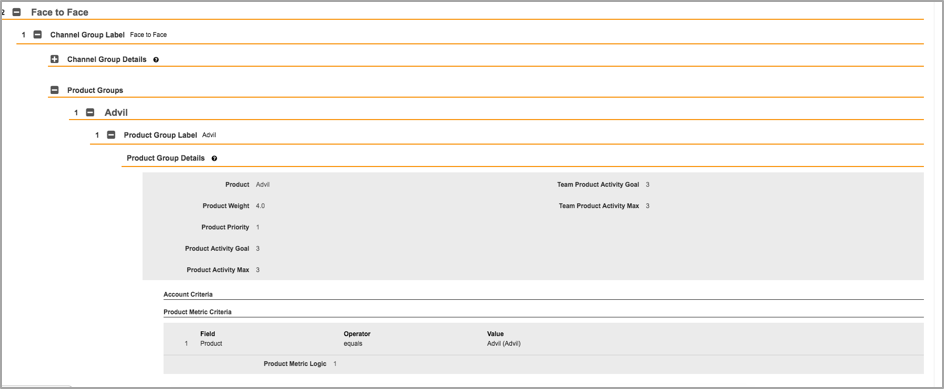
Within the MC Cycle Channel group's Channel Details section, users can do two things:
- Specify the activity goal and activity max values for Multichannel Cycle Plan products created by this channel group
- Specify the criteria an Account must meet to qualify for this channel group. These criteria can be based on values stored on the account__v record or in product_metrics__v records assigned to the Account. This section is identical to the criteria in the standard Account rules.
The product metrics criteria do not necessarily have to match the specific product for this product group's cycle product. This allows users to assign activities for a product to a target depending on its metrics for a different product.
Product groups are stored in the targeting_product__v object.
Targeting Assignment Preview
An assignment preview generates Targeting records if the preview includes at least one Targeting rule. To be included in an assignment preview for a territory or territory model, a Targeting rule must fulfill the following conditions:
- The preview’s run_date__v value must fall within the rule’s start_date__v and end_date__v values
- At least one of the territories in the assignment preview must be assigned to the Targeting rule's Field Force
Once a Targeting rule is included in an assignment preview, it is automatically used to generate Targeting records as part of the rule. This rule affects all territories included in the assignment preview assigned to the rule's Field Force or Field Force model.
Data Loading Targeting Rules
Align operational users can utilize the Align Data Loader to load targeting rules. This allows users to quickly create targeting rules for multiple field forces. The following objects are supported by the Data Loader:
- aln_targeting_rule_channel__v
- aln_targeting_rule_product__v
Additionally, records within an aln_account_rule__v Data Loader file where the rule_type__v field is targeting__v are also supported.
To use the Data Loader on targeting rules:
- Load the appropriate account_rule_object__v records where the rule_type__v field is set to targeting__v.
- Load the aln_targeting_rule_channel__v records referencing the appropriate targeting rules. The logic filter fields of these records should reference criteria using their external IDs.
- Load the aln_targeting_rule_product__v records referencing the appropriate targeting channels. The logic filter fields of these records should reference criteria using their external IDs.
- Load the appropriate aln_account_rule_criteria__v records. The Data Loader automatically assigns these records to the referenced parent and replaces the parent's external ID field with the newly created Vault ID field.
This process can also be used to load account rule model records.
Updating Rule Lifecycles
Align operational users can freeze their targets for the duration of a cycle. This allows users to account for the unpredictability of Accounts during a business cycle and provides greater consistency to planned activity goals. To facilitate this feature, the lifecycle__v field on the aln_account_rule__v and aln_account_rule_model__v objects controls the lifecycle status of the rule.
To help audit mc_cycle_plan__v records, the align_rule_id__v field has also been added. This field automatically stamps with the rule ID of the targeting rule that created the mc_cycle_plan__v record.
To change the lifecycle status of a targeting rule:
- Navigate to the appropriate targeting rule's detail page.
- Select the Action menu. This displays as a Gear icon.
-
Set Lifecycle. Select one of the three lifecycle options:
- Active – The rule creates and deletes account territory records. This is the default state for all new rules.
- Inactive – The rule is excluded from assignment previews. Targeting records previously created by this rule are deleted in the next preview involving them unless the record has been pushed to CRM.
- Frozen – The rule is excluded from assignment previews and does not create new targeting records. Targeting records previously created by this rule persist and are not deleted.
To assist in auditing Frozen rules, a list displays in assignment previews that displays all Frozen targeting rules.
Segmentation Stamping on the Rules Engine
Align enables stamping target records with the channel or product segment by which they were targeted. This makes segments defined in Align more visible on targets in Vault CRM, improving the review process and field execution.
To configure Segmentation Stamping:
- Create custom fields on the mc_cycle_channel_plan_channel__v and mc_cycle_plan_product__v objects in Vault CRM . These fields are used in the field mapping process.
- Navigate to the Align Integration page in the Integrations tab.
- Select the gear icon corresponding to the appropriate Vault CRM instance, then edit the Field Mapping.
- Map the appropriate Vault CRM field to the channel_segmentation__v field on the mc_cycle_plan_channel__v object.
- Map the appropriate Vault CRM field to the product_segmentation__v field on the mc_cycle_plan_product__v object.
Manual edits to these fields in Align are overwritten during the next rules run.
The channel_segmentation__v and product_segmentation__v fields do not display on the Target Mass Add page.
Processing Accounts as
Align Operational Users
Targeting rules run after all Account rule and hierarchy rules are processed, but before Account exclusions are applied to the resulting assignments. A Targeting rule evaluates all Accounts assigned to a Territory as of the preview, including rule-based assignments and explicit assignments. These Accounts are evaluated against each channel group or product group's criteria, as seen in the Creating Targeting Rules section of this document.
-
An Account matching the criteria for a channel group and at least one of the channel's product groups is assigned an MCCP Channel based on the same goals as the channel group and an MCCP Product based on the same product and goals as each matching product group
If an account matches the criteria for multiple product groups of the same product, only the group with the highest priority is assigned to the account.
- An Account matching the criteria for a channel group without products is assigned a cycle plan channel based on the same goals as the channel group
- An Account assigned to at least one cycle plan channel is also assigned a cycle plan target record with goals based on the combination of goals from all of the cycle plan channels and cycle plans products assigned to this Account
- A territory with at least one assigned Account classified as a target is assigned a cycle plan record with goals based on the combination of all targets assigned to this territory's Accounts
A Targeting rule evaluates only Accounts that are assigned to the territory as of the current preview. Accounts cannot become Targets unless they are assigned to the territory.
The assignment preview attempts to regenerate Targeting records without considering previous Targeting information at this stage. Should the user commit this assignment preview, the commit process handles merging the results of the assignment preview with preexisting Targeting records. This is the same method by which an assignment preview evaluates Account assignments.
Viewing Targeting Rule Results as
Align Operational Users
Users can view the result of their Targeting rules in addition to Account assignments on the assignment preview page through the Targeting tab. The Targeting tab displays the number of targets and the cycle plan's activity goals for each Territory included in the preview containing an assignment cycle.
Also, the Exclusions tab marks Accounts with the Targeting icon to indicate the Account qualified as a Target if it had not been excluded.
Committing Targeting Rule Results
Users can commit Targeting records to Vault by committing the assignment preview including Targeting records.
An assignment preview commit with Targeting records compares the list of Targeting records included in the preview with corresponding Targeting records existing in Vault:
- Targeting records included in the assignment preview but not existing prior to the preview are created
- Targeting records existing prior to this preview and also included in this preview are updated with their new values based on the assignment preview
- Targeting records existing prior to this preview but not included in this preview's results are deleted, as long as they have not been sent to CRM
- Records already sent to CRM can be updated via a preview with new values, but they cannot be deleted by the preview. This is intended to preserve any attainment made against those Targets in CRM.
Creating Targeting Exclusions as
Align Operational Users
Align supports the ability to block accounts from both targeting assignments and territory assignments. The assignment_type__v picklist on the aln_account_exclusion__v and aln_account_exclusion_model__v objects controls which assignment types the account is excluded from.
To exclude accounts from territory or targeting assignments:
- Create an aln_account_exclusion__v or aln_account_exclusion_model__v record for the appropriate account.
-
Select the appropriate value for the assignment_type__v picklist:
- Account__v – Excludes the record from territory and targeting assignments. This is the default selection.
- Target__v – Excludes the record from targeting assignments. The account is still assigned to a territory.
A value of NULL in the assignment_type__v picklist behaves the same as a value of account__v.
Exclusions prevent both automatic and manual assignments for the associated account.

