Managing Marketing Consent
To accelerate customer onboarding and ensure data integrity, business admin users can create consent headers that decouple consent for marketing emails from consent for other Approved Email communications. This enables HCPs to unsubscribe from marketing emails only, and still receive other emails sent by field users.
Who can use this feature?
- Business Admin Users - Browser
- Creating Consent Types for Marketing Emails
- End Users - Browser, iPad, iPhone
- Capturing Marketing Consent
- Users require Campaign Manager and Approved Email licenses
Configuring Marketing Consent for
 Business Admin Users
To configure this feature:
-
Ensure the following features are configured:
- Navigate to Admin > Users & Groups > Permission Sets.
- Select the appropriate permission set.
- Select the Objects tab.
-
Grant the following permissions:
Object
Object Permission
Object Types
Fields
Field Permission
consent_type__v
CRED
approved_email__v
- consent_restricted_to__v
- allow_field_consent_fallback__v
- legacy_consent_channel__v
Edit
multichannel_consent__v
CRED
approved_email__v
- consent_restricted_to__v
- legacy_consent_channel__v
Edit
sent_email__v
RE
All
- consent_restricted_to__v
- legacy_consent_channel__v
Edit
- Navigate to Admin > Configuration > Objects > consent_type__v > Layouts.
- Add the consent_restricted_to__v field to the appropriate layouts.
End Users
To configure this feature:
-
Ensure the following features are configured:
- Navigate to Admin > Users & Groups > Permission Sets.
- Select the appropriate permission set.
- Select the Objects tab.
-
Grant the following permissions:
Object
Object Permission
Object Types
Fields
Field Permission
consent_type__v
R
approved_email__v
- consent_restricted_to__v
- allow_field_consent_fallback__v
- legacy_consent_channel__v
Read
multichannel_consent__v
CRE
approved_email__v
- consent_restricted_to__v
- legacy_consent_channel__v
Edit
sent_email__v
R
All
- consent_restricted_to__v
- legacy_consent_channel__v
Read
Creating Consent Types for Marketing Emails as
Business Admin Users
Business admin users can define an Approved Email consent channel restricted to marketing emails using marketing consent records.
To create a marketing consent record, create a consent type with the following marketing-specific fields populated:
- consent_restricted_to__v – Select marketing__v
- allow_field_consent_fallback__v – Select this check box. When selected, emails sent from Campaign Manager are sent if the target has a valid, prior existing approved_email__v type consent, even if the target doesn’t have consent restricted to marketing.
- legacy_consent_channel__v – Populate with the appropriate custom channel object type. When this field is populated, consent validation checks for valid consent records against both the standard Marketing channel, as well as the entered legacy custom channel. This means an HCP with an existing opt-in under the legacy channel is considered consented for Campaign Manager emails. For example, opt-in to the custom newsletter__c channel would also be considered to be opt-in consented for Campaign Manager.
Ensure the consent type name is self-explanatory, as this will be the user-facing name on the Consent Capture screen.
Managing Marketing Consent as
End Users
Users can view an account profile and opt accounts in or out of marketing consent.
To manage marketing consent:
- Navigate to the appropriate Account.
-
Select the Consent Capture button from the All Actions menu.
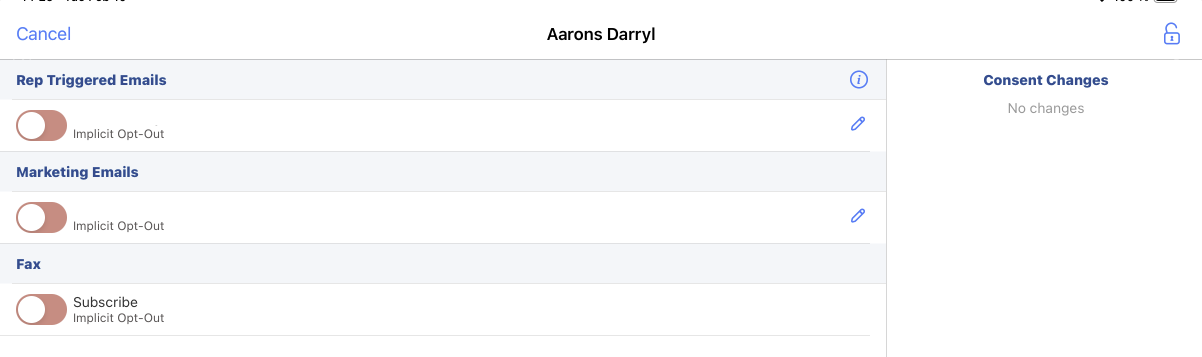
- Select the toggle for the appropriate marketing-specific channel.
- Select Save.

