Automatically Updating the Event Invite Status
Customers can enable event attendees and speakers to automatically advance to Invited status when an event team member creates an approved invitation email. This allows event attendee and speaker statuses to stay current without manual intervention.
Who can use this feature?
- End Users - Browser, iPad
- Using Invited Status on Event Invitation Emails
- Users require Approved Email and Events Management licenses
Configuring the Event Invite Status to Automatically Update for
 End Users
To configure this feature:
- Ensure the following are configured:
- Configuring Events Management
- Using Approved Email for Events Management
- Navigate to Admin > Users & Groups > Permission Sets.
- Select the appropriate permission set.
- Select the Objects tab.
- Grant the following permissions:
Object
Object Permission
Object Types
Fields
Field Permission
events_management_settings__v
R
events_management_settings__v
invitation_email_status_filter__v
Read
- Navigate to Business Admin > Objects > events_management_settings__v > Events Management Global Settings.
- Enter a comma-separated list of attendee and event speaker status API names in the Invitation Email Status Filter field to be automatically promoted to Invited status when an invitation approved email is created. For example, planned__v,pending__v.
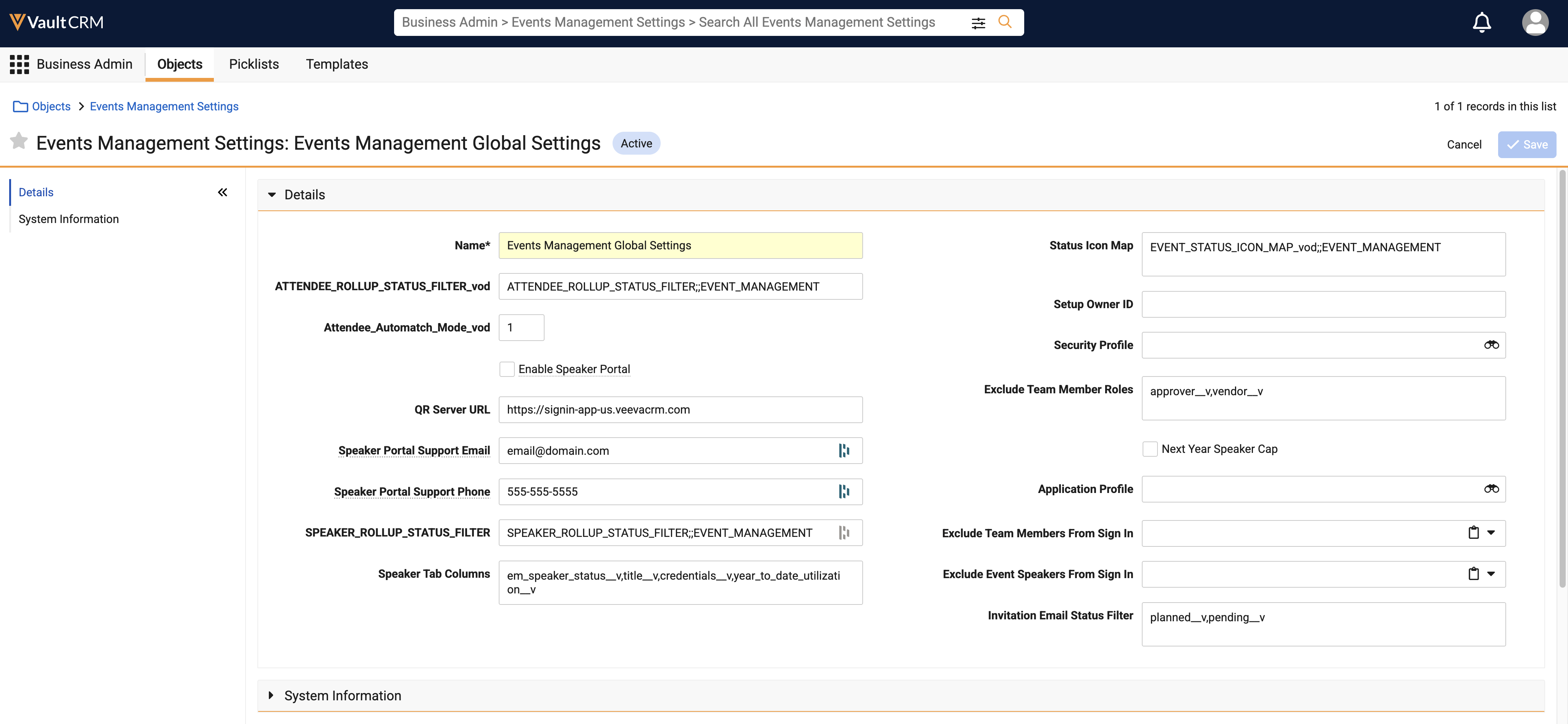
- Select Save.
Considerations
- The Invitation Email Status Filter field is case sensitive. Extra spaces around each value are allowed.
- A status name that does not match an attendee or event speaker status is ignored at runtime. If this field is blank, no status updates occur
- An edit to the field takes effect on the next qualifying invitation email; end users do not need to sync or refresh their devices
- End users do not need Edit permission on the attendee or event speaker status fields for the status to update
Using Automatically Updated Invite Statuses as
End Users
When an event team member sends an approved invitation email to an event attendee or speaker, or when the Automated Event Emails process generates one, each recipient whose current status is one of the statuses an administrator configured advances to Invited. This update occurs as soon as the email record is created, including emails scheduled to be sent later. This process applies whether the email is created manually or generated by the Automated Event Emails process.
On iPad, the status is updated in Vault CRM, not on the device. A recipient displays as Invited on iPad after the next sync.
Only recipients whose current status is listed in the Invitation Email Status Filter field advance to Invited. A recipient who has progressed to a status that is not in the list, for example Registered or Accepted, is not changed by a later invitation email, for example a reminder.
After an invitation email is created, the status is not reversed if the email is returned or errors; the recipient remains at Invited status. To confirm whether an invitation email reached a recipient, event team members can review the Sent Email related list on the event or attendee record.