Network Administration
Administrative tools for Veeva Network MDM are accessible via the Network Administration page.
The Network Admin page allows the user to manage Veeva Network MDM credentials. Each section is modeled as a standard detail page layout with its own actions. Only Administrators have access to the tools and are able to enter any information.
Who can use this feature?
- Business Admin Users — Browser
- Using Administrative Tools
- Users require a Veeva Network MDM license
Configuring the Network Administration Page for
 Business Admin Users
To configure this feature:
-
Navigate to Admin > Configuration > Pages.
-
Grant access to the Network Administration page.
Using Administrative Tools as
Business Admin Users
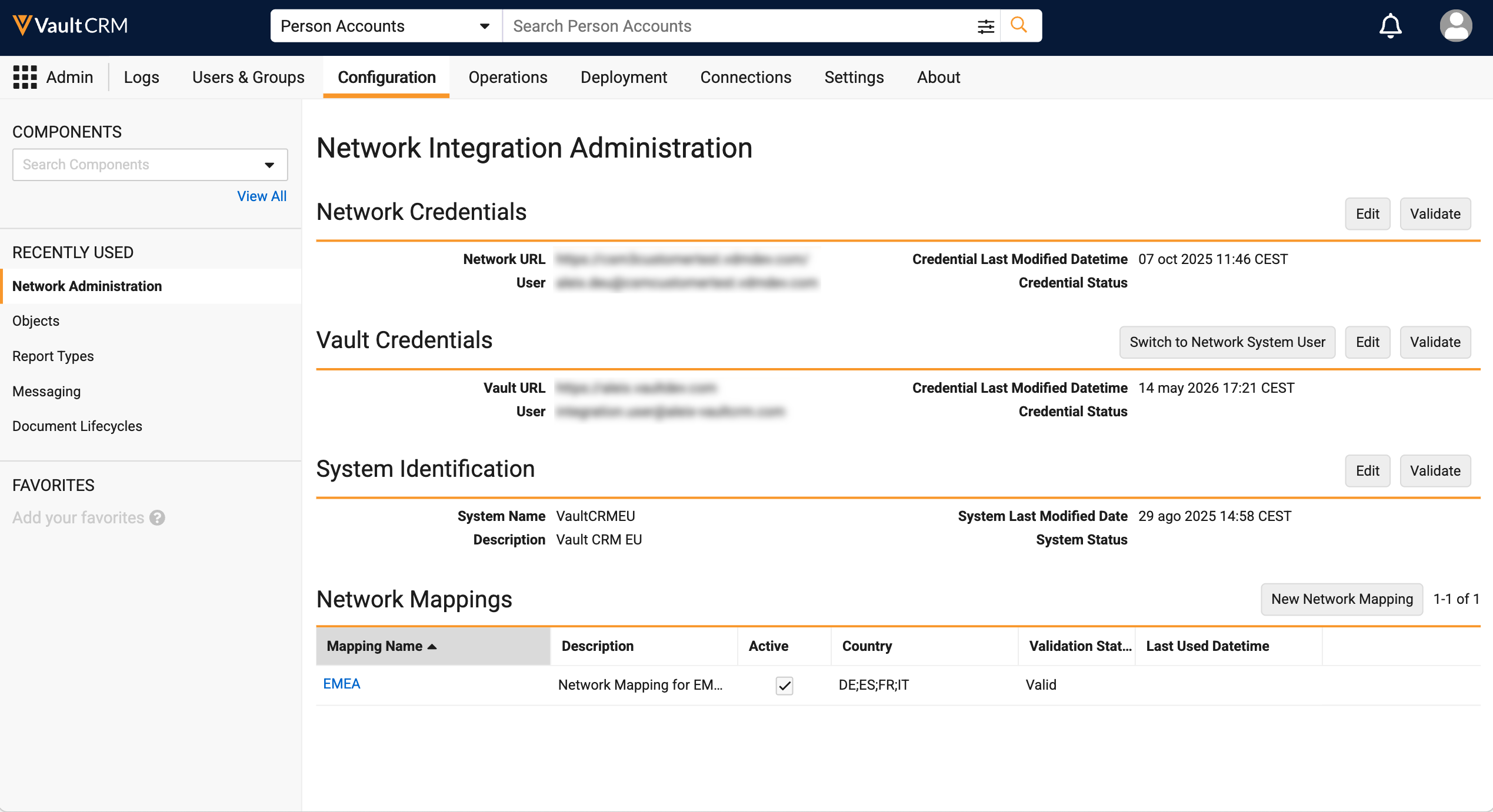
The Network Administration page has tools for specifying the credentials required to integrate Vault CRM with Veeva Network MDM, and for mapping Network fields to Vault CRM fields.
To access the Network Administration Page, select Admin > Configuration > Network Administration.
Network Credentials and Vault Credentials
The Network Credentials and Vault Credentials sections store authentication information for Veeva Network MDM and Vault CRM. These credentials are used by the system to integrate the applications.
To enter or update the Network credentials:
- Select the Edit button.
- Enter the authentication information in the URL, User, and Password fields.
- Select Save.
- Select Validate to test the authentication using the provided credentials. The Credential Status is updated to either Valid or Invalid based on the results.
For existing Vault CRM customers, admins have two options for providing Vault credentials for the integration:
- Create and manage a dedicated integration user
- Switch to the Network System User
Switching to the Network System User
Admins can automate the authentication and permission management for integrating Veeva Network MDM and Vault CRM by switching to the Network System User. This eliminates the manual overhead of maintaining dedicated integration user accounts, prevents integration failures caused by password expirations, and frees up Vault CRM licenses previously reserved for integration tasks.
System Users are created in Vault CRM instances and managed by Veeva for integration purposes. By default, these users are assigned the appropriate permission set. Customers cannot update the permission set, but can extend the permissions of the System User using Application Roles. It is highly recommended customers test this in their sandboxes first to ensure the proper permissions are added to the Network System User.
To switch existing Vault CRM instances to the Network System User:
- Select the Switch to Network System User button in the Vault Credentials section.
- Select Continue in the confirmation prompt.
- Ensure Veeva Network MDM is also updated to use the Network System User.
Switching to the Network System User is permanent. Once an admin selects this button and confirms the switch, they cannot return to using the Integration user to manage permissions.
New Vault CRM instances are automatically set to use the Network System User.
For more information, see System Owned Users in Vault CRM.
System Identification
In order to allow for a more flexible data subscription process, Vault CRM can be identified according to system names configured in Veeva Network MDM. This lifts the restriction of the system name being hard coded and including the Vault CRM ID(VCRM-[ID]).
System Name is used in several key Network Integration processes, most notably the Vault CRM-NTW custom key association process. It is important to understand the implications of changing the Vault CRM system name for live implementations. Although the older methods of system identification are still supported, it is a best practice, when enabling the integration, to use the new method of identifying the system.
Selecting the edit action in the System Identification section displays a system name edit dialog displaying all of the configured system names in Veeva Network MDM. This information comes directly from Veeva Network MDM. There is no way to enter the system name. After selecting a system name, select Submit to commit the change.
Network Mapping
The Network Mapping section allows admins to create the Network Mapping records required to map fields between Veeva Network MDM and Vault CRM.
For more information, see Network Mapping Overview.

