26R1 Maintenance Notes
The items listed below were added in the 26R1 release cycle and contain maintenance items from the 26R1.0, 26R1.2, 26R1.3, and 26R1.4 releases as they become available.
Maintenance items in the Vault CRM application are corrections to existing functionality.
261.4.43 | August 10, 2026
System Maintenance
261.4.42 | August 4, 2026
Call Reporting
|
Platform |
Issue Description |
Issue Number |
|---|---|---|
| iPad | Users were prevented from launching media during a call if required fields were not yet filled out. Users can now show media first and complete the required fields afterward, restoring the standard workflow. | VCRM-176826 |
261.4.41 | Family Build 432 (July 31, 2026)
Campaign Manager
|
Platform |
Issue Description |
Issue Number |
|---|---|---|
| Browser | Users were prevented from selecting multi-product Approved Email Templates in Campaign Manager. | VCRM-175524 |
CRM AI
|
Platform |
Issue Description |
Issue Number |
|---|---|---|
| Off-platform | An optimization was implemented to automatically fetch setup products during Agentic Text Monitoring for Home Office requests, reducing compute costs. | VCRM-175849 |
| Off-platform | Agentic Text Monitoring for Home Office was optimized to ensure more efficient processing while maintaining high accuracy for users. | VCRM-175847 |
General
|
Platform |
Issue Description |
Issue Number |
|---|---|---|
| Off-Platform | An issue preventing MCCP processes from starting in the EU and AP regions has been resolved. | VCRM-176817 |
| Off-Platform | Newly created sandbox and demo environments incorrectly inherited the Tenant ID from their parent Vault, resulting in database errors. | VCRM-176250 |
261.4.40 | Family Build 430 (July 30, 2026)
Align
|
Platform |
Issue Description |
Issue Number |
|---|---|---|
| iPad | Options to manage targets and exclusions incorrectly displayed in Territory Feedback. | VCRM-173320 |
Approved Notes
|
Platform |
Issue Description |
Issue Number |
|---|---|---|
| Browser | When a user ran bulk jobs large data submissions on a vault to process monitored text records, several jobs timed out repeatedly and stalled without throwing an error message. | VCRM-173284 |
Call Reporting
|
Platform |
Issue Description |
Issue Number |
|---|---|---|
| iPad | When users launched media directly from the My Accounts tab or an Account Detail page, call validation was unexpectedly triggered, displaying an error message if required call fields were not populated. | VCRM-175336 |
Campaign Manager
|
Platform |
Issue Description |
Issue Number |
|---|---|---|
| Browser | An error caused unusually long page loading times when creating a new campaign or refreshing the Overview tab. | VCRM-172273 |
CLM
|
Platform |
Issue Description |
Issue Number |
|---|---|---|
| iPad | iPad system icons (for example, Wi-Fi and battery) overlapped with interactive HTML buttons at the top of CLM presentations, preventing users from selecting them. | VCRM-168413 |
| Off-Platform | Users incorrectly received email notifications for slide updates in custom presentations that were expired. | VCRM-173079 |
| iPad | When a user stored data in LocalStorage and IndexedDB within a presentation on the iPad application, the saved data was completely cleared and returned null or false values after the user closed and reopened the application. | VCRM-173405 |
CRM AI
|
Platform |
Issue Description |
Issue Number |
|---|---|---|
| Off-Platform | A reading order error resulted in multi-column PDFs being parsed left to right across columns instead of down each column, reducing vector search fidelity for text on those pages. | VCRM-172064 |
| Browser | System query limits were exceeded when large batches of records were loaded for review by Agentic Text Monitoring for Home Office, resulting in issues for agent response and processing. | VCRM-173372 |
Data Grid Loader
|
Platform |
Issue Description |
Issue Number |
|---|---|---|
| CRM Desktop (Windows) | Required fields were incorrectly flagged as missing during the upload process. | VCRM-170361 |
Engage
|
Platform |
Issue Description |
Issue Number |
|---|---|---|
| Windows | Users received an "Account Unavailable" error when attempting to share a CLM web link via Approved Email directly from the Media tab, even after selecting a recipient. | VCRM-172436 |
| iPhone | Engage meeting logo displayed incorrectly for calls scheduled with Microsoft Teams or Zoom meeting types. | VCRM-173073 |
MC Cycle Plans
|
Platform |
Issue Description |
Issue Number |
|---|---|---|
| Browser | MCCP Activity Count queries are updated to reduce the incidence of execution failures, for improved job completion. | VCRM-170967 |
Medical Insights
|
Platform |
Issue Description |
Issue Number |
|---|---|---|
| iPad | Link Medical Insights users were unable to connect on the iPad when attempting to tag KOLs, Congresses, and Trials. | VCRM-174873 |
My Schedule
|
Platform |
Issue Description |
Issue Number |
|---|---|---|
| iPad | Account names in the View Call Cycles screen displayed as blank or truncated when the account was not in the user’s territory. | VCRM-164596 |
| iPad | When a user applied a call cycle with a custom start time in the application, created calls were scheduled for midnight instead of their designated times, causing them to display incorrectly on the schedule on both the web interface and iPad. | VCRM-174523 |
X-Pages Studio
|
Platform |
Issue Description |
Issue Number |
|---|---|---|
| Browser | Users were unable to restore or delete unsaved local changes on Territory Feedback pages, preventing them from accessing the page. | VCRM-174761 |
261.4.31 | July 28, 2026
Account Management
|
Platform |
Issue Description |
Issue Number |
|---|---|---|
| iPad | The Create button did not display for child accounts or addresses when DCRs were enabled without CRM Managed Account Types. | VCRM-174548 |
261.4.30 | Family Build 423 (July 23, 2026)
Profiling During Territory Feedback - Available on iPad
End users can view and update account profiling information, for example, access level, affinity, adoption, and potential, directly within Territory Feedback. These updates provide organizations the information they need to accurately segment accounts and set targeting goals.
Align
|
Platform |
Issue Description |
Issue Number |
|---|---|---|
| Browser | An error occurred where the Align Integrations Database could not be refreshed if a previous full data load failed. | VCRM-171100 |
Call Reporting
|
Platform |
Issue Description |
Issue Number |
|---|---|---|
| Windows | When users created a Commercial Insight record from a call report, an incorrect default object type and layout displayed if the user had read permission but lacked create permissions for the default object type. | VCRM-171992 |
Events Management
|
Platform |
Issue Description |
Issue Number |
|---|---|---|
| iPad | The system incorrectly expected all field inputs to be text; it failed to process number or currency values and did not save the new expense line. | VCRM-170861 |
Fax
|
Platform |
Issue Description |
Issue Number |
|---|---|---|
|
Browser |
When a Fax Template state was changed from Draft to Staged, the fax failed to publish and remained in Failed to Publish state. |
VCRM-173048 |
Network Integration
|
Platform |
Issue Description |
Issue Number |
|---|---|---|
| Windows | When users searched for an account in Network Account Search using a name or location that contained spaces, an error occurred and the account import failed. | VCRM-172419 |
User Visible and Behavior Changes
|
Platforms |
Description |
Before |
After |
|---|---|---|---|
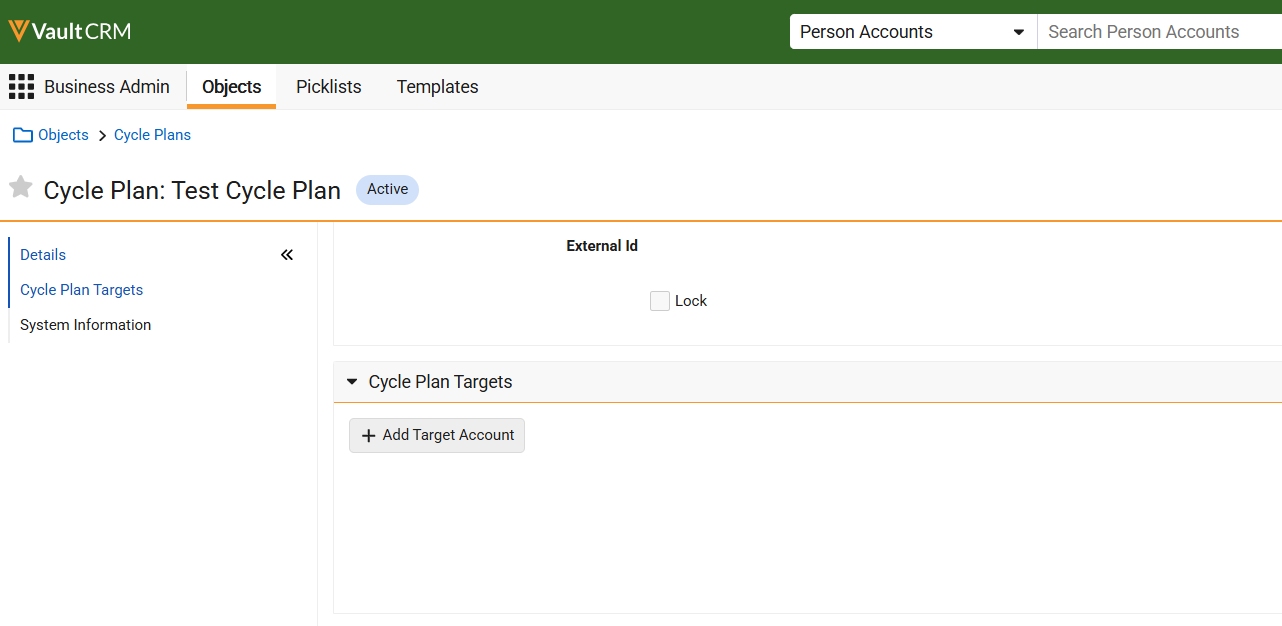
| Browser | To enable users to add targets to empty plans, the Add Target button now displays for Classic Cycle Plans with no existing target records. | 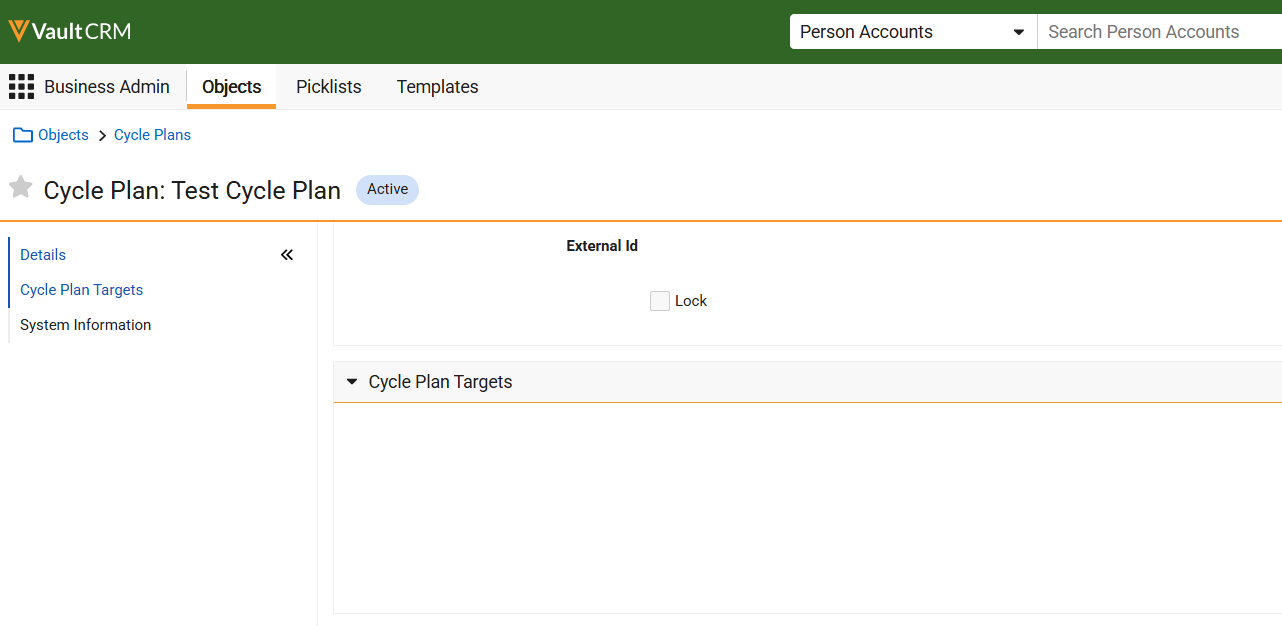
|
|
261.4.21 | July 17, 2026
CRM AI
|
Platform |
Issue Description |
Issue Number |
|---|---|---|
| iPad | In some cases, Media Agent citations were not rendered as clickable links. | VCRM-168444 |
261.4.20 | Family Build 416 and 417 (July 16, 2026)
Account Management
|
Platform |
Issue Description |
Issue Number |
|---|---|---|
| iPad | When users viewed the Account map on the iPad and switched from one address' action menu to another, the application closed unexpectedly. | VCRM-169075 |
| Windows | When users performed an incremental refresh after their assigned territories were updated, the updated territories did not sync correctly and failed to display in the territory selector. | VCRM-169268 |
Align
|
Platform |
Issue Description |
Issue Number |
|---|---|---|
| Browser | An error occurred during the Import from CRM process when updating related records for merged accounts. | VCRM-167532 |
| Browser | Processes were aborted after large numbers of records were deleted. | VCRM-170859 |
Approved Email
|
Platform |
Issue Description |
Issue Number |
|---|---|---|
| iPad | Email token values sent via Events Management did not resolve correctly. | VCRM-167040 |
| Browser | An error occurred where campaign emails fail to send with an invalid From Address or Invalid Consent error when the consent level is set to Content Type. | VCRM-169087 |
Call Reporting
|
Platform |
Issue Description |
Issue Number |
|---|---|---|
| Windows | When users selected the checkbox for an account in My Accounts and then recorded a call on a different account, the application closed unexpectedly. | VCRM-171485 |
Events Management
|
Platform |
Issue Description |
Issue Number |
|---|---|---|
| Browser | When a user attempted to create a new contract for an Event Speaker, Series Contract templates displayed. | VCRM-167312 |
| Browser | Automated emails could not be scheduled when the email template included an "Add to Calendar" token and the integration user lacked access to certain Zoom meeting fields. | VCRM-168104 |
| Browser | The comments text box extended beyond the boundaries of the Event Action dialog. | VCRM-168119 |
| Browser | The "New Event Speaker" button was unexpectedly disabled for users who did not have read access to Event Sessions. | VCRM-170851 |
261.4.10 | Family Build 401 (July 9, 2026)
Performance
|
Platform |
Issue Description |
Issue Number |
|---|---|---|
|
Browser |
Performance is improved significantly when building target lists using Target List Builder on campaigns or journeys. |
VCRM-149527 |
Infrastructure
|
Platform |
Issue Description |
Issue Number |
|---|---|---|
|
iPad |
Internal XML parsing is updated. Invalid HTML formatting within Contract or Order signature pages will no longer be supported or displayed. |
VCRM-123863 |
Account Management
|
Platform |
Issue Description |
Issue Number |
|---|---|---|
|
Windows |
When users navigated to the table view in My Accounts, the address field was empty. |
VCRM-158256 |
|
iPad |
When users navigated to the Product Dashboard for an account, product metrics failed to display if the associated product records contained a null value for the no_metrics__v field. |
VCRM-159538 |
|
Browser |
When users merged accounts that both contained a populated primary parent, the Primary Parent field on the winning account record was incorrectly cleared. |
VCRM-145099 |
|
Browser |
When users merged two accounts that shared the same primary parent Health Care Organization (HCO), the Primary Parent field on the winning account record was incorrectly cleared out. |
VCRM-151681 |
|
iPad |
When users created a child account under the "Member of" section in DCR Mode 2, the formula field columns in the related list row were blank prior to database synchronization. |
VCRM-159071 |
|
iPad |
When users attempted to create a new account using the New Account Wizard, no account object types were available to select. |
VCRM-157500 |
|
iPad |
When users accessed an account view that included a multi-value picklist field with only one value selected in its criteria, no accounts were displayed. |
VCRM-156488 |
|
Browser |
When users deleted an address with the lock__v field set to true, the application permitted the deletion instead of blocking the action with an error message. |
VCRM-154352 |
|
iPad |
When users navigated to the account view drop-down selection list, the record count for certain views did not display. Additionally, an error occurred if users dismissed the drop-down list by switching tabs or creating a new list. |
VCRM-166030 |
|
Windows |
Network Account Search import failed after users updated their user territory. |
VCRM-163630 |
|
Browser |
Users cannot have the Hot List tab disabled if they are assigned the base permission set (base_vault_crm__v) which automatically grants access to the tab. |
VCRM-159972 |
|
Windows |
When users select the Toggle Affiliations option in the Stakeholder Navigator, the screen briefly flashes white due to an abrupt loading state transition. |
VCRM-159729 |
Align
|
Platform |
Issue Description |
Issue Number |
|---|---|---|
|
Browser |
An error occurred where users received an incorrect email notification stating a scheduled job failed to complete, even though the underlying process tasks had run successfully. |
VCRM-158851 |
|
Browser |
An error occurred where the MC Cycle clone process would fatally abort if a unique field constraint was violated during the clone. |
VCRM-162602 |
|
Browser |
An error caused the Align Import process task status to incorrectly remain as Running and make result logs unavailable when a CRM user was inactivated. |
VCRM-163509 |
|
Browser |
An error occurred where jobs timed out and failed if they were running simultaneously with a full synchronization of the database used by Align’s rules engine. |
VCRM-163229 |
|
Browser |
An error caused the Push to CRM process to abort when the system attempted to clear expired process locks. |
VCRM-161185 |
|
Browser |
Automated feedback handling did not execute when publishing a project due to the wrong Settings record being queried. |
VCRM-160562 |
|
Browser |
The Product Specialty tab was not deployed to instances. |
VCRM-165260 |
|
Browser |
In Territory Feedback, allowed products were incorrectly flagged as restricted if their names were partial matches to a restricted product's name. |
VCRM-167315 |
|
Browser |
The Align Scheduler Job failed to run when the deprecated crmInstanceId parameter was included in the URL. |
VCRM-149753 |
Approved Email
|
Platform |
Issue Description |
Issue Number |
|---|---|---|
|
iPad |
An error occurred when a user attempted to load an Approved Email template without the required field permissions. |
VCRM-156813 |
|
Browser |
An error caused documents configured for Veeva CRM (Fax) publishing to become stuck indefinitely in a Ready to Publish status. |
VCRM-162919 |
|
Browser |
An error caused email template previews to continuously load or crash when a user lacked the required permissions for consent headers. |
VCRM-160501 |
Call Reporting
|
Platform |
Issue Description |
Issue Number |
|---|---|---|
|
Browser |
When users edited a planned call for a person account from My Schedule and changed the object type to a Unique Activities object type, the Call Detail section incorrectly disappeared from the layout. |
VCRM-151287 |
|
Browser |
When users attempted to delete a call key message that referenced a deleted parent call record, an error occurred and the deletion was blocked. |
VCRM-154513 |
Call Sampling
|
Platform |
Issue Description |
Issue Number |
|---|---|---|
|
Browser |
When users created a regular group call, the DEA and CDS license and expiration fields were incorrectly stamped on both the parent and child calls. |
VCRM-165301 |
Call Scheduling
|
Platform |
Issue Description |
Issue Number |
|---|---|---|
|
iPad |
The Vault CRM app closed unexpectedly when a user navigated to the My Schedule tab without read access to certain event fields. |
VCRM-165187 |
Campaign Manager
|
Platform |
Issue Description |
Issue Number |
|---|---|---|
|
Browser |
Campaign Manager app pages did not respect user sharing settings for the campaign__v object. |
VCRM-161623 |
Consent Capture
|
Platform |
Issue Description |
Issue Number |
|---|---|---|
|
Browser, iPad |
When users captured an opt-out consent when signature was not required and email confirmation was allowed, the Confirmation Method section still displayed. |
VCRM-164893 VCRM-163496 |
Data Grid Loader
|
Platform |
Issue Description |
Issue Number |
|---|---|---|
|
CRM Desktop (Windows) |
When users accessed the Data Grid Loader, the instructions did not translate to Japanese, even though an active and corresponding Veeva Message existed. |
VCRM-158814 |
Engage HCP
|
Platform |
Issue Description |
Issue Number |
|---|---|---|
|
Browser |
When users viewed meeting requests in My Schedule, the Meeting Type and Meeting Request Status field labels displayed in English instead of the localized language. |
VCRM-164594 |
Events Management
|
Platform |
Issue Description |
Issue Number |
|---|---|---|
|
Browser |
Inactive picklist values displayed when inline editing an attendee through an event related list. Additionally, users received an error when attempting to clear a previously saved picklist value, even if the field was not required. |
VCRM-158517 |
|
Browser |
Attendees were not successfully created during the QR Code sign-in process if their captured signature exceeded the maximum character limit. |
VCRM-161966 |
|
Browser |
A user could not generate a Speaker Contract when the Rate or Service Quantity maximum fields were left empty. |
VCRM-163874 |
General
|
Platform |
Issue Description |
Issue Number |
|---|---|---|
|
CRM Desktop (Windows) |
When users signed into the app for the first time, the UI displayed in English rather than their designated language until they signed in again. |
VCRM-159529 |
Medical Insights
|
Platform |
Issue Description |
Issue Number |
|---|---|---|
|
Browser |
When a user saved a Medical Insight from the Call page they were not redirected back to the Call page. |
VCRM-165148 |
|
iPhone |
When users selected the Medical Insights tab, the bottom section displayed truncated. |
VCRM-148879 |
Multichannel Cycle Plans
|
Platform |
Issue Description |
Issue Number |
|---|---|---|
|
Browser |
MCCP jobs failed to complete due to a database timeout. This has been resolved by optimizing the underlying query and updating database configurations to improve overall performance. |
VCRM-164441 |
My Schedule
|
Platform |
Issue Description |
Issue Number |
|---|---|---|
|
Browser |
The Unique Activities section on a call report displayed inconsistently depending on whether the call was created directly from an Account or planned via My Schedule. |
VCRM-152115 |
|
iPad |
The Owner field label on the iPad My Schedule event preview did not display the correct translated value, unlike the browser version. |
VCRM-161163 |
|
Browser |
The Toggle sidebar visibility tooltip in My Schedule was not localized for users with their language set to Japanese. |
VCRM-163860 |
|
Browser |
Calls from a shared calendar were incorrectly copied when a user executed the Copy to Call Cycle action in My Schedule online. |
VCRM-164591 |
Network Integration
|
Platform |
Issue Description |
Issue Number |
|---|---|---|
|
Browser |
When users performed a Network Account Search import with Network Address Inheritance enabled, an unexpected internal server error occurred if different external ID fields were configured for the Account and Address objects. |
VCRM-112652 |
|
Browser |
An error occurred in sandbox Vault CRM instances using the Network System Owned User. |
VCRM-169009 |
Patient CRM
|
Platform |
Issue Description |
Issue Number |
|---|---|---|
|
iPad |
When users opened the Add Cases to This Call modal from a Call Report, case subcategories did not display. |
VCRM-162288 |
|
Browser |
When two users simultaneously attempted to process the same document in the Case Inbox (Inbound Fax or Discarded Faxes), the incorrect error displayed for the second user. |
VCRM-162264 |
|
Browser |
Users were blocked from adding Case Comments to Outbound Fax activity cards within the Activity Feed. |
VCRM-162852 |
Send to Fax
|
Platform |
Issue Description |
Issue Number |
|---|---|---|
|
iPad |
When users captured consent for an unbranded item and a product at the same time, the unbranded consent incorrectly expired the product consent. |
VCRM-162612 |
Surveys
|
Platform |
Issue Description |
Issue Number |
|---|---|---|
|
Browser |
When adding a survey target, if there was an available survey with a null territory value, no surveys displayed to the user. |
VCRM-160488 |
Sync
|
Platform |
Issue Description |
Issue Number |
|---|---|---|
|
CRM Desktop (Windows), Windows |
Japanese user names were incorrectly formatted. |
VCRM-159435 VCRM-158813 |
|
Browser |
When users deleted a call attachment from a large group call record and submitted all attendee records at once, the deleted attachment was incorrectly included as both a deletion and an update in the sync upload queue. |
VCRM-164430 |
|
Browser |
When users edited fewer than two fields on a record and the sync failed, an incorrect permissions error message was logged instead of an error message indicating that more fields were required. |
VCRM-130880 |
|
Browser |
When a Child VMOCs had Enable Enhanced Sync selected and contained an invalid parent relationship name, sync did not complete. |
VCRM-157626 |
Territory Feedback
|
Platform |
Issue Description |
Issue Number |
|---|---|---|
|
iPad |
During a bulk edit in Territory Feedback, when an account with a pending Remove Target, Remove Account challenge was re-added as a target with edited goals, the challenge was incorrectly set to Remove Account, Edit Goals instead of clearing the challenge. |
VCRM-163017 |
Vault AI
|
Platform |
Issue Description |
Issue Number |
|---|---|---|
|
iPad |
When users attempted to record a Call Voice Note or Medical Insight Voice Note when specific language keyboards were enabled for the device, an error occurred indicating transcription was not supported in the device's language. |
VCRM-163031 |
|
Browser |
When refreshing the Vector Database, stale data was retained, causing duplicated content and files across documents (CLM presentations, compliance documents, and PI documents). |
VCRM-163039 |
|
iPad |
When using the Media Agent to search for CLM presentations, users sometimes received an error that the requested Information was not available in the media library instead of receiving the expected results. |
VCRM-160975 |
X-Pages
|
Platform |
Issue Description |
Issue Number |
|---|---|---|
|
Browser |
When viewing an Information page for a user on the Territory Feedback tab, the content was incorrectly formatted. |
VCRM-162201 |
|
Browser |
When viewing X-Page reports via an Account record, users experienced prolonged load times. |
VCRM-82053 |
261.3.23 | Family Build 674 (July 10, 2026)
Approved Email
|
Platform |
Issue Description |
Issue Number |
|---|---|---|
|
Browser |
Recommended Emails failed to send due to an invalid consent error when the consent level was set to Content Type. |
VCRM-169087 |
261.3.22 | Family Build 673 (July 9, 2026)
Call Reporting
|
Platform |
Issue Description |
Issue Number |
|---|---|---|
|
iPad |
When users created a Commercial Insight from the Call Report, rich text fields configured as read-only displayed as editable. |
VCRM-167963 |
Network Integration
|
Platform |
Issue Description |
Issue Number |
|---|---|---|
|
Browser |
An error occurred when users searched for accounts using the Network Account Search with a Network System User. |
VCRM-167756 |
Vault AI
|
Platform |
Issue Description |
Issue Number |
|---|---|---|
|
iPad |
When users uploaded Medical Insight or Commercial Insight records in a batch containing an inactive user, the corresponding Monitored Text records were not created for the batch. |
VCRM-167398 |
261.3.21 | Family Build 666 (July 1, 2026)
Approved Email
|
Platform |
Issue Description |
Issue Number |
|---|---|---|
|
Browser |
Scheduled emails remained in a scheduled status and were not sent when at least one scheduled email had an error. |
VCRM-167302 |
Call Reporting
|
Platform |
Issue Description |
Issue Number |
|---|---|---|
|
iPad |
The call address field appeared to be automatically populated, but prevented users from submitting the call due to a missing address error. |
VCRM-166061 |
Events Management
|
Platform |
Issue Description |
Issue Number |
|---|---|---|
|
Browser |
Speaker Attendance Product Cap Rule calculations used Cap Remaining instead of Cap Remaining Committed values in its calculations. |
VCRM-165722 |
261.3.20 | Family Builds 656 and 658 (June 25, 2026)
Account Management
|
Platform |
Issue Description |
Issue Number |
|---|---|---|
|
Browser |
When users selected an account name hyperlink in My Accounts search results or Account Views and Lists, the system displayed the Account Details pane instead of opening the full Account Details page in a new tab. |
VCRM-165429 |
|
Browser |
When the Enable Country, State, and Language CDA Veeva Setting is disabled and users perform an activity for an account where a related record is created, the country field on the related record was incorrectly stamped with the account’s country. |
VCRM-161294 |
App Family
|
Platform |
Issue Description |
Issue Number |
|---|---|---|
|
Browser |
An error occurred when attempting to reorder tabs if the total number of tabs exceeded the platform limit. This issue has been resolved by increasing the maximum tab limit to 120 tabs. |
VCRM-153762 |
| Browser | Content padding and margins were reduced in record detail sections on Events and Surveys pages. | VCRM-163844 |
Campaign Manager
|
Platform |
Issue Description |
Issue Number |
|---|---|---|
|
Browser |
An error occurred where emails were not created or sent upon campaign activation. |
VCRM-162156 |
CLM
|
Platform |
Issue Description |
Issue Number |
|---|---|---|
|
iPad |
Performance is improved when running an initial sync of CLM content. |
VCRM-141044 |
Engage
|
Platform |
Issue Description |
Issue Number |
|---|---|---|
|
Browser |
Processing status for Engage meetings did not update to Complete after 48 hours. |
VCRM-163733 |
Multichannel Cycle Plans
|
Platform |
Issue Description |
Issue Number |
|---|---|---|
|
Browser |
Long-running queries caused MCCP jobs to fail and block subsequent runs. |
VCRM-162233 |
Order Management
|
Platform |
Issue Description |
Issue Number |
|---|---|---|
|
Browser |
The bottom border of the Quantity field was slightly truncated on the Order Lines grid. |
VCRM-164189 |
Surveys
|
Platform |
Issue Description |
Issue Number |
|---|---|---|
|
Browser |
The Survey Target Questions section was missing padding. |
VCRM-164026 |
Sync
|
Platform |
Issue Description |
Issue Number |
|---|---|---|
|
Browser |
Users encountered a sync error when submitting a call if a call attachment was deleted online while simultaneously being edited offline. |
VCRM-162564 |
Territory Manager
|
Platform |
Issue Description |
Issue Number |
|---|---|---|
|
Browser |
An error prevented managers from viewing accounts within their subordinates' territories following re-parenting a territory. |
VCRM-162811 |
261.2.40 | Family Build 638 (June 18, 2026)
Align
|
Platform |
Issue Description |
Issue Number |
|---|---|---|
|
iPad |
Removing an account target in Territory Feedback caused subsequent records to display as duplicates. |
VCRM-161404 |
Consent Capture
|
Platform |
Issue Description |
Issue Number |
|---|---|---|
|
Browser |
Opting out of a single email address incorrectly opted out all other email addresses associated with the same Approved Email Consent Type. |
VCRM-163047 |
261.3.10 | Family Build 636 (June 18, 2026)
Performance
|
Platform |
Issue Description |
Issue Number |
|---|---|---|
|
iPad, iPhone |
Agentic Voice performance times are improved. |
VCRM-159367 |
| Browser | Performance is improved significantly when viewing the Performance sub-tab on campaigns or journeys. | VCRM-143635 |
|
Browser |
Performance is improved significantly when saving or submitting a call with the cycle_plan_realtime Veeva Setting enabled. |
VCRM-149482 |
Account Management
|
Platform |
Issue Description |
Issue Number |
|---|---|---|
|
Browser |
When users selected the Cancel or Back button on the Address creation page, the page refreshed and remained on the screen instead of redirecting to the account. |
VCRM-151052 |
|
Browser |
When users viewed the Territory Select field in the Account Wizard, the field did not display at full width. |
VCRM-149212 |
|
Browser |
When users selected the Cancel button on the New Account Wizard or Parent Account Wizard page after launching it from the global Create button, the page reloaded instead of redirecting to the My Accounts page. |
VCRM-154674 |
Align
|
Platform |
Issue Description |
Issue Number |
|---|---|---|
|
Browser |
An issue occurred where the Model Geography Territory Assignment Transfer process appeared to remain in a running state when reassigning a geography within the territory map feature. |
VCRM-156008 |
|
Browser |
An issue occurred where selecting the View More link in the Cycle Plan section only displayed the first record instead of all MC Cycle Plan records. |
VCRM-144490 |
|
Browser |
When running a Push to CRM from the territory level, users were unexpectedly removed from their assigned Functional Profile groups and Engage groups if they were transferred to another territory. |
VCRM-157283 |
|
Browser |
An error occurred during the Model Account Assignment Commit process when existing targeting rules were updated to add additional targets. |
VCRM-156135 |
|
Browser |
An issue occurred where the Territory Feedback cache did not automatically refresh when a model project's lifecycle state was changed to Feedback Review. |
VCRM-156121 |
|
Browser |
Rule Previews were aborted due to an error syncing data from the Vault database to the rules engine. |
VCRM-159767 |
|
Browser |
Targets were not generated when using the Account Object Type as an account field criteria with a matching or inclusive operator. |
VCRM-154037 |
|
Browser |
An error allowed users to successfully submit Add Account challenges for accounts that had active global, field force, or territory exclusions. |
VCRM-148257 |
|
iPad |
The interface between Align and Vault CRM was enhanced to provide future support for rendering percent values in Vault CRM. |
VCRM-138602 |
| Browser | When users attempted to preview account assignments on territory and field action menus, the Preview option was grayed out. | VCRM-161914 |
Approved Email
|
Platform |
Issue Description |
Issue Number |
|---|---|---|
|
iPad |
An error occurred when users navigated to the Needs Approval or Scheduled sub-tabs of the Email tab when an email sent via Campaign Manager contained a custom rich text token. |
VCRM-160304 |
Call Reporting
|
Platform |
Issue Description |
Issue Number |
|---|---|---|
|
iPad |
If a user did not have permission to the zvod_unique_group_activities__v field, but the field was added to the layout on the call2__v object, call reports initialized as Unique Activity calls. |
VCRM-157599 |
|
iPhone |
When users saved a call report that triggered a validation rule with a long error message, the text was clipped and the view could not be scrolled to read the full message. |
VCRM-155620 |
|
Browser |
When users saved or submitted a call report using a layout that did not include the Attendees section, an error incorrectly stated that the attendee field was required. |
VCRM-147318 |
|
Browser |
When users attempted to record a call while their language was set to Spanish, an error occurred and the Call Detail and Key Messages sections loaded indefinitely if users did not have sharing permissions for certain associated products. |
VCRM-156030 |
|
Browser |
When users selected the Select All button in the attendee section while attendee data was still loading, no attendees were selected, preventing dependent buttons from becoming enabled. |
VCRM-153393 |
Call Sampling
|
Platform |
Issue Description |
Issue Number |
|---|---|---|
|
Browser |
When users edited and saved or submitted a call with a locked sample section, validation errors and dialogs incorrectly displayed for sample opt-ins, state credential settings, and call dates. |
VCRM-142194 |
|
Browser |
When users edited and resubmitted a call with a locked sample section, license and address fields were incorrectly re-stamped with updated values. |
VCRM-142195 |
|
Browser |
When users viewed a submitted call for an attendee with samples or BRCs, and the call included the No Sample License No Signature or Non-PDMA Sampling section attributes, the attendee card incorrectly displayed a signature required indicator. |
VCRM-152210 |
|
iPad |
When users selected Sign after adding a sample to a call, an error occurred if they lacked read permissions for the sample lot field. |
VCRM-155069 |
|
iPad |
When users submitted call reports with sample products using a layout configuration that allowed skipping signatures, the local sample lot quantities were not deducted. |
VCRM-148383 |
|
Browser |
When users accessed the call page with call sampling enabled, an error displayed if any of the sample section column label Veeva Messages were inactive. |
VCRM-153324 |
Call Scheduling
|
Platform |
Issue Description |
Issue Number |
|---|---|---|
|
Browser |
When the device timezone and user timezone were mismatched and a user attempted to drag and reschedule an existing call within the Week view of the My Schedule calendar, the call temporarily jumped and displayed at an incorrect time at the bottom of the same day until users refreshed. |
VCRM-154111 |
|
Browser |
When a user attempted to schedule a call for a restricted account type from the My Accounts page, a warning error dialog box displayed in a new browser tab, but selecting the OK button or the X icon did not dismiss the message. |
VCRM-155157 |
CLM
|
Platform |
Issue Description |
Issue Number |
|---|---|---|
|
Windows |
When users attempted to launch content from an account or from the Media tab when the call had validation rules configured, the content did not display. |
VCRM-151828 |
|
iPad |
When users without field permission to certain CLM Presentation and Key Message fields previewed an Approved Email containing a CLM presentation web link, the presentation name did not display as a selectable hyperlink. |
VCRM-157550 |
|
Windows |
When users navigated to the Media tab, the My Presentations tab displayed when custom presentations were not enabled. |
VCRM-157681 |
Compass Integration
|
Platform |
Issue Description |
Issue Number |
|---|---|---|
|
Browser |
An error occurred where Compass data queries returned datetime values instead of standard dates, causing records to display in the incorrect month due to timezone shifts. |
VCRM-152082 |
Consent Capture
|
Platform |
Issue Description |
Issue Number |
|---|---|---|
|
iPad |
When users attempted to capture consent using email confirmation and the Paper Consent ID field was marked as required on the corresponding Multichannel Consent layout, the Continue button was unavailable if the Paper Consent ID was not populated. |
VCRM-160557 |
Documented Interest
|
Platform |
Issue Description |
Issue Number |
|---|---|---|
|
Browser |
When a user selected the Add Interest button in the Documented Interest section of a call report, or when a user resized the window on the Create Documented Interest page, the multi-select Interest Category field rendered incorrectly. |
VCRM-154424 |
Events Management
|
Platform |
Issue Description |
Issue Number |
|---|---|---|
|
Browser |
When a user attempted to select a Topic with a configured VQL criteria, no results displayed. |
VCRM-155549 |
|
Browser |
Validation rules were incorrectly triggered on save, regardless of whether an edit was made. |
VCRM-145285 |
|
Browser |
Expense estimate business rules attempted to query for existing records, even when no such business rules were configured. |
VCRM-159582 |
|
Browser |
Attendee search did not return any results when users searched using Furigana. |
VCRM-129694 |
Medical Interaction
|
Platform |
Issue Description |
Issue Number |
|---|---|---|
|
Browser |
Security improvements were made for Medical Interaction records. |
VCRM-155775 |
Multichannel Cycle Plans
|
Platform |
Issue Description |
Issue Number |
|---|---|---|
|
Browser |
The maximum allowed value for the attainment percentage field on the MC Cycle Plan Summary was incorrectly limited to 999%, preventing users from entering larger valid percentages. The field now correctly accepts values up to 9999999.99%. |
VCRM-159565 |
My Schedule
|
Platform |
Issue Description |
Issue Number |
|---|---|---|
|
iPad |
When a user navigated to My Schedule and attempted to view or delete an unavailable time record, the edit button and the deletion confirmation warning message displayed text in English instead of translating to Japanese. |
VCRM-155158 |
|
Browser |
When a user with Child Accounts enabled converted an unassigned CLM presentation to a call, the resulting call report did not populate the child account or child account ID fields. |
VCRM-158555 |
Network Integration
|
Platform |
Issue Description |
Issue Number |
|---|---|---|
|
Browser, iPad |
When users performed a Network Account Search, no out-of-territory results were returned if duplicate network reference field mappings were configured. |
VCRM-159488 |
Patient CRM
|
Platform |
Issue Description |
Issue Number |
|---|---|---|
|
Browser |
Field values and labels were not aligned correctly. |
VCRM-160144 |
Send to Fax
|
Platform |
Issue Description |
Issue Number |
|---|---|---|
|
Browser |
Faxes in Queued for Sending status displayed as blank entries in the timeline view. |
VCRM-159735 |
Surveys
|
Platform |
Issue Description |
Issue Number |
|---|---|---|
|
iPad |
When users interacted with an Advanced Coaching Report survey and selected an answer choice for a parent question that displayed last in the list, the conditional child survey questions linked to that answer choice did not display. |
VCRM-154914 |
Sync
|
Platform |
Issue Description |
Issue Number |
|---|---|---|
|
Browser |
Object type names were translated in error. |
VCRM-156680 |
|
iPad |
Users experienced significant performance issues when syncing. |
VCRM-159282 |
|
CRM Desktop (Windows) |
When users updated a rich text field on a saved record, the updates did not sync online. |
VCRM-156657 |
Vault AI
|
Platform |
Issue Description |
Issue Number |
|---|---|---|
|
Browser |
When users created a medical insight utilizing Chinese characters, an error occurred during Agentic Insight Quality’s evaluation process. |
VCRM-153730 |
|
iPad |
When users captured Japanese language Call Text using Agentic Text Monitoring, the safety system reference displayed as plain text instead of a selectable hyperlink. |
VCRM-152637 |
|
Browser |
When incremental sync jobs ran simultaneously, they continued to run longer than expected without resolving, potentially triggering unintended parallel processes if retries occurred. |
VCRM-151250 |
|
Browser |
When users interacted with Agentic Media, source citations displayed as hyperlinks but could not be selected. |
VCRM-149916 |
|
Browser |
When users asked Agentic Media questions while the system cache was stale, the agent incorrectly responded that it was unable to locate the requested information in the approved materials. |
VCRM-141367 |
| Browser | When users generated the CRM AI Interaction History Report, the exported CSV files contained improperly formatted rows if the interaction data exceeded Microsoft Excel's character limit for single cells. | VCRM-155750 |
| iPad, iPhone | When users create a call report from a Call Voice Note, products inferred from voice note context were added to the call report. | VCRM-156503 |
X-Pages
|
Platform |
Issue Description |
Issue Number |
|---|---|---|
|
Browser, iPad |
When users synced and accessed an X-Pages prompt overlay requiring Vault CRM context, the data was unavailable and errors occurred for the getOverlayContext or getDataForCurrentObject methods. |
VCRM-154784 |
|
iPad |
When users synced X-Pages, a No Page Found error occasionally displayed due to missing attachment links or missing files. |
VCRM-156162 |
|
Windows |
When users navigated to another page from a top-level X-Page using the viewRecord method and selected the back button, the incorrect top-level X-Page displayed. |
VCRM-155027 |
X-Pages Studio
|
Platform |
Issue Description |
Issue Number |
|---|---|---|
|
Browser |
Table fields using the Number with Bar style rendered incorrectly. |
VCRM-153388 |
|
Browser |
The Help link in the upper right corner was incorrect. |
VCRM-154853 |
|
Browser |
When users attempted to preview an Account Plan template using a test record without a linked account, or when the test user did not have field permission for the account field, the preview loaded indefinitely. |
VCRM-151099 |
261.2.31 (June 15, 2026)
Vault AI
|
Platform |
Issue Description |
Issue Number |
|---|---|---|
|
Browser |
When users refreshed the Vector Database for CLM content after modifying a document field, pages from multi-page documents were removed and Agentic Media was unable to answer questions regarding the removed content. |
VCRM-161890 |
|
Browser |
When users created or modified agent rules for Agentic Text Monitoring for Home Office, the rule cache was not cleared and the updated rules were not applied to submitted records. |
VCRM-161618 |
| iPad | When users attempted to create a call for regions outside the United States from a Call Voice Note, an error occurred. | VCRM-163041 |
261.2.30 | Family Build 635 (June 11, 2026)
Unique Activity Group Calls for Agentic Voice - Available on iPad, iPhone
Users can now create unique activity group calls with Agentic Voice. Agentic Voice uses AI to convert a user’s dictated notes into call reports, intelligently pre-populated with the information the user provided. The agent ensures detail products and key messages are attributed to individual attendees, if specified.
User Visible and Behavior Changes
|
Platform |
Description |
Before |
After |
|---|---|---|---|
|
iPad, iPhone |
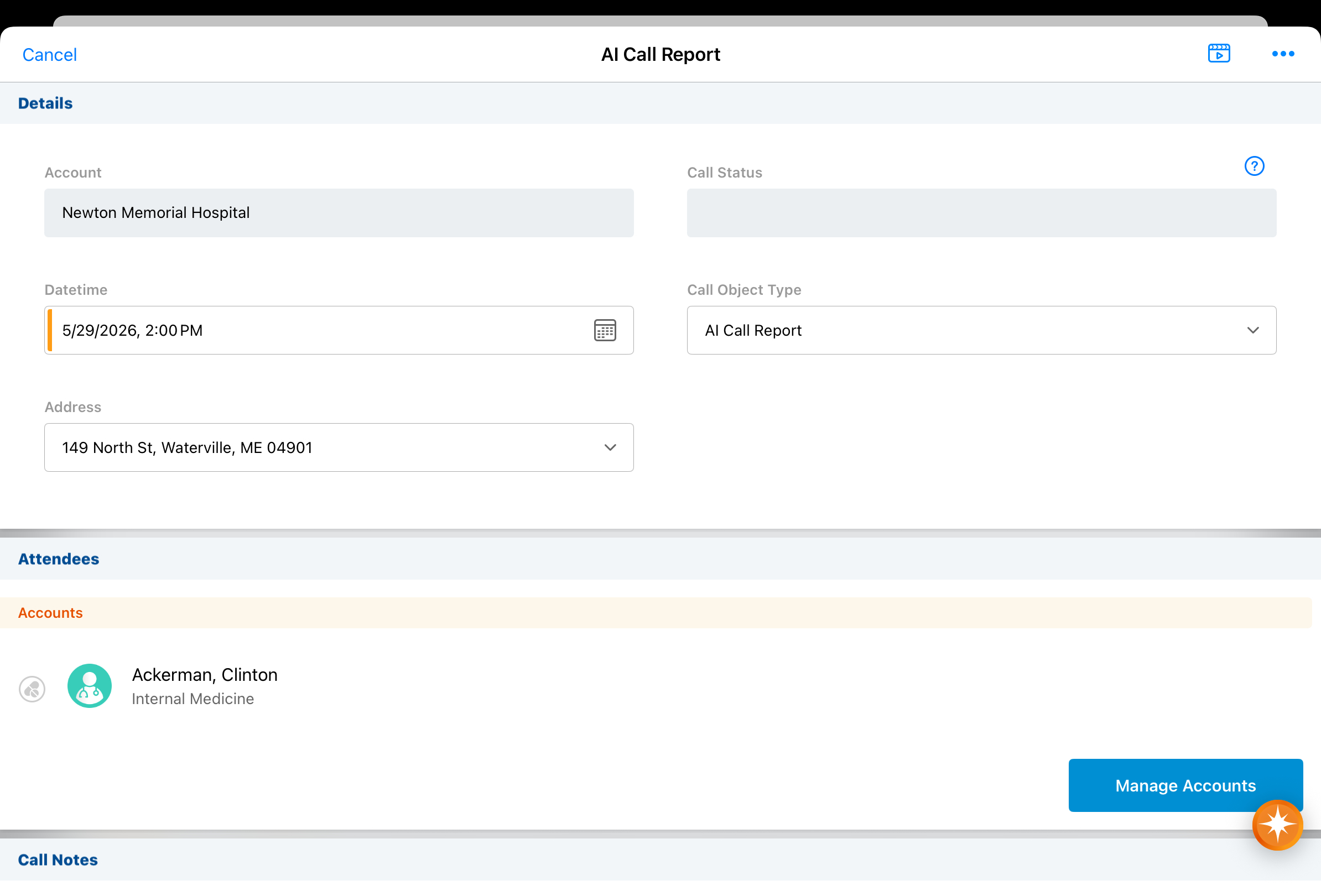
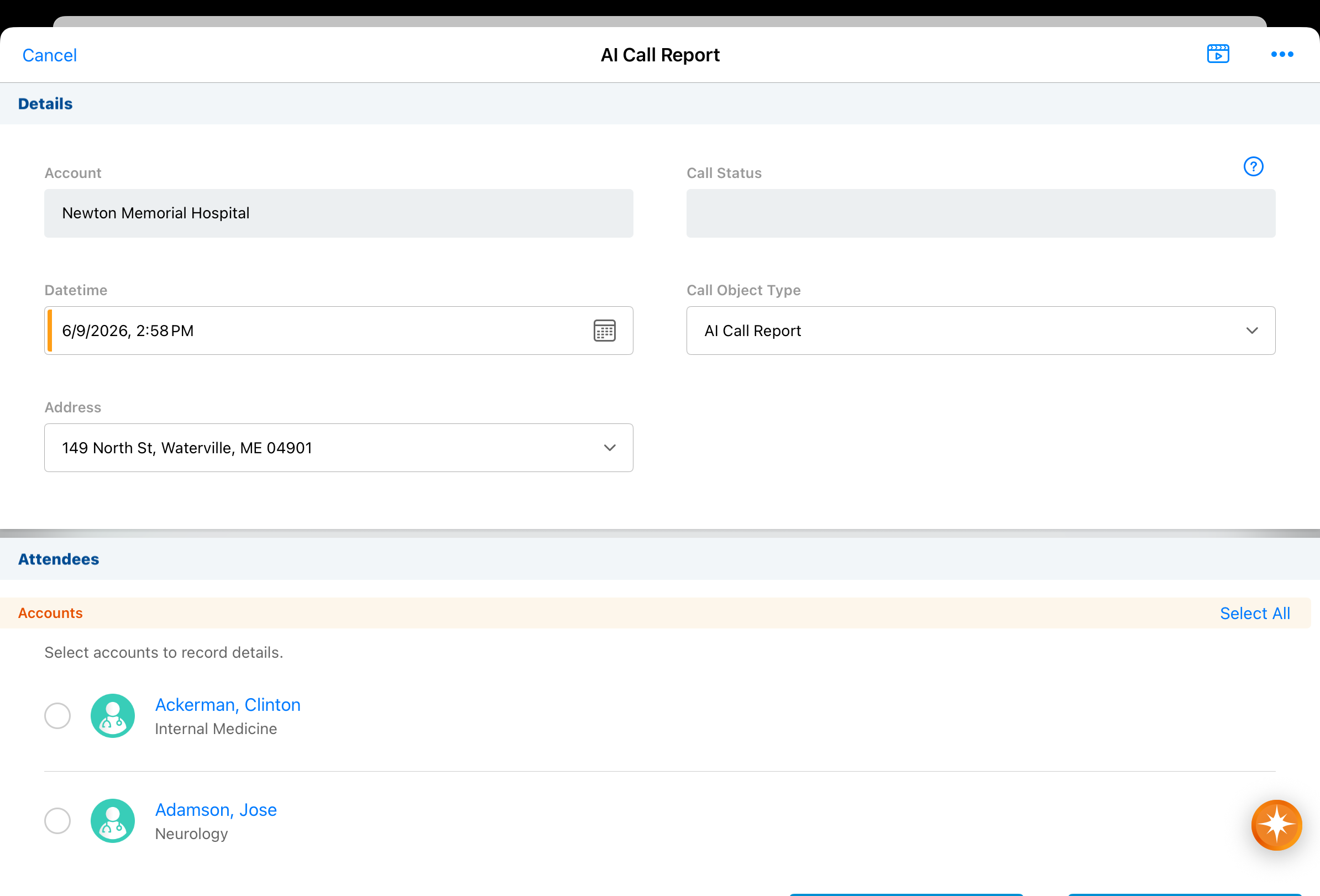
When Unique Activity group calls are enabled, Agentic Voice processes calls against a business account as Unique Activity group calls. |
|
|
|
iPad, iPhone |
When applicable, the Potential Attendees modal displays before Agentic Voice begins transposing Voice Notes into a call report instead of after. |
n/a |
n/a |
|
iPad, iPhone |
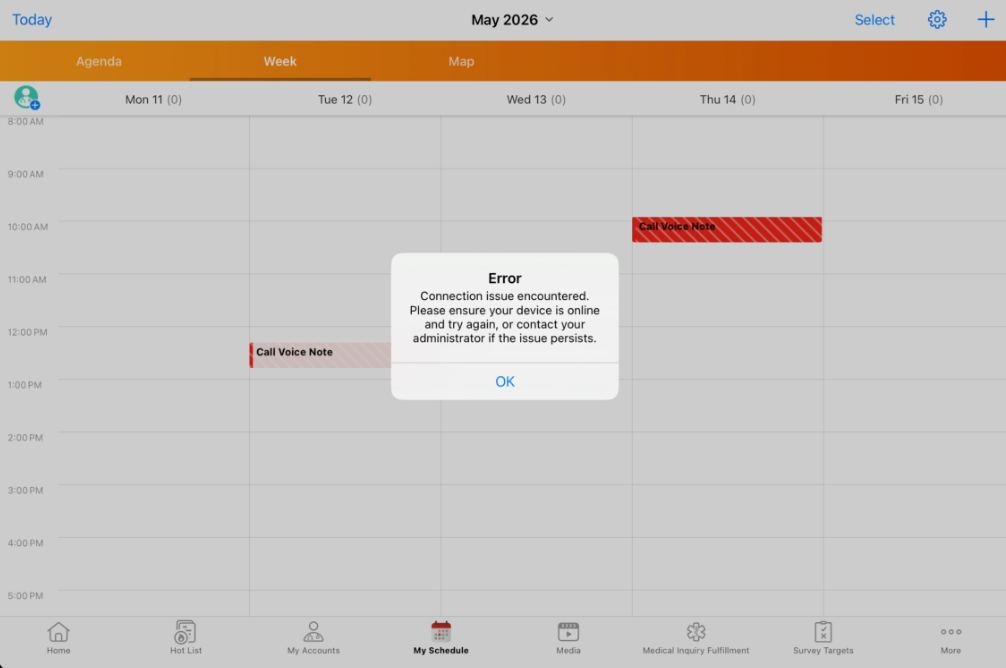
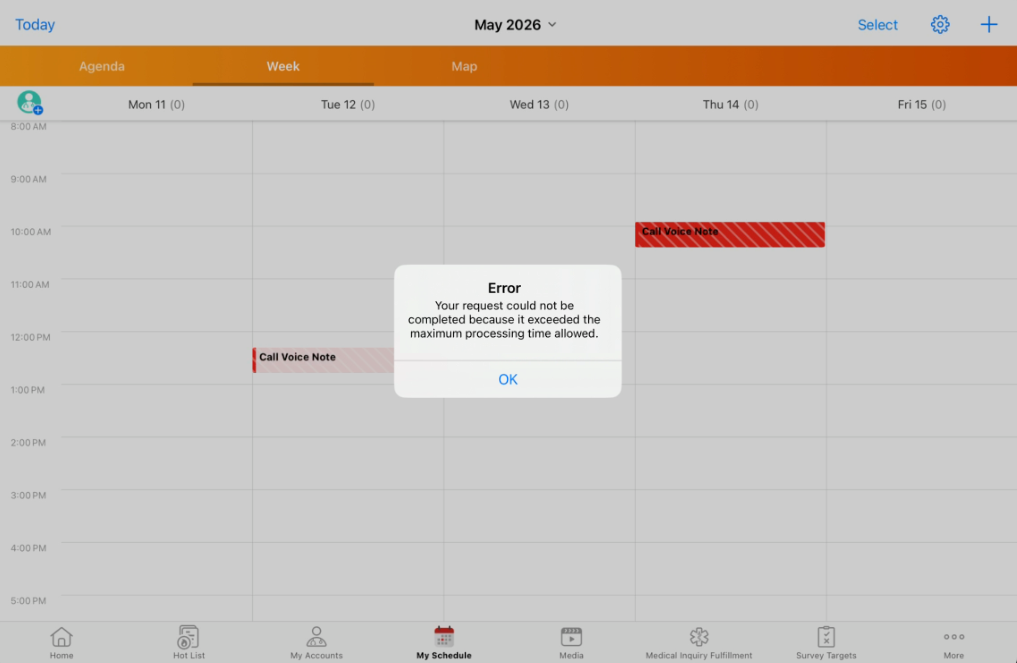
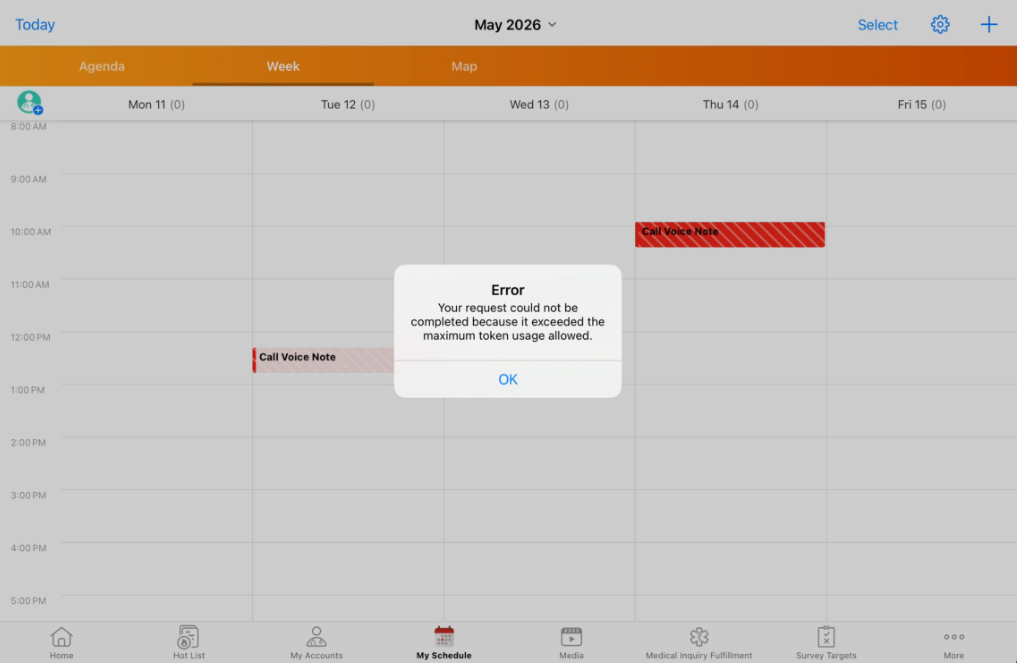
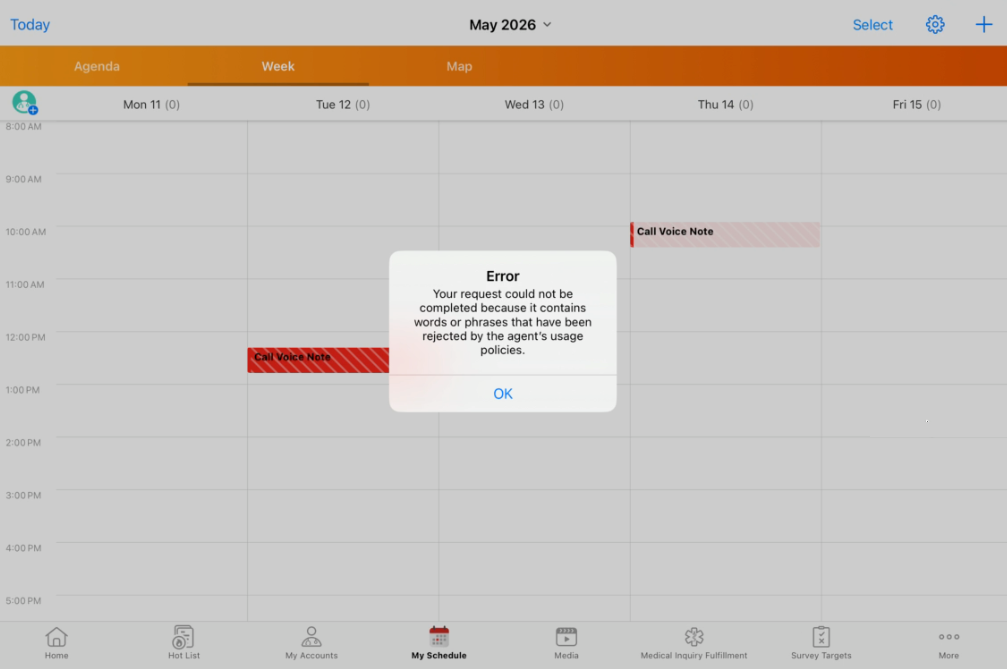
Unique error messages display when Agentic Voice users encounter the following issues:
Translations for these messages will be updated with the 26R1.3 release. Until then, Agentic Voice error messages display in English unless a translation is manually added. |
|
|
Account Management
|
Platform |
Issue Description |
Issue Number |
|---|---|---|
|
Browser |
When users filtered a My Accounts view using a multi-select dynamic attribute field, the view incorrectly returned zero results even though matching records existed. |
VCRM-158582 |
|
Browser |
When users switched a My Accounts view with dynamic attribute columns but no dynamic attribute search criteria from a list layout to a table layout, the data did not load. |
VCRM-161944 |
Align
|
Platform |
Issue Description |
Issue Number |
|---|---|---|
|
Browser |
When users pushed to CRM with both Groups and Content Groups and Membership enabled, Group Membership records were not pushed to CRM and users were removed from their content groups. |
VCRM-156338 |
Call Reporting
|
Platform |
Issue Description |
Issue Number |
|---|---|---|
|
iPad |
When users created a new address for an account and immediately recorded a call using that address, including displaying CLM content, the address fields were not stamped onto the call record. |
VCRM-159739 |
Commercial Insights
|
Platform |
Issue Description |
Issue Number |
|---|---|---|
|
Browser |
When a user without Create permission to Commercial Insight attempted to view a Commercial Insight record, a blank screen displayed. |
VCRM-161707 |
261.2.22 (June 4, 2026)
System Maintenance
261.2.21 | Family Build 621 (May 29, 2026)
CLM
|
Platform |
Issue Description |
Issue Number |
|---|---|---|
|
CRM Desktop (Windows) |
When users shared CLM content as web links via Approved Email, the presentation failed to embed in the email template preview upon redirection to the browser. |
VCRM-156780 |
Events Management
|
Platform |
Issue Description |
Issue Number |
|---|---|---|
|
Browser |
When users viewed an Expense Header record, an error occurred if the users did not have permission to the Concur User ID field on the User object. |
VCRM-159283 |
Call Sampling
|
Platform |
Issue Description |
Issue Number |
|---|---|---|
|
iPad |
When users submitted a call containing call samples that referenced an inactive sample lot, sample transaction or sample order transaction records were not created. |
VCRM-158592 |
261.2.20 | Family Build 616 (May 28, 2026)
Align
|
Platform |
Issue Description |
Issue Number |
|---|---|---|
|
iPad |
When users added a target from the Manage Removed Targets screen, the account continued to display on the screen until they exited and returned to Territory Feedback. |
VCRM-154758 |
Approved Email
|
Platform |
Issue Description |
Issue Number |
|---|---|---|
|
iPad |
When users in test mode sent emails with staged components, the messages did not send immediately and entered a saved status with an unapproved document error. The emails resumed sending when the Process Scheduler ran. |
VCRM-155221 |
Call Reporting
|
Platform |
Issue Description |
Issue Number |
|---|---|---|
|
Browser |
When users dismissed the Manage Attendees modal on a call report by selecting Done without adding or making changes to the attendees, a loading indicator displayed in the Attendees section indefinitely. |
VCRM-154416 |
Data Lakehouse
|
Platform |
Issue Description |
Issue Number |
|---|---|---|
|
Browser |
When users processed a full data load for extra-large class tenants, Data Lakehouse did not refresh as expected. |
VCRM-158730 |
Events Management
|
Platform |
Issue Description |
Issue Number |
|---|---|---|
|
Browser |
When users attempted to add an event team member to an event, a blank page displayed if custom or inactive picklist values existed for the Team Member Type field. |
VCRM-154136 |
My Schedule
|
Platform |
Issue Description |
Issue Number |
|---|---|---|
|
Browser |
An error occurred when users dragged and dropped a call entry to a time slot on the My Schedule and then attempted to drag a second call entry while the previous update was still in progress. |
VCRM-154806 |
Surveys
|
Platform |
Issue Description |
Issue Number |
|---|---|---|
|
iPad |
An error occurred when users changed a response to a radio button question in an advanced coaching report. |
VCRM-156079 |
Vault AI
|
Platform |
Issue Description |
Issue Number |
|---|---|---|
|
Browser |
When the Parent Call Account Type Preference AI Setting set to Prefer Business Account Parent Calls and users invoked Agentic Voice to find accounts, the agent did not provide links to identified business accounts. |
VCRM-156224 |
|
Browser |
A text monitoring error occurred when users invoked the Home Office Agent after submitting a scheduled call. |
VCRM-158209 |
261.2.11 (May 26, 2026)
Engage HCP
|
Platform |
Issue Description |
Issue Number |
|---|---|---|
|
Browser |
When direct data loads for external chat data were initiated, a full data load was incorrectly performed during every sync cycle because database queries did not accurately retrieve previous import timestamps. |
VCRM-157764 |
261.2.10 | Family Build 606 (May 21, 2026)
Performance
|
Platform |
Issue Description |
Issue Number |
|---|---|---|
|
Browser |
Performance of the Multichannel Cycle Plans Process job is improved. In performance testing, run times improved by 37% compared to the average job run before changes. |
VCRM-124736, |
|
Browser |
Performance is improved when saving call reports involving the creation of TSF records. |
VCRM-140544 |
Account Management
|
Platform |
Issue Description |
Issue Number |
|---|---|---|
|
Browser |
The HCP Status Reason (hcp_status_reason__v) picklist only displayed a subset of the required values from the OpenData 2.0 standard. If the picklist was added to a page layout before the dependency to the controlling field (status_cda__v) was set, the status_cda__v field was automatically added to page layouts in the Details section when the controlling field was set. |
VCRM-152628 |
|
iPad |
When users performed a Global Account Search, the territory selector displayed even when they only had one active territory assigned. |
VCRM-151927 |
|
Windows |
When users accessed the My Accounts tab on the Windows Full Client, they experienced excessively long load times and unresponsiveness in the account list. |
VCRM-147103 |
|
Browser |
When medical users without access to the Medical Identifier field used My Accounts, the Account Identifier did not display. |
VCRM-146381 |
|
iPad |
When users viewed number fields with format masking on the iPad, such as graduation years, the values were incorrectly displayed with a thousands-separator comma (for example, 2,021 instead of 2021). |
VCRM-150599 |
|
Browser |
When users with certain language translations (such as Polish) attempted to submit a Data Change Request (DCR), the application returned an error if the translated field label exceeded 40 characters. |
VCRM-147827 |
Align
|
Platform |
Issue Description |
Issue Number |
|---|---|---|
|
iPad, Browser |
When users accessed Territory Feedback, the Primary Parent values failed to populate for person and business accounts. |
VCRM-146753 |
|
Browser |
When a user executed a Push, rule-based account assignments were erroneously end dated. |
VCRM-148170 |
|
Browser |
When users attempted to push MCCP records, the process failed due to the system assigning an inactive user as the record owner. |
VCRM-146036 |
|
Browser |
When a user created or edited a targeting rule, validation rules did not trigger when the Parent HCO Product Metric Criteria section was left incomplete. |
VCRM-149464 |
|
Browser |
When a user performed an Assignment Preview with active targeting rules, goal values did not display in the Targets tab of the Preview Results screen. |
VCRM-149478 |
|
Browser |
When a user performed an Import after a Data Change Request (DCR) was accepted, the country field on the resulting Account Exclusion record remained empty. |
VCRM-126923 |
|
Browser |
When a user initiated a clone for an MC Cycle, the system failed to populate the Entity Name attribute within the resulting Process Task. |
VCRM-151516 |
|
iPad |
When users created a Remove Account challenge in Territory Feedback that was automatically rejected due to an approval rule, the Dropped Target label incorrectly displayed. |
VCRM-151425 |
|
Browser |
When users created a product-based rejection approval rule for Add as Target challenges, the rule did not execute because the product name was not available to the rejection rule during criteria evaluation. |
VCRM-135758 |
Approved Email
|
Platform |
Issue Description |
Issue Number |
|---|---|---|
|
Browser |
Elements with absolute positioning did not display correctly when previewing an Approved Email. |
VCRM-146334 |
|
Browser |
The Only Show Favorites toggle and the Favorites column did not display for users with access to a large number of products. |
VCRM-128923 |
Call Reporting
|
Platform |
Issue Description |
Issue Number |
|---|---|---|
|
Browser |
When users with the Child Accounts setting enabled recorded a call from a Medical Event that did not have an associated account, the application closed unexpectedly upon saving. |
VCRM-141368 |
|
Browser |
When users changed the Call object type while recording a call, selecting the Cancel button failed to exit the call report. Instead of returning to the previous account or schedule page, the application incorrectly reloaded the call page with the original object type. |
VCRM-111518 |
|
Browser |
When users attempted to save or submit a planned call from the My Schedule page, the application closed unexpectedly. |
VCRM-150908 |
|
Browser |
When users created Call Followup Activities and cleared the required Name (account__v) field, the application allowed the call to be saved or submitted without displaying a validation error. |
VCRM-148731 |
|
Browser |
When users changed the controlling Product field in the Medical Discussion or Product Discussion sections of a Call Report, the dependent picklist values failed to clear. This resulted in inconsistent behavior where previously selected values persisted even when they were no longer valid for the newly selected product. |
VCRM-147097 |
|
Browser |
When users recorded an interaction on the browser platform while the territory field was not on the page layout, the application stamped a child territory associated with the account instead of the manager's direct territory. |
VCRM-140667 |
|
Browser |
When users attempted to delete a parent Call Report that contained a submitted child call, the application displayed an SDK internal error message. |
VCRM-145033 |
|
Browser |
When users without field permission to the Signature Date field on the call object attempted to load My Schedule, an error occurred and existing calls did not display. |
VCRM-152452 |
Campaign Manager
|
Platform |
Issue Description |
Issue Number |
|---|---|---|
|
Browser |
Users needed to select the radio button twice to select a row when editing campaign details. |
VCRM-145719 |
CLM
|
Platform |
Issue Description |
Issue Number |
|---|---|---|
|
CRM Desktop (Windows) |
When users navigated between slides while presenting CLM content in an Engage meeting, a black screen flicker occurred for the attendee. Additionally, an error occurred when rendering the Presenter View window while loading the presentation. |
VCRM-138221 |
|
Browser |
When a user cloned a Vault CRM instance to create a new sandbox, Content Group and Directory records from the parent instance were not created in the cloned environment, and an error occurred if users attempted to manually create or delete these records. |
VCRM-144674 |
|
Browser |
When a user updated the where clause for a Vault-to-Vault CRM connection, single document presentations that previously failed to sync remained in the retry queue even if they no longer met the new filter criteria. |
VCRM-144658 |
|
Browser |
When a user manually deleted a CLM Presentation record, the associated Content Group Content records remained as orphaned data with null values, and an error occurred when users tried to manually delete the orphaned Content Group Content records. |
VCRM-147616 |
|
iPad |
When a user attempted to use Advanced Text Search, an error occurred if users did not have specific field permissions for fields on the Multichannel Settings object. |
VCRM-143252 |
Concur Integration
|
Platform |
Issue Description |
Issue Number |
|---|---|---|
|
Browser |
When users sent expenses with attendees to Concur, an invalid attendee type ID error occurred if there were more than 100 attendee types in Concur. |
VCRM-153757 |
Consent Capture
|
Platform |
Issue Description |
Issue Number |
|---|---|---|
|
iPad |
When a user attempted to log in or sync their iPad, an error occurred if the filenames of consent text files contained special characters. |
VCRM-147119 |
|
Windows |
When users initiated the Consent Capture process, the disclaimer text did not render correctly and displayed raw HTML code instead of formatted text. |
VCRM-152331 |
|
Browser |
When a user captured opt-out consent, Paper Consent ID was displayed as optional even though signature was not required on opt-out. |
VCRM-154200 |
|
iPad |
When a user captured an opt-out consent, an optional signature pop-up displayed even when signature was not required on opt-out. |
VCRM-152324 |
|
Browser |
In Classic Consent mode, when the Approved Email Opt-In Required field in Approved Email Settings changed from unchecked (implicit) to checked (explicit), emails sent from an unsynced iPad were incorrectly delivered. |
VCRM-154049 |
|
Browser |
When a user attempted to capture consent, an error occurred if the user did not have Read field permission to the Country field on the Account object. |
VCRM-97686 |
Engage
|
Platform |
Issue Description |
Issue Number |
|---|---|---|
|
Browser |
When an Approved Email admin user selected Send Invite from an Engage meeting call report, Approved Email did not display. |
VCRM-146169 |
Events Management
|
Platform |
Issue Description |
Issue Number |
|---|---|---|
|
Browser |
When a user created a new event record, the system displayed a generic default layout instead of the specific layout assigned to the selected record type. |
VCRM-144647 |
|
iPad |
When a user sent an Event Invitation email with an attachment from an iPad, the registration link provided to the recipient was malformed or empty. |
VCRM-151711 |
|
iPad |
When a user attempted to save a new event on the iPad, a required field error occurred for the Event ID field. |
VCRM-151227 |
|
Browser |
When a user attempted to search for attendees, the out-of-territory (OOT) filter toggle did not display as expected in the selection modal. |
VCRM-139598 |
|
Browser |
When a user reconciled an attendee with an out-of-territory (OOT) account and updated the registration status, the system failed to send the expected confirmation or rejection email. |
VCRM-151387 |
|
Browser |
When a user attempted to create a child event from a parent event, the object types of the parent event’s related records were not copied to the child event and defaulted to the standard object type |
VCRM-153753 |
|
Browser |
When a user reconciled walk-in attendees, the system incorrectly matched them to Customer Master records instead of existing CRM accounts. |
VCRM-149445 |
Medical Events
|
Platform |
Issue Description |
Issue Number |
|---|---|---|
|
iPad |
When a user accessed a medical event, the Sign In button for the self-service sign-in sheet did not display. |
VCRM-151493 |
|
Browser |
When a user attempted to add attendees to a medical event using the Add Attendee record action, HCO accounts displayed in the list without a selectable checkbox. |
VCRM-140736 |
General
|
Platform |
Issue Description |
Issue Number |
|---|---|---|
|
iPhone |
When users changed device orientation or completed an application update, the navigation menus and screen content in the application rotated or displayed incorrectly. |
VCRM-144003 |
Medical Inquiries
|
Platform |
Issue Description |
Issue Number |
|---|---|---|
|
Browser |
When a user attempted to create a response from a Medical Inquiry Fulfillment (MIF) record, an error occurred if the specific fulfillment object type was not listed in the allowed call record types setting. |
VCRM-124752 |
|
Browser |
When a user lacked delete permissions for the Medical Inquiry Fulfillment Response object, the Create Response and Assign buttons did not display on the Medical Inquiry Fulfillment page. |
VCRM-146144 |
|
Browser |
When a user accessed a medical inquiry to perform a workflow task, the task ribbon and Complete button did not display. |
VCRM-150766 |
|
Browser |
When a user without permission to the Assign to User field attempted to submit a saved medical inquiry, an error occurred. |
VCRM-146507 |
My Schedule
|
Platform |
Issue Description |
Issue Number |
|---|---|---|
|
Browser |
When a user accessed My Schedule online, the calendar failed to display any records and returned an internal server error. |
VCRM-151047 |
|
Browser |
When a user created a call for an account from My Schedule, the default selection for the address was incorrectly set to an inactive address. |
VCRM-151372 |
|
iPad |
When a user navigated to My Schedule and selected an event call, the event name and title did not display within the call details popover. |
VCRM-153263 |
Patient CRM
|
Platform |
Issue Description |
Issue Number |
|---|---|---|
|
Browser |
When a user refreshed the Case Inbox, the fax count was updated, but new faxes were not loaded unless the user navigated between different tabs. |
VCRM-125963 |
|
Browser |
If the Patient Intake phase had Enter Therapeutic Phase set to Yes, completing the patient intake automatically set the Patient Journey state to Active and updated the In Therapy, In Therapy Start Date, and Time to Therapy fields. |
VCRM-133672 |
|
Browser |
An error occurred when adding a provider or facility to an already affiliated Patient Journey from the Providers and Helpers tab. |
VCRM-143022 |
Sample Management
|
Platform |
Issue Description |
Issue Number |
|---|---|---|
|
Browser |
When users updated the order quantity of an existing inventory order line to zero or left it blank, the change was not saved and instead retained the previous quantity value. |
VCRM-148035 |
Service Center
|
Platform |
Issue Description |
Issue Number |
|---|---|---|
|
Browser |
When transient network connectivity issues affected Shared Mailboxes, Service Center Admins received email notifications stating an authentication error occurred. |
VCRM-135190 |
|
Browser |
When using the Service Center Email Inbox, users experienced intermittent network failures during verification calls to Microsoft, preventing email delivery. |
VCRM-139366 |
Sync
|
Platform |
Issue Description |
Issue Number |
|---|---|---|
|
iPad |
When users added accounts to their territory via Network Account Search (NAS), a mini-sync error occurred when custom territory fields contained file references. |
VCRM-147656 |
|
Browser |
An error occurred when a VMOC was created without specifying an object name. |
VCRM-134189 |
|
iPad |
When a user performed an action that triggered a validation rule, calculated formula fields were not stamped on the object before the validation check. |
VCRM-147270 |
Territory Management
|
Platform |
Issue Description |
Issue Number |
|---|---|---|
|
Browser |
When users attempted to update Account Territory Loader (ATL) records that were missing an initial account assignment, an error occurred. |
VCRM-144747 |
|
Browser |
When users ran Territory Assignment Rules containing criteria for multiselect picklist fields using the IN operator, an error occurred when more than one value was selected. |
VCRM-153336 |
Vault AI
|
Platform |
Issue Description |
Issue Number |
|---|---|---|
|
Browser |
When users asked questions about CLM content, an error occasionally displayed stating the system was not trained to handle the request. |
VCRM-152657 |
|
iPad |
When users used an external physical keyboard to enter Japanese text for Vault AI, pressing the Enter key to confirm a character conversion caused the message to submit prematurely. |
VCRM-150136 |
|
Browser |
When users edited and saved fields on an AI Settings record not related to Vector Sync, a Vector Sync warning displayed. |
VCRM-152931 |
|
iPad |
When users exited and then reopened the application, the floating chat icon sometimes did not display and the bottom of the chat window covered the navigation bar. |
VCRM-152625 |
X-Pages
|
Platform |
Issue Description |
Issue Number |
|---|---|---|
|
iPad |
When a user switched between multiple attendees on a call report using the Jump To button, the X-Page content did not refresh and continued to display information for the previously selected attendee. |
VCRM-147206 |
|
iPhone |
When a user accessed the home page, the Prompt Overlay button incorrectly displayed. |
VCRM-152617 |
X-Pages Studio
|
Platform |
Issue Description |
Issue Number |
|---|---|---|
|
iPad |
When a user viewed the Territory Feedback dashboard, there were discrepancies between the Preview tab and the actual device, including missing summary rows for blank priority fields and incorrect metric counts for challenge reasons. |
VCRM-144606 |
261.0.50 (May 21, 2026)
Vault AI
|
Platform |
Issue Description |
Issue Number |
|---|---|---|
|
Browser |
When syncing CLM presentation metadata during an incremental sync, duplicate vectors were created in the database. |
VCRM-156250 VCRM-154786 |
|
Browser |
CLM content was not processed correctly, preventing Agentic Media from finding information in the content. |
VCRM-154858 |
261.0.40 | Family Build 600 (May 14, 2026)
Align
|
Platform |
Issue Description |
Issue Number |
|---|---|---|
|
iPad |
When users removed a target on the Edit Alignment screen and navigated to the Manage Removed Targets screen, the account did not display in the list until the user navigated away and returned to the screen. |
VCRM-152819 |
Approved Email
|
Platform |
Issue Description |
Issue Number |
|---|---|---|
|
Browser |
When users sent an Approved Email invite for a Microsoft Teams or Zoom meeting from a call with an HCP child account, the HCO account was incorrectly added as a recipient. |
VCRM-139887 |
|
Browser |
An error occurred where scheduled Approved Emails failed to send if the Capture Datetime was more than 14 days in the past. |
VCRM-154034 |
Call Scheduling
|
Platform |
Issue Description |
Issue Number |
|---|---|---|
|
Windows |
When users attempted to add users to the attendees list on a call, they experienced severe navigation delays or froze temporarily. |
VCRM-151468 |
Campaign Manager
|
Platform |
Issue Description |
Issue Number |
|---|---|---|
|
Browser |
When users accessed a survey link from an email sent via Campaign Manager, the page loaded endlessly. |
VCRM-153323 |
CLM
|
Platform |
Issue Description |
Issue Number |
|---|---|---|
|
Windows |
An error occurred when users attempted to launch media after a database sync failed to correctly delete records. |
VCRM-151784 |
Vault AI
|
Platform |
Issue Description |
Issue Number |
|---|---|---|
|
Browser |
When users used Agentic Voice to create a call from an account detail page, the account search process was skipped, which prevented the agent from identifying and adding attendees or locations to the created call. |
VCRM-152776 |
|
Browser |
When users used Agentic Voice to create a call, the search time for users who were assigned to a large number of detail groups was very long. |
VCRM-152791 |
|
Browser |
Agentic Media used more tokens and was slower than expected for certain types of requests. |
VCRM-154126 |
X-Pages Studio
|
Platform |
Issue Description |
Issue Number |
|---|---|---|
|
Browser |
When users navigated to Preview mode, number bars did not display in tables in certain instances. |
VCRM-152832 |
|
Browser |
When users configured a table number column to display a currency style using a non-hardcoded expression for the currency value, the expression failed to evaluate and the table did not render. |
VCRM-153422 |
261.0.30 | Family Build 589 (May 7, 2026)
Agentic Voice for Call Key Messages - Available on iPad and iPhone
Agentic Voice now automatically selects Key Messages, reactions, and vehicles based on the user’s audio input. This helps capture the full context of the user’s interaction with an HCP, informing future visits.
Align
|
Platform |
Issue Description |
Issue Number |
|---|---|---|
|
iPad |
When making feedback challenges, approval rules were not applied correctly for certain criteria. |
VCRM-150591 |
|
iPad |
When a user attempted to add an out-of-territory account within Territory Feedback, an error occurred. |
VCRM-152068 |
Approved Email
|
Platform |
Issue Description |
Issue Number |
|---|---|---|
|
Browser |
Duplicate emails were sent if a user triggered the Send Email action multiple times in quick succession. |
VCRM-151148 |
Call Reporting
|
Platform |
Issue Description |
Issue Number |
|---|---|---|
|
Windows |
When users attempted to select a call channel or access a call report, mouse clicks sometimes failed to register or there was a significant delay when loading the page. |
VCRM-147234 |
Call Sampling
|
Platform |
Issue Description |
Issue Number |
|---|---|---|
|
Browser |
When a user submitted a call with a sample product and multiple sample lots existed for the same product and owner, the sample order transaction was not created and the sample lot allocation quantity was not deducted. |
VCRM-150600 |
Campaign Manager
|
Platform |
Issue Description |
Issue Number |
|---|---|---|
|
Browser |
When targets did not meet the requirement for a follow-up action, and a subsequent follow-up action had a trigger condition relying on the previous follow-up action being unopened, the subsequent follow-up action was erroneously triggered. |
VCRM-151083 |
Suggestions
|
Platform |
Issue Description |
Issue Number |
|---|---|---|
|
Browser, iPad |
Suggestions did not display when users accessed the Suggestions tab. |
VCRM-151607 |
X-Pages
|
Platform |
Issue Description |
Issue Number |
|---|---|---|
|
Windows |
Certain migrated X-Pages did not behave correctly. |
VCRM-148710 |
261.0.21 (May 3, 2026)
Call Reporting
|
Platform |
Issue Description |
Issue Number |
|---|---|---|
|
iPad |
When users attempted to submit a call where the reaction field for a key message defaulted to None, an error occurred which prevented the call from being submitted successfully. |
VCRM-152883 |
261.0.20 | Family Build 575 (April 30, 2026)
Account Management
|
Platform |
Issue Description |
Issue Number |
|---|---|---|
|
iPad |
The Record a Call and Launch Media buttons in My Account List rows displayed a red prohibited icon when the Do Not Call picklist on the account was not set to Yes. |
VCRM-146527 |
|
iPad |
When users created affiliations through the New Account Wizard, picklist overrides and default values for the Role field were not respected. |
VCRM-147912 |
|
Browser, iPad |
When users created or edited affiliations within Stakeholder Navigator, picklist overrides and field visibility based on affiliation object types were not respected. |
VCRM-139463 |
|
iPad |
When users managed affiliations in Stakeholder Navigator, picklist overrides for the Role field were not respected for specific object types. |
VCRM-150483 |
Align
|
Platform |
Issue Description |
Issue Number |
|---|---|---|
|
Browser |
During feedback cloning, invalid territory targets for accounts outside of the territory were generated when unused fields were populated. |
VCRM-64181 |
Approved Email
|
Platform |
Issue Description |
Issue Number |
|---|---|---|
|
iPad |
When users generated email receipts for Medical Inquiries, Call Samples, or Orders, transaction-related tokens were translated based on the admin's language settings instead of the user's language. |
VCRM-148248 |
|
Browser |
After sending emails, the status of the Sent Email records were stuck in Sending and did not update immediately. |
VCRM-149989 |
|
Browser |
When users who did not have field permission to the segmentation__v field on the account__v object selected an email template and navigated to the template tab, an error displayed and they were unable to select recipients. |
VCRM-150245 |
Call Reporting
|
Platform |
Issue Description |
Issue Number |
|---|---|---|
|
iPhone |
In Create mode, when users canceled a child call during a Unique Activities (UA) call, the Attendee Specific Fields (ASF) section did not display for the account attendee on the parent call. |
VCRM-148288 |
Call Sampling
|
Platform |
Issue Description |
Issue Number |
|---|---|---|
|
Browser |
When users attempted to save calls with samples, an error occurred preventing the save operation. |
VCRM-150151 |
Campaign Manager
|
Platform |
Issue Description |
Issue Number |
|---|---|---|
|
Browser |
When users opened the Copy Target List modal and selected the Owner filter icon, the resulting list displayed only System instead of all available users. |
VCRM-143177 |
|
Browser |
When multiple account records shared the same email address, follow-up emails were sent to previously failed targets. |
VCRM-145803 |
CLM
|
Platform |
Issue Description |
Issue Number |
|---|---|---|
|
iPad |
When using the getDataForCurrentObject method to query the Alias field on the User object, the field was incorrectly translated to alias__v instead of alias__sys. |
VCRM-147510 |
|
CRM Desktop (Windows) |
When users attempted to download large CLM presentations, an error occurred. |
VCRM-144061 |
|
CRM Desktop (Windows) |
When users attempted to open media, an error occurred when loading the content. |
VCRM-147233 |
|
CRM Desktop (Windows) |
When users attempted to access video presentations, an error occurred when downloading the content. |
VCRM-148098 |
|
Browser |
When the CLM Integration for PromoMats/MedComms connections was activated, an error occurred during the slide and rendition sync jobs. |
VCRM-149326 |
Consent Capture
|
Platform |
Issue Description |
Issue Number |
|---|---|---|
|
Browser |
When users attempted to continue to the Consent Summary screen, an error occurred when Multichannel Consent layouts contained multiple Space fields. |
VCRM-150480 |
Events Management
|
Platform |
Issue Description |
Issue Number |
|---|---|---|
|
Browser |
Users were able to save Business Rules and Business Rule Configurations with inactive picklist values. |
VCRM-147025 |
General
|
Platform |
Issue Description |
Issue Number |
|---|---|---|
|
CRM Desktop (Windows) |
Users were unable to edit the Primary Parent field when its Criteria VQL depended on the language__v field. |
VCRM-148047 |
My Schedule
|
Platform |
Issue Description |
Issue Number |
|---|---|---|
|
iPad, iPhone |
When a user viewed events in My Schedule, the event names did not display. Additionally, an error occurred when users selected the All Actions button for these events. |
VCRM-147572 |
Opportunity Management
|
Platform |
Issue Description |
Issue Number |
|---|---|---|
|
Browser |
When an Opportunity Line was deleted, the total amount was not updated on the main Opportunity. |
VCRM-148661 |
Sample Management
|
Platform |
Issue Description |
Issue Number |
|---|---|---|
|
iPhone |
When users submitted a call with sample or non-sample products, the Unit of Measure (U/M) is not stamped on the resulting disbursement sample transaction record. |
VCRM-146718 |
Suggestions
|
Platform |
Issue Description |
Issue Number |
|---|---|---|
|
Browser, CRM Desktop (Windows), iPad |
When users navigated to the Suggestions tab, an error occurred displaying a No Access error message, preventing access to the Suggestions tab. |
VCRM-149616 |
|
iPad |
When some users scheduled a Call from a Suggestion on the homepage and returned to the Overview tab, the page was blank. |
VCRM-147776 |
Surveys
|
Platform |
Issue Description |
Issue Number |
|---|---|---|
|
Browser |
When adding Survey Targets via the Add Survey Target modal, existing Survey Targets incorrectly displayed as selectable options when navigating the modal’s pages. |
VCRM-147005 |
Sync
|
Platform |
Issue Description |
Issue Number |
|---|---|---|
|
iPad |
When users submit a call with multiple attendees while a validation rule is enabled, an error occurs. |
VCRM-147973 |
Territory Feedback
|
Platform |
Issue Description |
Issue Number |
|---|---|---|
|
iPad |
When users added a recommended target and then navigated away from the Edit Alignments page, the selection did not persist and the recommended target displayed again in the Add Recommended Targets list. |
VCRM-149828 |
Vault AI
|
Platform |
Issue Description |
Issue Number |
|---|---|---|
|
iPad |
When users signed into the application, the AI Chat window did not display on the Home tab until the user navigated to a different tab and back. |
VCRM-145812 |
|
Browser |
VectorDB syncs failed due to excessive memory consumption. |
VCRM-150893 |
X-Pages Studio
|
Platform |
Issue Description |
Issue Number |
|---|---|---|
|
iPad |
The column header text in the Tier Breakdown table on the Territory Overview report was incorrectly wrapping, causing UI and horizontal scrolling issues. |
VCRM-147154 |
261.0.12 (April 24, 2026)
| Platform | Issue Description | Issue Number |
|---|---|---|
| Browser | When users initiated Recalculate Territory Data processes in a project containing multiple field forces and at least one target exclusion, an error occurred. | VCRM-149901 |
261.0.11 | Family Build 542 (April 22, 2026)
Align
|
Platform |
Issue Description |
Issue Number |
|---|---|---|
|
Browser |
When users attempted to re-add a target that they had themselves removed in a previous cycle, the challenge was automatically rejected. |
VCRM-147840 |
Approved Email
|
Platform |
Issue Description |
Issue Number |
|---|---|---|
|
Browser |
Employee Number object reference tokens failed to resolve correctly within URLs. |
VCRM-146049 |
Call Reporting
|
Platform |
Issue Description |
Issue Number |
|---|---|---|
|
Browser |
When users saved or submitted call reports, performance issues occurred. |
VCRM-148268 |
|
iPad |
If the trigger_timestamp__v field was not enabled for the call object type, an error occurred when users submitted a group call with call details. |
VCRM-148217 |
|
Browser |
On Unique Activities group calls, the signature icon did not display for attendees who provided a signature for call details. |
VCRM-148043 |
Campaign Manager
|
Platform |
Issue Description |
Issue Number |
|---|---|---|
|
Browser |
When users attempted to delete a campaign, an error occurred because the campaign record was still associated with existing campaign segments. |
VCRM-147729 |
|
Browser |
When users viewed the Sankey chart on the Performance tab for an active campaign with targets at multiple levels, the chart showed all targets at a single level. |
VCRM-147398 |
|
Browser |
When users created a multi-action campaign or journey with targets, the Edit icon did not display. |
VCRM-146969 |
|
Browser |
When users re-added a previously removed target to a campaign via the search feature, the toast notification incorrectly indicated that the target was unchanged. |
VCRM-146910 |
|
Browser |
When users viewed the target list for a multi-action campaign or journey, the flow name and segment name columns did not sort correctly. |
VCRM-146827 |
|
Browser |
When users created a campaign with a large number of targets and opened the side panel, the horizontal axis labels on the target list summary bar graph overlapped. |
VCRM-146542 |
Engage
|
Platform |
Issue Description |
Issue Number |
|---|---|---|
|
Browser |
When custom sharing rules prevented the Engage System User from accessing account records, Engage Scheduling email recipients encountered errors when submitting meeting requests. |
VCRM-147086 |
Events Management
|
Platform |
Issue Description |
Issue Number |
|---|---|---|
|
Browser |
When users reconciled walk-in attendees and the matching attendee record contained a signature date but no signature, the attendee status remained in a pending state. |
VCRM-147991 |
|
Browser |
When users performed a Network search for walk-in attendees and Custom Scoring and Reconciliation for Walk-in Attendees was enabled, city and zip code values did not display in the results. |
VCRM-147629 |
|
Browser |
When users entered a large numerical value in the Search Weight field, the value converted to exponential notation and could not be deleted using the backspace key. To prevent this, the maximum value for the Search Weight field has been reduced to 9999. |
VCRM-147454 |
|
Browser |
When users saved Business Rules or Business Rule Configurations, they were able to select inactive picklist values. |
VCRM-147025 |
General
|
Platform |
Issue Description |
Issue Number |
|---|---|---|
|
Browser |
When users viewed affiliated HCP counts, numerical range values incorrectly displayed as dates in translated languages. |
VCRM-148422 |
|
Browser |
After environment cloning, configuration values for specific server pods were misaligned. |
VCRM-148254 |
Microsoft Integration
|
Platform |
Issue Description |
Issue Number |
|---|---|---|
|
Browser |
Performance issues occurred while processing external calendar event data. |
VCRM-149273 |
Service Center
|
Platform |
Issue Description |
Issue Number |
|---|---|---|
|
Browser |
The Knowledge Base tab was labeled as the Library tab. |
VCRM-147446 |
Suggestions
|
Platform |
Issue Description |
Issue Number |
|---|---|---|
|
Browser |
When users without permission for Event Attendee Suggestions fields attempted to access the Suggestions tab, a No Access error displayed. |
VCRM-149616, |
Surveys
|
Platform |
Issue Description |
Issue Number |
|---|---|---|
|
Browser |
When users added survey targets to a survey with multiple pages of existing records, the selection options displayed accounts that were already targets. |
VCRM-147005 |
261.0.10 | Family Build 511 (April 16, 2026)
Performance
|
Platform |
Issue Description |
Issue Number |
|---|---|---|
|
Browser |
Performance is improved when creating or editing call reports. |
VCRM-105382 |
|
Browser |
Performance is improved when saving call reports with medical discussions or call details. |
VCRM-92441 |
Account Management
|
Platform |
Issue Description |
Issue Number |
|---|---|---|
|
iPad |
When users accessed the My Accounts table view, account object type labels displayed in English regardless of the user's language settings. |
VCRM-142558 |
|
iPad |
When users configured layout rules using expressions that evaluated the id field, the rules failed to execute. |
VCRM-141291 |
|
iPhone |
When users viewed record layouts, field arrangement was inconsistent across different objects. |
VCRM-128065 |
|
Browser |
When users enabled Dynamic Attribute Query (DAQ) records for objects that exceeded Vault's custom field limits, the enablement process failed but did not properly report the error status, leaving records stuck in an Enablement in Progress state. |
VCRM-142723 |
Align
|
Platform |
Issue Description |
Issue Number |
|---|---|---|
|
Browser |
An error occurred when users attempted to open a cycle record when the full content of the channel criteria field text exceeded 250 characters. |
VCRM-139924 |
|
Browser |
Territories did not display correctly in the territory and field force hierarchy pages. |
VCRM-125823 |
|
Browser |
When a user opened a parent territory in the map view, the shape colors for child territories did not display correctly. |
VCRM-139922 |
|
Browser |
An error occurred when attempting to push end-dated roster members to Vault CRM. |
VCRM-143616 |
|
Browser |
When users pushed to Vault CRM, active roster members who were mastered by the application but lacked a territory assignment had their security policies reset to a default value. |
VCRM-144043 |
|
Browser |
When a user performed an account assignment preview, the system returned no results. |
VCRM-141302 |
|
Browser |
When a user submitted territory feedback to edit goals, the auto-rejection rules for Edit Goals challenges failed to evaluate correctly when criteria spanned multiple products. |
VCRM-135756 |
|
Browser |
When data loading account territory assignments, the system did not assign the account if duplicate assignments existed in the upload. |
VCRM-130151 |
|
Browser |
Warning text was added to Recalculate Territory Data popup to inform users that feedback will be temporarily unavailable while the Feedback cache is refreshed. |
VCRM-143645 |
|
Browser |
MCCP channel criteria values were incorrectly stored. |
VCRM-146432 |
Approved Email
|
Platform |
Issue Description |
Issue Number |
|---|---|---|
|
Browser |
When users accessed the Approved Email Administration Console, the Email Domain Status table experienced formatting issues where text would overflow into neighboring columns and require horizontal scrolling. |
VCRM-142943 |
| Browser | When users navigated to the Send Email page, only the recipient's name was visible. The recipient's email address did not display on the initial screen. | VCRM-144481 |
| Browser | When users marked an email fragment as a favorite, it did not display as a favorite upon returning to the Send Email screen. | VCRM-142976 |
Call Reporting
|
Platform |
Issue Description |
Issue Number |
|---|---|---|
|
iPad |
When users attempted to clear the Help Content for standard fields in the iPad app, a help icon and an empty popover continued to display. This was resolved so that the help icon does not display when the Help Content is blank. |
VCRM-132380 |
|
Browser |
When users attempted to save or submit a call while no territory was assigned, an error occurred and Survey Targets failed to load. |
VCRM-20547 |
Call Sampling
|
Platform |
Issue Description |
Issue Number |
|---|---|---|
|
Browser |
When users submitted a unique activities group call with samples, sample lot quantity did not update on the user’s device until an incremental sync was performed. |
VCRM-100829 |
|
Browser |
When users modified the date or datetime on Unique Activity group calls, they were prompted to update the datetime of signed child calls. |
VCRM-132328 |
CLM
|
Platform |
Issue Description |
Issue Number |
|---|---|---|
|
Windows |
When users selected the Media icon from an account to record a call, the call record type selection modal did not display a Cancel option. |
VCRM-136073 |
|
CRM Desktop (Windows) |
When users disabled custom presentations, the My Presentations tab still displayed in the Media tab. |
VCRM-140179 |
|
Browser |
When users synced CLM content, a duplicate CLM Legacy Text Search document was created for a presentation if the initial major version update failed. |
VCRM-134445 |
Consent Capture
|
Platform |
Issue Description |
Issue Number |
|---|---|---|
|
iPad |
When users toggled between different languages for the same country in Consent Capture, an error occurred if one of the Consent Headers did not have an associated Consent Type. |
VCRM-141274 |
Data Lakehouse
|
Platform |
Issue Description |
Issue Number |
|---|---|---|
|
Browser |
A timing error between manual foll-loads and incremental data updates caused certain call2__v records to not display in the Data Lakehouse. |
VCRM-141408 |
Events Management
|
Platform |
Issue Description |
Issue Number |
|---|---|---|
|
Browser |
When a user attempted to clear a custom date field on an event speaker record, the field failed to update and retained its previous value upon saving. |
VCRM-143929 |
|
Browser |
When Furigana was enabled but not explicitly configured as a column for attendees or speakers, the Name column in the selection page for attendees and event speakers did not display a sort indicator. |
VCRM-144185 |
|
iPad |
Attachments sometimes failed to save when added immediately after creating a new Event Material. |
VCRM-136924 |
|
iPad |
The Out-of-Territory filter in the Attendee Selection modal did not display when it was enabled via the Event Rule for the applicable Event Type and Country and the user had Edit field permission to the entity_reference_id__v field on the em_attendee__v object. |
VCRM-139493 |
Medical Inquiries
|
Platform |
Issue Description |
Issue Number |
|---|---|---|
|
iPad |
When a user created a Medical Inquiry offline, the default value formula for the inquiry text field failed to render line breaks correctly. |
VCRM-142966 |
|
iPhone |
When a user created a Medical Inquiry with multiple products, a custom dependent picklist field failed to populate on subsequent product records when the custom field was located in a different page layout section than the primary inquiry controls. |
VCRM-137183 |
Multichannel Cycle Plans
|
Platform |
Issue Description |
Issue Number |
|---|---|---|
|
Browser |
When the Multichannel Cycle Plan Process job ran, Territory Specific Field (TSF) records were incorrectly marked as targets for accounts in territories that did not overlap with the cycle plan. Additionally, some TSF records for active targets were not created or updated as expected. |
VCRM-141564 |
|
Browser |
When Child Accounts were enabled, the Multichannel Cycle Plan Process created Territory Specific Field (TSF) records for all targets, including child accounts. |
VCRM-140823 |
My Schedule
|
Platform |
Issue Description |
Issue Number |
|---|---|---|
|
Browser |
When a user navigated to the My Schedule tab and attempted to apply a bookmark in the Scheduler while no filters were active, a blank screen displayed until the page was reloaded. Additionally, if a user successfully saved a bookmark under these conditions, it subsequently disappeared from the bookmark drop-down menu upon refreshing the page. |
VCRM-139517 |
Network Integration
|
Platform |
Issue Description |
Issue Number |
|---|---|---|
|
Browser |
When users performed a Network Account Search (NAS) or imported records from Network, the process failed with an internal server error if any mapped fields exceeded the 255-character limit in Vault CRM. |
VCRM-111976 |
Sync
|
Platform |
Issue Description |
Issue Number |
|---|---|---|
|
Browser |
When users submitted calls from a mobile platform, the calls remained in a saved status after syncing if a validation rule error occurred on one record in the transaction, preventing subsequent retries of the remaining records. |
VCRM-137380 |
X-Pages
|
Platform |
Issue Description |
Issue Number |
|---|---|---|
|
iPad |
When a user accessed the Account Plan Detail screen while offline, the X-Pages section incorrectly displayed. |
VCRM-140245 |
X-Pages Studio
|
Platform |
Issue Description |
Issue Number |
|---|---|---|
|
Browser |
When a user attempted to configure a Territory Feedback page, certain custom fields remained hidden and unavailable for selection. |
VCRM-138961 |

