26R2 Maintenance Notes
The items listed below were added in the 26R2 release cycle and contain maintenance items from the 26R2.0, 26R2.2, and 26R2.3 releases as they become available.
Maintenance items in the Vault CRM application are corrections to existing functionality.
262.3.40 | Family Build 665 (October 29, 2026)
User Visible and Behavior Changes
|
Platform |
Description |
Before |
After |
|---|---|---|---|
|
Browser |
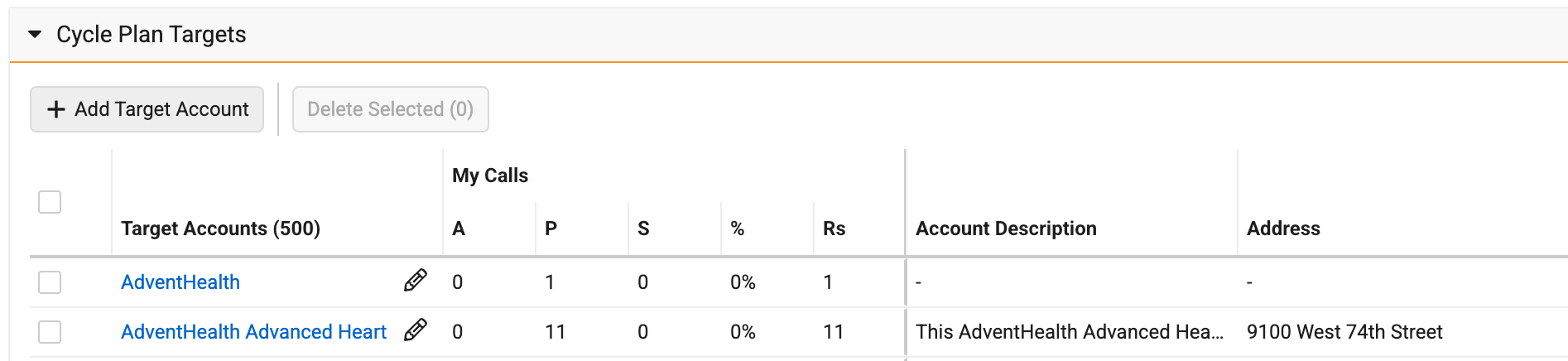
The Cycle Plan Targets table does not wrap text or adjust the heights of cells to show all content automatically. If a cell has text that exceeds the existing column width, an ellipsis displays at the end of the cell, and users can drag the cell border to expand the column. |
N/A |
|
Account Management
|
Platform |
Issue Description |
Issue Number |
|---|---|---|
| Windows | Vault CRM closed unexpectedly when users searched for accounts and an account record included in the search had a blank value for the Key Opinion Leader field. | VCRM-199361 |
Align
|
Platform |
Issue Description |
Issue Number |
|---|---|---|
|
Browser |
Self-assignments from Vault CRM were not imported into Align in the scenario where a Push to CRM job was performed on a separate part of the hierarchy, followed by a subsequent Push to CRM job on the impacted part of the hierarchy. This resulted in the assignments being removed from CRM. | VCRM-196454 |
| Browser | Importing the same Territories into a Model multiple times resulted in certain values being cleared on related records in the Model. | VCRM-199831 |
Approved Email
|
Platform |
Issue Description |
Issue Number |
|---|---|---|
| Browser | Some Sent Email records displayed a blank list unsubscribe header value instead of the expected value. | VCRM-199558 |
Cycle Plans
|
Platform |
Issue Description |
Issue Number |
|---|---|---|
| Browser | If users had six or more active "My Setup" product assignments where “No Cycle Plan” is unchecked, the Cycle Plan record page became unresponsive or closed unexpectedly. This occurred because the Cycle Plan Targets table recalculated the height of every cell, including columns that did not need to wrap text. | VCRM-192836 |
CRM AI
|
Platform |
Issue Description |
Issue Number |
|---|---|---|
| iPad | All Insight Quality agent rules were run when a user created a Commercial Insight, rather than only the rules configured for Commercial Insights. | VCRM-197782 |
| iPad | When a user used the voice agent to dictate a medical insight, they were able to create the record using an object type they did not have Create access to. | VCRM-199571 |
Engage
|
Platform |
Issue Description |
Issue Number |
|---|---|---|
| n/a | Engage Profile sync failed for a user with Zoom attendance reporting enabled, which caused the sync job to fail for the user’s entire tenant. | VCRM-196135 |
Home Page
|
Platform |
Issue Description |
Issue Number |
|---|---|---|
| iPad | The AI home page widget displayed with square edges instead of the expected rounded edges. | VCRM-197892 |
Medical Interaction
|
Platform |
Issue Description |
Issue Number |
|---|---|---|
| iPad | When a user submitted a Medical Interaction after adding a Discussion and a Medical Inquiry, they received an error stating a required field was missing for Product. | VCRM-192106 |
My Schedule
|
Platform |
Issue Description |
Issue Number |
|---|---|---|
| iPad | For users with their locale set to Thailand, the calendar on My Schedule displayed the year using the Buddhist calendar instead of the Gregorian calendar and calculated the day of the week incorrectly. This also affected the year displayed when viewing or editing a call report. | VCRM-190066 |
Order Management
|
Platform |
Issue Description |
Issue Number |
|---|---|---|
| Windows | A validation rule incorrectly prevented some users from saving an order line on one platform, when the same rule worked as expected on other platforms. | VCRM-194283 |
| Browser | The Orders detail page now displays the workflow task bar when there is an active workflow task assigned to the current user. | VCRM-195339 |
| Browser | When a user created a new order, the currency fields on the Order Header did not default to the local currency value. | VCRM-199283 |
Patient CRM
|
Platform |
Issue Description |
Issue Number |
|---|---|---|
| Browser | Users were unable to complete adherence check-ins after selecting a later date to retry the attempt. | VCRM-199422 |
Sample Inventory Order
|
Platform |
Issue Description |
Issue Number |
|---|---|---|
| Browser | Inventory order lines did not display when a user viewed a saved inventory order if the associated inventory allocation record was no longer active. | VCRM-196775 |
X-Pages
|
Platform |
Issue Description |
Issue Number |
|---|---|---|
| n/a | When a user queried the User.ManagerId field, the X-Pages report failed. | VCRM-196211 |
262.3.30 | Family Build 654 (October 22, 2026)
Account Management
|
Platform |
Issue Description |
Issue Number |
|---|---|---|
| iPad | All address object types were incorrectly available for creation when using custom related object sections. | VCRM-198570 |
Align
|
Platform |
Issue Description |
Issue Number |
|---|---|---|
| N/A | The preview process closed unexpectedly when a user ran territory account assignments, resulting in affected accounts not being properly assigned. | VCRM-196232 |
Call Reporting
|
Platform |
Issue Description |
Issue Number |
|---|---|---|
| Browser, iPad | The application closed unexpectedly when a user attempted to record a call for a newly created account. | VCRM-198505 |
CLM
|
Platform |
Issue Description |
Issue Number |
|---|---|---|
| iPad | The iPad status bar (time and battery) remained visible while a user viewed CLM content. |
VCRM-193838 |
| Windows | A custom presentation displayed a false refresh prompt when a user edited slides using the right-click context menu; accepting the prompt caused the user's changes to be lost. | VCRM-195803 |
| iPhone | A user was unable to download media content from the Media tab and received a download error. | VCRM-197068 |
| Windows | After the user pasted slides into a newly saved presentation and saved again, the presentation displayed a “Media is no longer available” message. | VCRM-197928 |
Coaching Reports
|
Platform |
Issue Description |
Issue Number |
|---|---|---|
| Browser | Users were unable to update and save completed coaching reports due to an underlying validation issue. | VCRM-198699 |
Content Studio
|
Platform |
Issue Description |
Issue Number |
|---|---|---|
| N/A | A Vault Document token inserted in an email template displayed as raw text instead of a readable label; the edit button used to select the document was not displayed. | VCRM-195318 |
CRM AI
|
Platform |
Issue Description |
Issue Number |
|---|---|---|
| iPad | The Media Agent displayed responses to a user without the expected clickable citations for available presentations. | VCRM-196266 |
| Browser | Insight Definition Rules incorrectly displayed in Insight Quality Agent Guidelines. | VCRM-197275 |
| Browser | When the user ran a vector database sync, a StackOverflowError occurred for a subset of reference documents. | VCRM-197753 |
Engage
|
Platform |
Issue Description |
Issue Number |
|---|---|---|
| N/A | After a user's organization migrated from Veeva CRM to Vault CRM, Engage Meetings data stopped migrating once a certain migration status was reached. | VCRM-196872 |
| iPad | End users intermittently received a “Signature Method Unavailable” error when attempting to request a signature for samples via the Engage meeting. | VCRM-190984 |
Events Management
|
Platform |
Issue Description |
Issue Number |
|---|---|---|
| iPad | When a user tried to send an approved email to an Events Management attendee, an error referencing a missing Consent Header displayed even though the environment was configured for Classic Consent rather than Consent Capture. | VCRM-196916 |
Medical Inquiries
|
Platform |
Issue Description |
Issue Number |
|---|---|---|
| Browser | When a user added an account to their territory, an existing territory assignment created through a Medical Inquiry was dropped. | VCRM-193196 |
Sync
|
Platform |
Issue Description |
Issue Number |
|---|---|---|
| N/A | Sync did not report that Enhanced Sync had been run against Medical Interaction Discussion records when Enhanced Sync was not manually enabled by the user, even though Enhanced Sync was still running correctly. | VCRM-196371 |
262.3.22 (October 20, 2026)
Multichannel Cycle Plans
|
Platform |
Issue Description |
Issue Number |
|---|---|---|
|
Browser |
An error affected MCCP processing, resulting in job failures. |
VCRM-196631 |
262.3.21 | Family Build 644 (October 16, 2026)
Engage
|
Platform |
Issue Description |
Issue Number |
|---|---|---|
|
Off-Platform |
An error occurred where custom scheduled jobs running as the System user caused authentication failures within Engage Connect Group Management. |
VCRM-196534 |
Events Management
|
Platform |
Issue Description |
Issue Number |
|---|---|---|
|
iPad |
The Meal Type field incorrectly displayed blank for certain users when the Program Type was not specified. |
VCRM-197713 VCRM-197710 |
|
Browser |
The Event Speaker search results incorrectly sorted alphabetically instead of by relevance if the search window was closed and reopened. |
VCRM-192379 |
|
Off-Platform |
An unexpected server error occurred when a user attempted to record a call from an Event associated with an account outside of their territory. |
VCRM-193815 |
Sample Management
|
Platform |
Issue Description |
Issue Number |
|---|---|---|
|
Browser |
An error occurred where Sample Inventory Items were not saved when creating a new Sample Inventory record using a custom object type. |
VCRM-196242 |
262.3.20 | Family Build 634 and 635 (October 15, 2026)
Align
|
Platform |
Description |
Issue |
|---|---|---|
|
Off-Platform |
Editing a roster member start or end date in the UI after it was set out of sequence with a child assignment date through a data load returned a validation error, even though the same correction succeeded in business admin. |
VCRM-191331 |
|
Off-Platform |
A roster member could not be pushed to CRM when the records manager did not exist in CRM and was not mastered by Align. |
VCRM-193588 |
|
Off-Platform |
An account assignment commit process aborted, and the account assignment preview created before the failed commit was not discarded by subsequent scheduled jobs. |
VCRM-194307 |
|
Off-Platform |
The Publish process of MC Cycle Plans failed when the system attempted to assign records to inactive users. |
VCRM-194698 VCRM-193569 |
|
Browser |
An error occurred during the "Push to CRM" process where Account Territory records failed to create or update when the system defaulted to GMT when calculating the territory's end datetime. |
VCRM-195358 |
Approved Email
|
Platform |
Description |
Issue |
|---|---|---|
|
Browser |
A custom one-click unsubscribe URL did not populate all of its token values for emails sent through the recommended email feature. |
VCRM-192862 |
|
Browser, iPad |
An error occurred preventing Approved Emails from being sent from Events Management on the iPad when a custom unsubscribe link was included in the generated header information. |
VCRM-195359 |
Campaign Manager
|
Platform |
Description |
Issue |
|---|---|---|
|
Browser |
The Date field displayed was shorter than the Time field on the Schedule and Reschedule modals. |
VCRM-193569 |
|
Browser |
Performance enhancements were introduced when configuring and saving filters in the Target List Builder that reduced loading times. |
VCRM-187611 |
Commercial Insights
|
Platform |
Description |
Issue |
|---|---|---|
|
Browser |
Configured help text did not display on the browser for certain Commercial Insight fields. |
VCRM-192886 |
Consent Capture
|
Platform |
Description |
Issue |
|---|---|---|
|
iPad |
Consent capture allowed simultaneous opt-in and opt-out selections across multiple fields sharing the same email address. |
VCRM-169580 |
Events Management
|
Platform |
Description |
Issue |
|---|---|---|
|
Browser |
Required field settings configured on the Speaker Nomination page layout were not respected. |
VCRM-192349 |
|
Browser |
The expense line related list on the expense header displayed fields that were not expected to appear. |
VCRM-192591 |
|
Browser |
The reschedule dialog displayed an error when the start and end time fields were cleared and a new start time was selected. |
VCRM-193566 |
|
Browser |
The attendee related list on an event was limited to displaying 5,000 records. |
VCRM-187949 |
|
Browser |
The related list tabs on the Events Management Speaker detail page did not display the record counts in the related object section titles. |
VCRM-191396 |
Sample Management
|
Platform |
Description |
Issue |
|---|---|---|
|
Browser |
The lot number field label on a sample transaction did not display a required indicator after multi-line transactions were enabled. |
VCRM-191903 |
Surveys
|
Platform |
Description |
Issue |
|---|---|---|
|
Browser |
An error occurred preventing users from adding survey targets to an account when they lacked read access to the restricted products field. |
VCRM-192436 |
X-Pages
|
Platform |
Description |
Issue |
|---|---|---|
|
iPad |
The Prompt Overlay window incorrectly opened in an expanded (immersive) view instead of the assistive view when Conversational AI was enabled. |
VCRM-193278 |
262.3.10 | Family Build 609 (October 8, 2026)
Account Management
|
Platform |
Description |
Issue |
|---|---|---|
|
Windows |
A deprecated profile tab displayed as the first tab on the desktop application. |
VCRM-184089 |
|
iPad |
The application closed unexpectedly when saving a newly created account. |
VCRM-185742 |
|
Browser |
A product metric was not visible or selectable when creating a view in My Accounts. |
VCRM-181223 |
|
Browser |
Saving edits in the office best times section by pressing Enter displayed a success message without saving the changes. |
VCRM-186008 |
|
Windows |
Account records failed to populate within account lists on the desktop application. |
VCRM-184076 |
|
iPad |
The Account Lookup Object Type field displayed in English instead of the proper translation when users created an Account Plan. |
VCRM-185638 |
|
Windows |
A sync error occurred when a user added an out-of-territory account. |
VCRM-187522 |
|
Browser |
Text describing an affiliated role was cut off in the SOI map. |
VCRM-186006 |
|
Browser |
The country code field was not defaulted during creation of a new account for users without a value in the Network Additional Countries field. |
VCRM-56339 |
|
Browser |
A DCR line was created when a picklist value was changed and then reverted to its original value. |
VCRM-185264 |
|
Windows |
Data Change Request (DCR) fields, for example the Phone field, were incorrectly uneditable when configured as read-only on the page layout. | VCRM-185757 |
Account Plan
|
Platform |
Description |
Issue |
|---|---|---|
|
Browser |
Clicking the Sharing Settings action on an Account Plan record opened the page briefly before navigating back to the Account Plan. |
VCRM-192814 |
|
Off-Platform |
Hyperlink formula fields on the Account Plan layout displayed the raw URL instead of the label. |
VCRM-180116 |
Align
|
Platform |
Description |
Issue |
|---|---|---|
|
Browser |
The Add Account button remained active when account search was disabled and returned an error upon searching. |
VCRM-179376 |
|
Off-Platform |
The territory import job failed with a duplicate assignment error for merged records. |
VCRM-185349 |
|
Browser |
The push to CRM process aborted unexpectedly before completion. |
VCRM-185688 |
|
Browser |
Preview and commit processes failed with an error stating that over 100,000 records were modified since the rules database update. |
VCRM-186420 |
|
iPad |
Search results differed between full-width and half-width character inputs across feedback screens. |
VCRM-186549 |
|
Off-Platform |
Field force settings allowed global-only configuration values to be saved on field force setting records. |
VCRM-185158 |
|
Off-Platform |
The model account assignment commit process failed with a missing required parameter error. |
VCRM-186790 |
|
Off-Platform |
Users were unable to revert an edited account field back to a blank value during feedback. | VCRM-178569 |
|
Off-Platform |
The value field did not populate after a cycle channel field was selected when configuring criteria for a model approval rule. | VCRM-188015 |
Approved Email
|
Platform |
Description |
Issue |
|---|---|---|
|
Browser |
An object reference token for a calculated account salutation field failed to return data when sending emails. |
VCRM-175082 |
|
Browser |
Email tracking activities were recorded in the original sent email record instead of creating a stub record. |
VCRM-182415 |
|
Off-Platform |
The record count shown on the send email page did not match the count shown when filtering approved email templates by language. | VCRM-188714 |
Call Reporting
|
Platform |
Description |
Issue |
|---|---|---|
|
Browser |
Users were unable to see key message records that had their language field set to Korean. |
VCRM-187119 |
Call Sampling
|
Platform |
Description |
Issue |
|---|---|---|
|
iPad |
When users added a sample recipient to a call before adding a BRC product and selected Ship to Location, not all business account addresses displayed in the address selection list. |
VCRM-187501 |
Campaign Manager
|
Platform |
Description |
Issue |
|---|---|---|
|
Off Platform |
When batch processing fails, in rare cases duplicate email_activity__v records get written to Vault. A unique field (<id>_<timestamp>) is added to the email_activity__v object that gets checked in case of a retry, preventing duplicate records. |
VCRM-191586 |
CLM
|
Platform |
Description |
Issue |
|---|---|---|
|
iPad |
Users received new media content alerts on iPad for presentations in unassigned territories and products. |
VCRM-167571 |
|
Browser |
User role setup records failed to update properly during user realignment. |
VCRM-183098 |
|
Off-Platform |
Applying a label filter in a large media library experienced performance delay. |
VCRM-183757 |
|
Off-Platform |
Content stopped syncing from the content repository to CRM, expiring existing CRM content. |
VCRM-179716 |
|
Browser |
Content server FTP authentication failed during login attempts in the regression environment. |
VCRM-184164 |
|
iPad |
Launching an approved email from a presentation opened two email templates simultaneously instead of one. |
VCRM-180341 |
CLM (Document Model)
|
Platform |
Description |
Issue |
|---|---|---|
|
Off-Platform |
Legacy text search documents were created instead of slides after running content sync. |
VCRM-184307 |
Compass Integration
|
Platform |
Description |
Issue |
|---|---|---|
|
Off-Platform |
New data segments were not loading, so new data was not being served to customers. | VCRM-193280 |
|
Off-Platform |
A failure notification email was not sent after a data load failed. | VCRM-191725 |
Concur Integration
|
Platform |
Description |
Issue |
|---|---|---|
|
Browser |
The expense synchronization job failed during execution. |
VCRM-186204 |
Concur Sync
|
Platform |
Description |
Issue |
|---|---|---|
|
Browser |
Expense sync failure notification emails were sent despite sync logs displaying jobs as completed. |
VCRM-176275 |
Consent Capture
|
Platform |
Description |
Issue |
|---|---|---|
|
iPad |
Different Veeva Message records were used for the same consent confirmation text on browser and on iPad. |
VCRM-182259 |
Content Studio
|
Platform |
Description |
Issue |
|---|---|---|
|
Off-Platform |
Editing a custom text token in the email template editor displayed a custom picklist modal instead of a text modal. |
VCRM-181701 |
|
Off-Platform |
The canvas drop zone in the content studio editor failed to maintain full height. |
VCRM-183695 |
CRM AI
|
Platform |
Description |
Issue |
|---|---|---|
|
iPad |
Pressing Enter to confirm Japanese IME (input method editor) character conversions on an external physical keyboard unexpectedly submitted the message. |
VCRM-184109 |
|
iPad |
Agentic Media offered capabilities beyond the intended scope in its response. |
VCRM-187153 |
|
Off-Platform |
Requests regarding CLM content are more accurately routed through Agentic Media, returning a robust response. |
VCRM-188413 |
CRM Content Metadata Integration
|
Platform |
Description |
Issue |
|---|---|---|
|
Browser |
Attempting to delete the CRM Vault Metadata connection triggered a page refresh and did not delete the connection. |
VCRM-187940 |
Cycle Plans
|
Platform |
Description |
Issue |
|---|---|---|
| Browser | A field on the Cycle Plan Target record displayed an unexpected number of decimal places. | VCRM-176212 |
Data Lakehouse
|
Platform |
Description |
Issue |
|---|---|---|
|
Off-Platform |
Concurrent delete operations on multiple objects could result in the wrong records being deleted or not deleted at all. | VCRM-190458 |
Engage
|
Platform |
Description |
Issue |
|---|---|---|
| Windows | When attempting to create and save a User Detail record, the operation failed with a "Server Error" message when using custom triggers to set a photo file. | VCRM-193210 |
Engage Connect
|
Platform |
Description |
Issue |
|---|---|---|
|
iPad |
Direct data synchronization failed with a database execution error. Between the 262.2.10 and 262.2.20 releases, end users newly assigned to or removed from a WhatsApp messaging phone number did not see those changes reflected when using the Chats tab on iPad. |
VCRM-187650 |
Events Management
|
Platform |
Description |
Issue |
|---|---|---|
|
Browser |
Deleting orphan expense header records via bulk loader failed with an unexpected batch error. |
VCRM-176513 |
|
Browser |
Participant URLs failed to generate for attendees and speakers of child events with differing object types. |
VCRM-185006 |
|
Browser |
Closing an event failed to create a stage event history record. |
VCRM-185331 |
|
Off-Platform |
The Event Materials Business Rules dialog rendered misaligned and cut off at the top of the browser window. |
VCRM-183863 |
|
Browser |
The workflow field on event history records was not stamped when the user had Read Field permissions. |
VCRM-183741 |
|
Browser |
An error message did not display when an error occurred dismissing approval process errors. |
VCRM-184070 |
|
iPad |
Wet signature functionality was unavailable on contract activation buttons, offering only digital signatures. |
VCRM-187208 |
|
Browser |
Wet signature functionality was unavailable on contract activation buttons, offering only digital signatures. |
VCRM-186419 |
|
Off-Platform |
Configured lookup columns for vendor objects failed to display in expense header lookup modals. |
VCRM-187595 |
|
iPad |
The event template selection screen displayed the no available email templates message in English instead of Japanese. |
VCRM-183375 |
|
Browser |
Formula fields for remaining event budgets were not performing currency conversions. The budget and speaker estimate fields now correctly calculate and convert currencies as expected. |
VCRM-183466 |
| Browser | Object type labels on a related list were not translated in the browser, although they were translated on iPad and within the record itself. | VCRM-192107 |
| Browser | Action buttons in the top-right corner of certain page layouts were partially cut off. | VCRM-186376 |
| Browser | An English calendar was displayed to a Japanese user on the event creation page instead of a Japanese calendar. | VCRM-175972 |
| Browser | Fields without read field-level security continued to display in the Manage Contracts window. | VCRM-188483 |
MC Cycle Plans
|
Platform |
Description |
Issue |
|---|---|---|
|
Off-Platform |
Multi-channel cycle plan background jobs remained stuck in progress instead of updating to failed status. |
VCRM-186649 |
Medical Events
|
Platform |
Description |
Issue |
|---|---|---|
|
Browser |
Users were able to create an Event Attendee record with both a User and a Contact selected, when only one Account, User, or Contact can be populated on a single attendee record. |
VCRM-183749 |
Network Integration
|
Platform |
Description |
Issue |
|---|---|---|
|
Windows |
Adding an account through Network Account Search displayed an error, and the account displayed in both inside and outside territory lists after a refresh. |
VCRM-189736 |
Patient CRM
|
Platform |
Description |
Issue |
|---|---|---|
| Browser | The Documents sub-tab incorrectly used the plural form when only a single document was attached. | VCRM-143652 |
|
Browser |
The enrolled field remained set to true for patient journey association records that entered a canceled lifecycle state. |
VCRM-190084 |
| Off-Platform | Link formula fields rendered as raw, unclickable URLs in the Patient Details section instead of as clickable links. | VCRM-190079 |
Security
|
Platform |
Description |
Issue |
|---|---|---|
|
Windows |
A security vulnerability was addressed for Network Account Search. |
VCRM-189736 |
Service Center
|
Platform |
Description |
Issue |
|---|---|---|
|
Browser |
The Documents sub-tab incorrectly used the plural form when only a single document was attached. | VCRM-118275 |
Territory Management
|
Platform |
Description |
Issue |
|---|---|---|
|
Browser |
Running assignment rules caused background processing jobs to hang, blocking subsequent executions. |
VCRM-177447 |
User Experience
|
Platform |
Description |
Issue |
|---|---|---|
|
iPad |
Logging out of the application after an idle period caused an error to occur. |
VCRM-185049 |
X-Pages
|
Platform |
Description |
Issue |
|---|---|---|
|
iPad |
Navigating back from a record view failed to keep the source prompt overlay open. |
VCRM-156273 |
| Browser | A top-level X-Page did not load without an internet connection, while a home page X-Page continued to work on other platforms. | VCRM-188745 |
X-Pages Studio
|
Platform |
Description |
Issue |
|---|---|---|
|
Browser |
A date-type custom data element field was not editable when updating the element version in X-Pages Studio. |
VCRM-190950 |
262.2.50 | Family Build 640 (October 8, 2026)
Acknowledgement of Content
|
Platform |
Description |
Issue |
|---|---|---|
|
iPad |
When users attempted to capture an Acknowledgement of Content signature during an active meeting, the Engage Meeting option did not display. |
VCRM-191605 |
CRM AI
|
Platform |
Description |
Issue |
|---|---|---|
|
Off-Platform |
In certain cases, Agentic Voice account search did not automatically select an account from among multiple returned results, though the spoken name was phonetically similar to a single matching account. |
VCRM-190634 |
|
Off-Platform |
When users converted Call Reports from Voice Notes, mentioned products and key messages were not added to the call report if they were framed as planning for the upcoming Call and not a historic account of a Call that had already occurred. |
VCRM-190915 |
262.2.42 | October 6, 2026
MCCP
|
Platform |
Description |
Issue |
|---|---|---|
|
Off-Platform |
Calculations for channel_interactions_actual__v on MCCP targets were higher than expected when the same target was part of different MC Cycle Plans and used the same cycle channel. |
VCRM-192176 |
262.2.41 | October 5, 2026
MCCP
|
Platform |
Description |
Issue |
|---|---|---|
|
Browser |
The MC Cycle Plans job stalled at the Downloading Metadata stage without processing any records. |
VCRM-192429 |
262.2.40 | Family Build 636 (October 1, 2026)
Account Management
|
Platform |
Description |
Issue |
|---|---|---|
|
Browser |
Updating the Address Line 1 field on a parent account address failed to propagate to the child account address. |
VCRM-184305 |
Align
|
Platform |
Description |
Issue |
|---|---|---|
|
Browser |
Updating a roster member territory end date to an earlier date caused an error. |
VCRM-185030 |
Approved Email
|
Platform |
Description |
Issue |
|---|---|---|
|
iPad |
Navigating to Send Email from a media slide displayed only email templates that allowed fragments. |
VCRM-188804 |
|
iPad, iPhone |
Sending an email to 100+ recipients 100 recipients caused an error to occur. |
VCRM-189184 |
Call Sampling
|
Platform |
Description |
Issue |
|---|---|---|
|
Off-Platform |
The sample quantity picklist on call reports truncated value options defined in the product__v.sample_quantity_picklist__v after 250 characters, and displayed unexpected characters. |
VCRM-190126 |
CRM AI
|
Platform |
Description |
Issue |
|---|---|---|
|
Browser |
Agentic Text Monitoring did not flag adverse events on subsequent runs after edits were made to Call Text. |
VCRM-190597 |
|
iPad, iPhone |
Adding a Voice Note automatically associated the note with an existing call on the same date despite having no matching accounts. |
VCRM-190631 |
|
Off-Platform |
Agentic Voice required manual attendee selection when dictating a person name, even if only one account matched. |
VCRM-190907 |
|
iPad |
Citation links in Agentic Media responses rendered as non-clickable text. |
VCRM-191329 |
Compass Integration
|
Platform |
Description |
Issue |
|---|---|---|
|
Off-Platform |
The Compass Patient V4 schema version caused integration failures. |
VCRM-191944 |
Events Management
|
Platform |
Description |
Issue |
|---|---|---|
|
Browser |
Navigating to the expense header related list on an event temporarily displayed a no items found message before loading existing records. |
VCRM-189662 |
|
Browser |
The attendee reconciliation filter list omitted several walk-in status options that were available on other platforms. |
VCRM-189738 |
Sample Management
|
Platform |
Description |
Issue |
|---|---|---|
|
Browser |
Selecting a product during sample transfer creation produced a no sample lot found error when sample_lot__v.sample__v field matches with multiple products and sample_lot__v.product__v is not populated. |
VCRM-189577 |
262.2.31 | September 26, 2026
CRM AI
|
Platform |
Description |
Issue |
|---|---|---|
|
iPad, iPhone |
From the “Dictate Call” entry point, Voice notes were incorrectly automatically added to the existing call on the same date if there was exactly one planned or saved call on the day. |
VCRM-190631 |
262.2.30 | Family Build 623 (September 24, 2026)
Align
|
Platform |
Description |
Issue |
|---|---|---|
|
Off-Platform |
The detail priority values on multichannel cycle product records cascaded down and erased manually loaded detail priority values on multichannel cycle plan product records during preview, commit, and territory data recalculation processes. |
VCRM-189709 |
Call Sampling
|
Platform |
Description |
Issue |
|---|---|---|
|
Browser |
When a call record was submitted with promotional, reprint, or custom product disbursements, the system incorrectly stamped the call type as Sample Only instead of Call Only. |
VCRM-186179 |
CRM AI
|
Platform |
Description |
Issue |
|---|---|---|
|
Off-Platform |
When users configured for Portuguese or Korean languages, the provided voice input was sometimes incorrectly transcribing the voice input into Russian text. |
VCRM-187368 |
Engage Connect
|
Platform |
Description |
Issue |
|---|---|---|
|
Off-Platform |
The external chat service failed to process incoming log direct-data messages, throwing deserialization exceptions and backing up message queues due to continuous retry attempts. |
VCRM-189788 |
Events Management
|
Platform |
Description |
Issue |
|---|---|---|
|
iPad |
When a new event team member record of type Event Team Member was created and populated with a user on the iPad application, the name field failed to auto-populate. |
VCRM-186380 |
My Engage Portal
|
Platform |
Description |
Issue |
|---|---|---|
|
Off-Platform |
The communication center service failed to process incoming log direct-data messages, throwing deserialization exceptions and backing up message queues due to continuous retry attempts. |
VCRM-189789 |
Sync
|
Platform |
Description |
Issue |
|---|---|---|
|
Browser |
Users experienced synchronization failures where the metadata move operation failed during the data synchronization process. |
VCRM-187839 |
262.2.20 | Family Build 611 (September 17, 2026)
Account Management
|
Platform |
Description |
Issue |
|---|---|---|
|
iPhone |
On the Account Details screen, display text was truncated without word wrapping. |
VCRM-186723 |
|
Windows |
An account search performed on the desktop application using a custom text field value returned no results. |
VCRM-184078 |
Align
|
Platform |
Description |
Issue |
|---|---|---|
|
Off-Platform |
An account assignment process restricted incremental delta query volumes to 250,000 records. When a user initiated a preview job immediately after a large commit completed, the data volume exceeded the threshold and caused the process to abort unexpectedly. |
VCRM-187290 |
|
Off-Platform |
An account assignment commit process failed during execution due to date and time parameter errors. Although the underlying record field values were valid, the system evaluated the date and time strings as improperly formatted. |
VCRM-186734 |
Approved Email
|
Platform |
Description |
Issue |
|---|---|---|
|
Browser |
When a user navigated to the email opt-in page for an account, the application failed to display the relevant consent record. Even though a valid consent record existed with matching language and a null country designation, the consent option did not appear on screen. |
VCRM-185937 |
Call Reporting
|
Platform |
Description |
Issue |
|---|---|---|
|
Browser |
After a user edited and saved a call record from view mode (can we add that this is when using sample section is configured), the application remained on a continuous loading screen and failed to redirect back to view mode. The web address did not update upon entering edit mode, and subsequent attempts to navigate away from the call record through tabs or links failed. |
VCRM-187603 |
|
Windows |
Default picklist values failed to populate when adding a new Medical Discussion row during a call. |
VCRM-185303 |
CRM AI
|
Platform |
Description |
Issue |
|---|---|---|
|
iPad, iPhone |
During call report dictation, generic product names and parenthetical text were added to the transcript. |
VCRM-185648 |
| iPad, iPhone | Misheard HCP names were retained in the Call Text, instead of being updated to the account name selected. | VCRM-182723 |
EPPV / PI
|
Platform |
Description |
Issue |
|---|---|---|
|
iPad, iPhone |
When an end user recorded a call, selected a business event task, chose a custom channel picklist value, and attempted to submit the call report, the application displayed an invalid channel error message and blocked submission. Saving the record did not display the error. |
VCRM-185083 |
Surveys
|
Platform |
Description |
Issue |
|---|---|---|
|
Browser |
When a user attempted to save and submit a survey, the system applied inconsistent time zone rules. The start date was evaluated against the server time zone, while the end date was evaluated against the user’s local time zone. |
VCRM-172541 |
X-Pages
|
Platform |
Description |
Issue |
|---|---|---|
|
Off-Platform |
Certain queryVDSRecord method calls failed. The system failed to fetch Nitro data despite daily background data connection refreshes. |
VCRM-185099 |
|
iPad |
When a user on an X-Page with a Prompt Overlay applied an update, the overlay would briefly flash before the page closed. |
VCRM-185057 |
262.0.52 | September 15, 2026
Align
|
Platform |
Description |
Issue |
|---|---|---|
|
Off-Platform |
An error prevented users from editing goals when a new cycle plan product was automatically generated during the Feedback process. |
VCRM-187561 |
262.2.11 | Family Build 598 (September 11, 2026)
Account Management
|
Platform |
Issue Description |
Issue Number |
|---|---|---|
|
Browser, iPad |
Formula fields configured to display icons rendered incorrectly. |
VCRM-176204 |
Account Plan
|
Platform |
Issue Description |
Issue Number |
|---|---|---|
|
Browser |
The text for the Remove Self Access message and the Continue button labels in the Account Plan dialog were updated. |
VCRM-185751 |
App Family
|
Platform |
Issue Description |
Issue Number |
|---|---|---|
|
Browser |
Recent Outlook SOU changes on the Outlook Admin Page caused errors. |
VCRM-187427 |
Call Sampling
|
Platform |
Issue Description |
Issue Number |
|---|---|---|
|
Browser |
An error causing the Call page to go blank when a non-sample product without a configured parent product was added to a call. |
VCRM-185563 |
CLM (Object Model)
|
Platform |
Issue Description |
Issue Number |
|---|---|---|
|
Browser |
Relationships between main presentations and sub-presentations, or shared resources, were not added during a CLM Integration sync. |
VCRM-185563 |
Events Management
|
Platform |
Issue Description |
Issue Number |
|---|---|---|
|
Browser |
The Expense Type and Event Budget fields on the Split Expense Lines page did not respect the required or read-only configurations set in the page layout. |
VCRM-185903 |
|
Off-Platform |
Custom configured columns did not display in the Event Material lookup dialog. |
VCRM-184953 |
262.0.51 | September 11, 2026
System Maintenance
262.0.50 | Family Build 627 (September 10, 2026)
CLM
|
Platform |
Issue Description |
Issue Number |
|---|---|---|
|
iPad |
When a user attempted to open a presentation from the tile view or display-by view on an iOS 27 device, the presentation failed to open. |
VCRM-184197 |
Events Management
|
Platform |
Issue Description |
Issue Number |
|---|---|---|
|
Browser |
When a custom process updated the Event Status to lock an event, the system displayed an error indicating that the event was locked. |
VCRM-182789 |
|
Browser |
When a user saved or opened an event record, there were longer than expected load times to load the page. |
VCRM-183420 |
|
Off-Platform |
When a user viewed an expense header after a SAP Concur submission failed, the page displayed an incorrect action label to resubmit to Concur. |
VCRM-185194 |
262.0.42 | September 9, 2026
Align
|
Platform |
Issue Description |
Issue Number |
|---|---|---|
|
Off-Platform |
An error occurred where the Account ID field was incorrectly cleared when re-importing manually created Model Account Territories. |
VCRM-186378 |
262.2.10 | Family Build 585 (September 10, 2026)
Performance
|
Platform |
Issue Description |
Issue Number |
|---|---|---|
|
iPad, iPhone |
Conversational AI (Early Adopter) performance is improved, reducing token usage by roughly 25%. |
VCRM-181555 |
|
Browser |
Agent Action Execution records were updated every six hours, rather than hourly. |
VCRM-174215 VCRM-183134 |
|
Browser, iPad, iPhone |
Average speed of response for Agentic Text Monitoring is improved by approximately 5 seconds. |
VCRM-159723 |
|
Browser |
Execution logic for Activity Counts within Multichannel Cycle Plans (MCCP) is optimized to improve execution stability and scaling across large data sets. |
VCRM-133009 |
|
Browser |
Performance is improved when updating Engage user photos for Digital Business Cards sent to HCPs. |
VCRM-177494 |
Account Management
|
Platform |
Issue Description |
Issue Number |
|---|---|---|
|
Browser |
When users selected a link from the Related Information section in the account preview pane, the account record page opened to the incorrect section. |
VCRM-149106 |
|
Browser |
When users viewed an account, the Territory field displayed an indirectly assigned child territory instead of the directly assigned root territory. |
VCRM-149577 |
|
Browser |
When users viewed currency fields on the Product Dashboard, the currency code was positioned before the numerical value regardless of the user's locale preference. |
VCRM-170845 |
|
iPad |
When users attempted to select the same account as both parent and child in the Members section, duplicate validation error messages were displayed. |
VCRM-176282 |
|
iPad |
When users accessed Global Account Search with the setting to hide the new account button enabled, the button to create a new account still displayed in the search modal. |
VCRM-177709 |
|
Browser |
When users accessed My Accounts, specific custom account views configured for their application profile were not visible if the profile list contained more than 250 characters. |
VCRM-183176 |
|
Browser |
When users created a new address or child account record from an account record configured with a CRM Managed Account Type, duplicate field labels displayed, causing column alignment issues on the creation page. |
VCRM-184675 |
Account Plan
|
Platform |
Issue Description |
Issue Number |
|---|---|---|
|
iPad |
When users uploaded an attachment within an account plan, the pop-up modal title displayed in English instead of the user's localized language. |
VCRM-175493 |
|
Browser |
When users attempted to change the deletion rules for the account field on account tactics, the deletion rule could not be changed. |
VCRM-181953 |
Align
|
Platform |
Issue Description |
Issue Number |
|---|---|---|
|
Browser |
When users attempted to assign a Detail Product with an assigned grouping product to a field force, an invalid parameter validation error occurred. |
VCRM-159410 |
|
iPad |
When users searched for an account on the Edit Alignment screen and navigated away and back, the account list remained filtered by the previous search term. |
VCRM-162134 |
|
Browser |
When users modified territory feedback goals with automated feedback handling disabled, updated activity goals failed to copy to the model territory upon lifecycle state completion. |
VCRM-168779 |
|
Browser |
When users updated name fields using letter case changes and pushed changes to Vault CRM, case changes were incorrectly pushed along with other field updates. |
VCRM-170087 |
|
Browser |
When users performed an import or push process and encountered an invalid session response, the task remained stuck continuously instead of aborting. |
VCRM-170336 |
|
Browser |
An error occurred when users initiated Account Assignment Commits. |
VCRM-174369 VCRM-176374 VCRM-176681 |
|
Browser |
When users saved a cloned field force setting record, global-only settings were permitted and saved without triggering validation errors. |
VCRM-175222 |
|
Browser |
When users attempted to update the Send to CRM field on a parent territory back to Yes, the save operation failed to process. |
VCRM-176226 |
|
Browser |
When managers viewed Territory Feedback for an end user with a pending transfer request, a Feedback Unavailable error occurred if the user had not refreshed their screen. |
VCRM-177296 |
|
Browser |
When users accessed Manager Territory Feedback during a push to Vault CRM, an unexpected error occurred due to missing integration IDs on territory settings. |
VCRM-178543 |
|
Browser |
When managers attempted to change the lifecycle state of a territory from Manager Review, a Feedback Unavailable error occurred. |
VCRM-179086 |
|
Browser |
When users ran an Assignment Preview with Target Feedback Cloning enabled on a cloned cycle, the preview failed due to missing territory values. |
VCRM-179399 |
|
Browser |
When users viewed feedback instructions in Territory Feedback, long instruction text incorrectly truncated. |
VCRM-180364 |
|
Browser |
When users searched for accounts in Territory Feedback using Japanese strings, search queries failed to return matching account results. |
VCRM-180920 |
|
Browser |
When users added target accounts in Territory Feedback, configured auto-reject approval rules failed to trigger and allowed target additions. |
VCRM-181495 |
|
Browser |
When users ran a push or import task after adding new roster members, the task stalled and showed an unhealthy status. |
VCRM-182997 |
|
Browser |
When users edited a MC Cycle to remove assigned channels, removed channels remained displayed after saving. |
VCRM-184761 |
App Family
|
Platform |
Issue Description |
Issue Number |
|---|---|---|
|
Browser |
When updating AI settings, validation did not prevent admins from assigning an application profile to the single default global AI settings record. |
VCRM-180358 |
Authentication
|
Platform |
Issue Description |
Issue Number |
|---|---|---|
|
iPad |
When users entered a different username in the single sign-on authentication modal than on the initial login screen, the application persisted a session under the incorrect username. |
VCRM-183038 |
CLM
|
Platform |
Issue Description |
Issue Number |
|---|---|---|
|
Browser |
When integration users viewed CLM field mappings with field-level security edit access, optional fields were incorrectly displayed as hidden. |
VCRM-153997 |
|
Browser |
When users saved a presentation for later and subsequently associated it with a call, the CLM field populated on parent call records but remained false on child call records. |
VCRM-162857 |
|
iPhone |
When users viewed website content in CLM, the option to save for later appeared in the action menu despite not being supported. |
VCRM-175480 |
|
iPad |
When users executed a standard search in the media library for a product assigned to a key message, matching presentations were not returned in search results. |
VCRM-179645 |
CLM (Document Model)
|
Platform |
Issue Description |
Issue Number |
|---|---|---|
|
Browser |
When users synced published CLM presentations, duplicate slides were created without generating a corresponding presentation binder. |
VCRM-174813 |
CRM AI
|
Platform |
Issue Description |
Issue Number |
|---|---|---|
|
Browser |
When admins attempted to vectorize prescribing information documents, vector synchronization failed intermittently. |
VCRM-173023 |
|
iPad |
When users logged out and logged back into the application, existing chat history failed to display in Conversational AI until a new prompt was sent. |
VCRM-176990 |
|
iPad |
When users changed Conversational AI view preferences, the updated view setting did not take effect until switching tabs. |
VCRM-178951 |
|
iPhone |
When users accessed voice mode in Conversational AI, empty white space displayed at the bottom of the flame visual indicator. |
VCRM-180305 |
|
Browser |
An intermittent PDF parsing issue caused partial document vector sync failures, resulting in fewer vectors than expected in one region. |
VCRM-173023 |
|
Browser |
Agent action execution records for identifying accounts and creating the call report with Agentic Voice are now combined into one record, ensuring accurate counts of Agentic Voice activity. |
VCRM-172023 |
| iPad, iPhone | When attempting to use Conversational AI (Early Adopter) in Voice Mode without an active internet connection, the expected warning message does not display on the home page widget. | VCRM-177797 |
|
iPad |
Connection errors may display when starting a Voice Mode conversation for Conversational AI (Early Adopter). |
VCRM-174343 |
|
iPad |
The AI icon displays on the Media AI tab, and does not display on some views where it is expected to display (Hot Lists, Medical Interactions). |
VCRM-174274, VCRM-172970 |
|
iPad |
When using Conversational AI (Early Adopter), Voice Mode may remain active when a user switches to a new or previous conversation. |
VCRM-174316 |
|
iPad |
An intermittent flash displays when switching between Conversational AI (Early Adopter) views. |
VCRM-174270 |
|
iPad |
Unsent text in the Conversational AI (Early Adopter) input box remains visible when a different user logs in to the same device. |
VCRM-171883 |
|
iPad |
In Voice Mode for Conversational AI (Early Adopter), the “thinking” animation continues to display until a text result displays, instead of ending with the Voice Mode response. |
VCRM-173833 |
|
iPad |
When re-opening a Conversational AI (Early Adopter) Voice Mode conversation, the chat window defaulted to Text Mode rather than Voice Mode. |
VCRM-175878 |
|
iPhone |
The Conversational AI (Early Adopter) sidebar tray is incorrectly expanded by default. |
VCRM-176835 |
|
iPhone |
The Conversational AI (Early Adopter) “speaking” animation does not fully expand to the bottom and sides of the interface. |
VCRM-176820 |
|
iPhone |
The AI icon can be removed from the home page via a swiping gesture. |
VCRM-176779 |
| iPad | On the home page, the AI chat window incorrectly opened in an expanded view by default. | VCRM-179052 |
Call Reporting
|
Platform |
Issue Description |
Issue Number |
|---|---|---|
|
Browser |
When users viewed custom date-time fields in a two-column detail section on call reports, fields rendered across two rows instead of a single row. |
VCRM-162643 |
|
Browser |
When localized Japanese users opened the calendar picker during call or event creation, the calendar was rendered in English. |
VCRM-169983 |
|
Browser |
When users saved a call entry with unique group activities, the call entry screen failed to close, preventing record submission. |
VCRM-170011 |
|
Browser |
When users selected products on call discussions, product-dependent picklist mappings failed to filter dependent fields. |
VCRM-170368 |
|
iPad |
When users tapped date and time fields in calendar activity entry, the numeric keypad picker rendered partially off-screen. |
VCRM-176461 |
|
Browser |
When users submitted a call with an active action trigger to schedule a follow-up call, a status change action error occurred. |
VCRM-180107 |
Call Scheduling
|
Platform |
Issue Description |
Issue Number |
|---|---|---|
|
iPad |
When users scheduled a call by dragging and dropping an account within My Schedule, an error occurred. |
VCRM-182341 |
Campaign Manager
|
Platform |
Issue Description |
Issue Number |
|---|---|---|
|
Browser |
When marketing users previewed email templates, the Desktop and Mobile mode tabs aligned to the left instead of centering. |
VCRM-180353 |
|
Browser |
Campaign Manager admins can now use a single, unified email domain across multiple Vault CRM regions, for example, the US and EU. This allows a single domain to be shared globally while ensuring that campaign data is processed accurately within its respective region. |
VCRM-161644 |
Concur Integration
|
Platform |
Issue Description |
Issue Number |
|---|---|---|
|
Browser |
When users executed expense synchronization with Concur, integration requests failed due to missing user identification data. |
VCRM-168445 |
Consent Capture
|
Platform |
Issue Description |
Issue Number |
|---|---|---|
|
Browser |
When users attempted to deactivate classic consent capture without an active Approved Email license, the configuration setting could not be updated. |
VCRM-138572 |
|
Browser |
When users captured consent and selected Continue, an internal server error redirected users back to the consent capture page without displaying the summary. |
VCRM-172235 |
|
Browser |
When users viewed consent lines containing custom text on the consent capture screen, long custom text rendered as cut off. |
VCRM-174349 |
Documented Interest
|
Platform |
Issue Description |
Issue Number |
|---|---|---|
|
Browser |
When users selected Cancel while creating a documented interest record, the page refreshed instead of returning to the account page. |
VCRM-176543 |
Engage
|
Platform |
Issue Description |
Issue Number |
|---|---|---|
|
Browser |
When users sent Microsoft Teams meeting invitations with group emails disabled, parent health care organizations were included as email recipients alongside individual practitioners. |
VCRM-176511 |
Events Management
|
Platform |
Issue Description |
Issue Number |
|---|---|---|
|
Browser |
When users saved an expense line with a null expense code, the expense estimate value was cleared instead of being retained. |
VCRM-151079 |
|
Browser |
When users with read-only permissions accessed an event record, the Event Details tab failed to load content. |
VCRM-170640 |
|
Browser |
When users added an attendee who reached attendance limits to an event, pre-alert warning notifications failed to display. |
VCRM-172194 |
|
Browser |
When users opened the Send Email screen for event attendees, custom email fields populated on account records were not pulled into the recipient list. |
VCRM-174876 |
|
Browser |
When users filtered event speakers, qualification option lists failed to sort in expected alphabetical order. |
VCRM-179404 |
|
Browser |
When users updated financially closed dates via data loader on unlocked events, an error occurred indicating the record was locked. |
VCRM-182789 |
|
Browser |
When users saved or loaded event records, page processing experienced significant response delays. |
VCRM-183420 |
Home Page
|
Platform |
Issue Description |
Issue Number |
|---|---|---|
|
iPad |
When users performed a sync and applied changes, navigation tab ordering rearranged into an incorrect sequence. |
VCRM-165181 |
KMI
|
Platform |
Issue Description |
Issue Number |
|---|---|---|
|
Browser |
When users selected the Return or Cancel buttons on a Key Medical Insight record, the page refreshed instead of navigating back to the account. |
VCRM-176946 |
Medical CRM
|
Platform |
Issue Description |
Issue Number |
|---|---|---|
|
Browser |
When users synced mobile configurations for clinical operations objects, query clause mismatches caused sync errors. |
VCRM-179061 |
Medical Inquiries
|
Platform |
Issue Description |
Issue Number |
|---|---|---|
|
Browser |
When users selected Cancel within the medical inquiry creation dialog, the button was non-responsive. |
VCRM-179896 |
My Schedule
|
Platform |
Issue Description |
Issue Number |
|---|---|---|
|
iPad |
When users with the Iraq locale viewed My Schedule, calendar column headers and weekend toggles did not reflect localized work days. |
VCRM-172652 |
|
Browser |
When users applied custom account views in the scheduler pane of My Schedule, account results differed from the results in My Accounts. |
VCRM-174351 |
Patient CRM
|
Platform |
Issue Description |
Issue Number |
|---|---|---|
|
Browser |
When users initiated AI auto-fill during patient intake without entering text, an overwrite warning message displayed unexpectedly. |
VCRM-168759 |
|
Browser |
When users accepted incoming call notifications while viewing the Case Inbox tab, the application redirected to a blank page. |
VCRM-170703 |
|
Browser |
When users processed a case, the Patient Journey Association field displayed in Case Details despite not being configured in page layouts. |
VCRM-184195 |
Sample Management
|
Platform |
Issue Description |
Issue Number |
|---|---|---|
|
Browser |
When users edited a Call record, the Print Receipt action unexpectedly displayed in the More Actions menu. Executing this action in Edit mode caused unsaved changes on the Call record to be ignored. |
VCRM-182819 |
Service Center
|
Platform |
Issue Description |
Issue Number |
|---|---|---|
|
Browser |
When users sent previously created email drafts from a case, the sent messaging card displayed the draft creation timestamp instead of the sent timestamp. |
VCRM-175521 |
Sync
|
Platform |
Issue Description |
Issue Number |
|---|---|---|
|
iPad |
When users attempted to perform data synchronization, network request errors prevented sync completion across multiple orgs. |
VCRM-172284 |
|
Browser |
When parent objects with more than 1,000 child records were deleted, synchronization failed due to synchronous cascade delete limits. |
VCRM-176752 |
Territory Feedback
|
Platform |
Issue Description |
Issue Number |
|---|---|---|
|
iPad |
When users requested feedback data with differing column configurations in settings, product metric headers and values returned mismatched data. |
VCRM-55046 |
Territory Management
|
Platform |
Issue Description |
Issue Number |
|---|---|---|
|
iPad |
To improve system performance and prevent timeout errors during large data loads, the creation of Territory Field (tsf__v) records during Account Territory creation is now processed asynchronously. |
VCRM-164018 |
User Experience
|
Platform |
Issue Description |
Issue Number |
|---|---|---|
|
Browser |
When users logged in under Korean locale settings, prompt buttons displayed Japanese text instead of Korean translations. |
VCRM-181589 |
X-Pages
|
Platform |
Issue Description |
Issue Number |
|---|---|---|
|
iPad |
When users navigated using record view methods, prompt overlay pages opened with bottom slide animations and briefly rendered at the bottom of the screen. |
VCRM-180700 |
|
iPad |
When users executed getDataForCurrentObject methods from account plan entry points on a migrated My Insights page, record field query calls failed. |
VCRM-181443 |
X-Pages Studio
|
Platform |
Issue Description |
Issue Number |
|---|---|---|
|
Browser |
When users configured summarize data elements, newly created fields were selectable within their own expressions and caused circular configuration errors. |
VCRM-127277 |
262.0.41 | September 4, 2026
Align
|
Platform |
Issue Description |
Issue Number |
|---|---|---|
|
Off-Platform |
Users received a Feedback Unavailable error when attempting to validate alignments with constraints in the Model Field Force. |
VCRM-185157 |
|
Browser |
An error occurred during the Push to CRM task due to missing recently created records during data synchronization. |
VCRM-184764 |
262.0.40 | Family Build 620 (September 3, 2026)
Account Plan
|
Platform |
Issue Description |
Issue Number |
|---|---|---|
|
Browser |
Users were unable to change the Account Plan Object Type using the Change Type action from an Account Plan page. |
VCRM-184082 |
|
Browser |
Account Plan records were incorrectly created using the default object type, regardless of the specific object type selected by the user during creation. |
VCRM-184339 |
Align
|
Platform |
Issue Description |
Issue Number |
|---|---|---|
|
Off-Platform |
Edits to Account Card fields in Territory Feedback did not immediately display on the Account List. |
VCRM-178568 |
|
Browser |
When a user attempted to clone an MC Cycle, unique system fields (for example, legacy IDs) were incorrectly copied to the new record, resulting in an error. |
VCRM-183052 |
CLM (Document Model)
|
Platform |
Issue Description |
Issue Number |
|---|---|---|
|
Browser |
An error occurred during CLM integration where the system erroneously attempted to sync "Related Original Document" relationships, resulting in sync errors. |
VCRM-183153 |
Consent Capture
|
Platform |
Issue Description |
Issue Number |
|---|---|---|
|
Off-Platform |
An unexpected error occurred when users accessed the Consent Capture page for an account that had no applicable consent types available. |
VCRM-181599 |
CRM AI
|
Platform |
Issue Description |
Issue Number |
|---|---|---|
|
iPad |
An error message intermittently displayed "There was a connection issue!" when users entered a question in the Conversational AI input box. |
VCRM-181980 |
Engage
|
Platform |
Issue Description |
Issue Number |
|---|---|---|
|
iPhone |
The "Send Email" button on the My Account screen displayed in English instead of being translated to the user's selected language. |
VCRM-175063 |
Engage Connect
|
Platform |
Issue Description |
Issue Number |
|---|---|---|
|
iPad, iPhone |
An error occurred causing the iOS application to close unexpectedly when a user logged out after navigating to chats from the account details screen. |
VCRM-182620 |
Events Management
|
Platform |
Issue Description |
Issue Number |
|---|---|---|
|
Browser |
Automated event emails displayed incorrect token values when multiple events sharing the same email template were sent emails at the same time. |
VCRM-182887 |
|
Browser |
The column headers in the Expense Line section did not align with their corresponding field values when the browser window was expanded. |
VCRM-183370 |
262.0.32 | August 31, 2026
Align
|
Platform |
Issue Description |
Issue Number |
|---|---|---|
|
iPad |
Territory Feedback goals incorrectly displayed as zero and target totals were undercounted iPad. |
VCRM-184363 |
262.0.31 | August 28, 2026
CRM AI
|
Platform |
Issue Description |
Issue Number |
|---|---|---|
|
iPad |
A connection error occurred when users attempted to use voice or text inputs in Conversational AI. |
VCRM-184306 |
262.0.30 | Family Build 610 (August 27, 2026)
Share Target Requests – Available on Browser and iPad
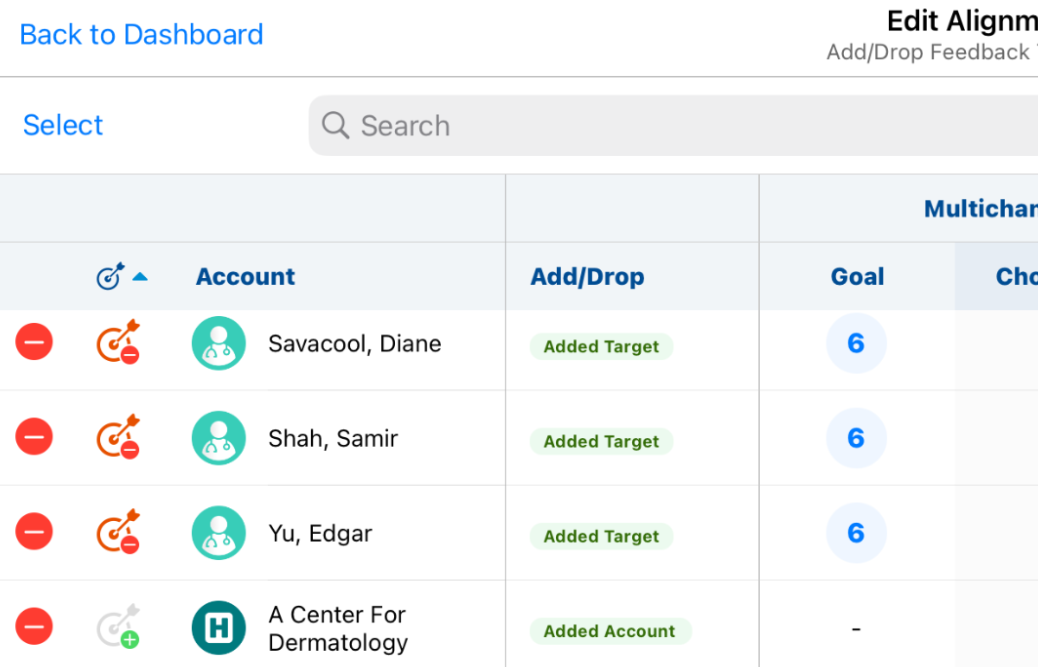
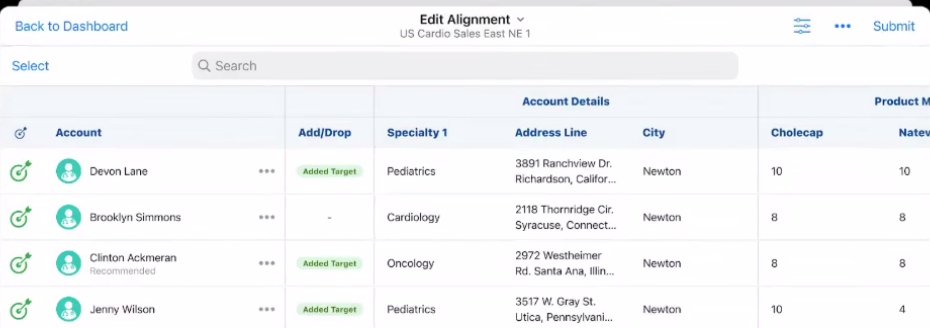
End users can request to share target responsibility for specific products with other end users when they do not have capacity to fully own the target themselves, allowing sales teams to share workload without transferring accounts away entirely.
User Visible and Behavior Changes
|
Platform |
Description |
Before |
After |
|---|---|---|---|
|
Browser, iPad |
End users can now create Add Target challenges in Territory Feedback without also needing to define goals for the newly added target. This is only applicable if the corresponding MC Cycle is created without channels. |
|
|
Account Management
|
Platform |
Issue Description |
Issue Number |
|---|---|---|
| iPad | Data Change Request (DCR) pending icons remained visible next to fields even after the DCR was approved and processed. | VCRM-181617 |
Account Plan
|
Platform |
Issue Description |
Issue Number |
|---|---|---|
| Browser | Administrators could not change the deletion rules of the Account field on the Account Plan object. | VCRM-179760 |
| Browser | When users attempted to use the Apply Product Plan action but lacked create access to the default Account Tactic object type, an error occurred. | VCRM-182513 |
Approved Email
|
Platform |
Issue Description |
Issue Number |
|---|---|---|
| Off-Platform | Large numbers of automated email activity events, for example opens and clicks, for a single email caused system performance issues. | VCRM-183419 |
CRM AI
|
Platform |
Issue Description |
Issue Number |
|---|---|---|
| Off-Platform | When using Agentic Text Monitoring for end users, the correct PI was not always retrieved for similarly-named products in a brand name line extension, resulting in a below-standard number of false positives under the Promotional Compliance rule. | VCRM-179820 |
262.0.23 | August 25, 2026
Sync
|
Platform |
Issue Description |
Issue Number |
|---|---|---|
|
iPad |
Users experienced a VDS Sync Error due to transient network timeouts during authentication. |
VCRM-182418 |
262.0.22 | August 23, 2026
Authentication
|
Platform |
Issue Description |
Issue Number |
|---|---|---|
|
iPad |
A permissions issue prevented users from logging in and syncing devices. |
VCRM-182725 |
262.0.21 | August 21, 2026
Approved Email
|
Platform |
Issue Description |
Issue Number |
|---|---|---|
|
Off-Platform |
Sent emails remained in a Saved status and were not delivered. |
VCRM-182626 |
262.0.20 | Family Build 597 and 598 (August 20, 2026)
Account Plan
|
Platform |
Issue Description |
Issue Number |
|---|---|---|
|
Browser |
When users added blank spaces to an Account Plan layout, the blank spaces were ignored and did not display when viewing or editing an Account Plan. |
VCRM-180115 |
|
Browser |
When users configured layout rules or field settings—such as Required or Read-only—on an Account Plan layout, the settings were ignored when editing an Account Plan. As a result, read-only fields appeared as editable, required fields were not indicated as required, and fields configured to be hidden remained visible. |
VCRM-180117 |
|
Browser |
When users viewed an Account Plan with a related object section that did not have Object Types enabled, the button to create a new record for that related object did not display. |
VCRM-179051 |
|
Browser |
When users without edit field-level security for the Object Type field attempted to create an Account Plan, a Page not found error displayed. |
VCRM-179715 |
|
Browser |
When users deleted an Account Plan record, they remained on the deleted record page instead of being redirected to the Account Plan list view. |
VCRM-180118 |
Align
|
Platform |
Issue Description |
Issue Number |
|---|---|---|
|
Browser |
An error occurred causing Territory Feedback recalculations to abort when a custom Attachment field was added to an object included in the recalculation, such as an Account. |
VCRM-177741 |
|
Browser |
An error caused the Recalculate Territory Data process to hang and fail to complete when processing a large number of projects. |
VCRM-179398 |
|
iPad |
An error occurred where product goals were not successfully transferred when a user accepted a Target Transfer-To request, causing the request to remain stuck in a pending state. |
VCRM-175532 |
Approved Email
|
Platform |
Issue Description |
Issue Number |
|---|---|---|
|
Windows |
An error caused previously added Approved Email attachments to be removed when a user searched for and added additional attachments. |
VCRM-175976 |
|
Browser |
Products with an Implicit Opt-Out consent setting incorrectly displayed as checked by default on the unsubscribe page. |
VCRM-142918 |
Authentication
|
Platform |
Issue Description |
Issue Number |
|---|---|---|
|
iPad |
A session mismatch occurred when logging into the Vault CRM application via SSO with a different username on the SSO page than the one entered on the initial login page. |
VCRM-147210 |
Call Sampling
|
Platform |
Issue Description |
Issue Number |
|---|---|---|
|
Browser |
When users requested an Acknowledgement of Content signature during a remote Engage meeting, the signature page did not close after the HCP selected the cancel button and confirmed the cancellation. |
VCRM-157113 |
|
Browser |
When users recorded a call with sample products, a delay occurred before the “Limit reached” warning message displayed. |
VCRM-173909 |
CLM
|
Platform |
Issue Description |
Issue Number |
|---|---|---|
|
Off-Platform |
Presentations stopped being shared with end users when its associated content group was inactivated in PromoMats, even if an active content group with the same external ID existed in Vault CRM. |
VCRM-180500 |
Consent Capture
|
Platform |
Issue Description |
Issue Number |
|---|---|---|
|
Windows |
The Paper Consent ID field incorrectly displayed during the opt-in process when the "Double opt-in instead of signature" setting was enabled. |
VCRM-177131 |
CRM AI
|
Platform |
Issue Description |
Issue Number |
|---|---|---|
|
iPad |
On the home page, the AI chat window incorrectly opened in an expanded view by default. |
VCRM-179052 |
|
iPhone |
The AI chat icon incorrectly changed position on the screen when the device was rotated into landscape mode. |
VCRM-176877 |
|
Off-Platform |
An error prevented Monitored Text records from being captured and processed. |
VCRM-176104 |
Engage
|
Platform |
Issue Description |
Issue Number |
|---|---|---|
|
Off-Platform |
A "Page Not Found" error displayed when users attempted to access the My Engage Portal from a non-production Vault. |
VCRM-179368 |
|
iPad |
The "Review Later" button was incorrectly disabled on the Business Reply Card (BRC) signature review screen. |
VCRM-179824 |
Events Management
|
Platform |
Issue Description |
Issue Number |
|---|---|---|
|
Browser |
Formula fields did not display on the event registration form. |
VCRM-176267 |
|
Browser |
An error occurred preventing users from submitting an event for approval if they lacked edit permissions for the Event Override Topic field and Business Rules were configured. |
VCRM-180127 |
MC Cycle Plans
|
Platform |
Issue Description |
Issue Number |
|---|---|---|
|
Browser |
A processing error caused Multichannel Cycle Plan (MCCP) calculations to time out during execution. |
VCRM-177489 |
Microsoft Integration
|
Platform |
Issue Description |
Issue Number |
|---|---|---|
|
Browser |
Users were missing the necessary permissions in the Core CRM Integration Permission Set (core_crm_int_permissions__v) to read Microsoft Teams and Zoom meeting details within the Outlook integration. |
VCRM-176760 |
Sample Management
|
Platform |
Issue Description |
Issue Number |
|---|---|---|
|
Browser |
When users viewed an Inventory Order record in vaults with Dynamic Access Control enabled, editor permissions were incorrectly assigned to users who were neither the record's owner nor approver. As a result, unauthorized users were able to edit the Inventory Order and create Inventory Order Line records. |
VCRM-176878 |
Sync
|
Platform |
Issue Description |
Issue Number |
|---|---|---|
|
iPad |
An "ATF Download Error" occurred during synchronization on the iPad app due to a file decompression issue. |
VCRM-175930 |
|
iPad |
The iPad app closed unexpectedly during synchronization when an attachment record was unexpectedly missing from the database. |
VCRM-171628 |
Territory Management
|
Platform |
Issue Description |
Issue Number |
|---|---|---|
|
Browser |
An error prevented the bulk deletion of TSF records due to existing system-managed TSF Yearly Activity records. |
VCRM-171240 |
X-Pages
|
Platform |
Issue Description |
Issue Number |
|---|---|---|
|
Windows |
X-Pages failed to load data and only displayed section headers when querying objects with lifecycle state fields. |
VCRM-176915 |
262.0.11 | August 13, 2026
CRM AI
|
Platform |
Issue Description |
Issue Number |
|---|---|---|
|
iPad |
The Agentic Home Screen is now available for use with Conversational AI. See Agentic Home Screen for more information. |
VCRM-176526 VCRM-176527 |
262.0.10 | Family Build 563 (August 6, 2026)
Account Management
|
Platform |
Issue Description |
Issue Number |
|---|---|---|
|
iPad |
When users created an account with Data Change Request (DCR) Mode 3 and Advanced Search enabled, the newly created account did not appear in search results on the My Accounts screen. |
VCRM-168359 |
|
Windows |
When users selected the option to create a new account, they were not redirected to the Global Account Search page if My Accounts Redirect was disabled, even though Global Account Search was enabled. |
VCRM-167887 |
|
Browser |
When users viewed or created account affiliations in the Sphere of Influence section, account record type icons did not reflect the custom mappings configured in the ACCOUNT_RECORD_TYPE_ICON_MAP Veeva Message. Instead, default or generic folder icons were displayed. |
VCRM-169607 |
Align
|
Platform |
Issue Description |
Issue Number |
|---|---|---|
|
Browser |
An error occurred during the Push to CRM job where Application Profiles and Layout Profiles for some users were incorrectly cleared out instead of inheriting the populated assignments from their primary territory. |
VCRM-155729 |
|
Browser |
An error caused account assignment previews to abort when feedback cloning was enabled and a newly created model territory did not yet exist in production. |
VCRM-169749 |
|
Browser |
The “Do not copy” field attribute was ignored when cloning Projects, resulting in a duplicate value error when cloning records that contained a unique custom field. |
VCRM-166198 |
|
Browser |
An error occurred where CRM Account Territories were unexpectedly deleted and later recreated when a Push to CRM was executed during a Vault CRM maintenance window. |
VCRM-162126 |
|
iPad |
An error prevented end users from accessing Territory Feedback when a territory was assigned to an inactive roster member. |
VCRM-128707 |
|
Browser |
An error caused the Account Assignment Preview process to abort when a Country record was missing a Country Code. |
VCRM-167605 |
|
Browser |
An error prevented users who transitioned from a Representative to a Manager role for the same territory from approving territory feedback. |
VCRM-169159 |
|
Browser |
An error occurred when requesting territory details for a user’s territory that did not have a Multichannel Cycle configured. |
VCRM-168897 |
|
Browser |
A missing index caused the Push to CRM process to run slowly and abort. |
VCRM-174546 |
|
Browser |
An error occurred during data Import From CRM and Preview processes due to an incorrect character length configured for a field. |
VCRM-175484 |
|
Browser |
An error occurred on the Integrations page when deleting a aln_territory_product_model__v record that contained a null territory model value. |
VCRM-170078 |
|
Browser |
An error occurred during Import from CRM processes when multiple account territory records in the same territory had missing account values. |
VCRM-169000 |
| Browser | An error caused recalculating territory data to fail when no MC Cycles were linked to the corresponding Model Field Forces. | VCRM-173657 |
| Browser | An integration error occurred when custom field names started with a number. | VCRM-175088 |
Approved Email
|
Platform |
Issue Description |
Issue Number |
|---|---|---|
|
Browser |
An error occurred when email templates contained a mix of Veeva CRM and Vault CRM table tokens, causing scheduled email batches to fail. |
VCRM-167350 |
| Windows | An error caused ineligible recipients to incorrectly display as eligible when editing a saved draft or scheduled email. | VCRM-176376 |
Approved Notes
|
Platform |
Issue Description |
Issue Number |
|---|---|---|
|
Off-Platform |
When querying for Product and Detail Group references, the search failed to correctly fetch and display results. |
VCRM-167296 |
Call Objectives
|
Platform |
Issue Description |
Issue Number |
|---|---|---|
|
iPad |
When users viewed the Call Objective list, the Object Type field displayed in English instead of the localized language. |
VCRM-171648 |
Call Reporting
|
Platform |
Issue Description |
Issue Number |
|---|---|---|
|
Browser |
When users created or edited a Call Report, the Submit button label displayed text from the default Vault system message instead of the customized SUBMIT Veeva Message. |
VCRM-163046 |
|
iPad |
When users added attendees to a group call after the associated address record was removed from the device's local database, individual address fields on the child call records were not populated. |
VCRM-167886 |
|
Windows |
When users created or viewed a call report, empty layout sections—such as System Information—and inactive Call Key Messages sections did not render properly or display the "No records to display" message. |
VCRM-158589 |
Call Scheduling
|
Platform |
Issue Description |
Issue Number |
|---|---|---|
|
Browser |
When child accounts are enabled and a user scheduled a call with a Healthcare Professional (HCP) the system incorrectly created a standard HCP call instead of a Child Account call when the primary parent account was outside the user's territory. |
VCRM-170862 |
|
iPad |
The account address did not display on the calendar popover in the My Schedule Agenda view when the address field was not configured on the default call page layout. |
VCRM-174175 |
CLM
|
Platform |
Issue Description |
Issue Number |
|---|---|---|
|
Off Platform |
Invalid website presentations failed to sync from PromoMats to Vault CRM without displaying an error message to administrators. |
VCRM-151712 |
|
Browser |
An error occurred during CLM integration because certain language picklist values present in PromoMats were missing in Vault CRM. |
VCRM-170863 |
|
iPad |
The Vault CRM application closes unexpectedly when certain CLM presentations displayed. |
VCRM-166325 |
|
Off Platform |
Deleting a related content record left an orphaned Content Group Content (CGC) record with a missing content field, which subsequently blocked content alignment. |
VCRM-153988 |
| Browser | A Connection Refused error occurred when users clicked external hyperlinks within auto-published presentations shared via Engage links. The error is resolved by ensuring external links automatically open in a new browser tab. | VCRM-142678 |
CRM AI
|
Platform |
Issue Description |
Issue Number |
|---|---|---|
|
Off-Platform |
When users searched by presentation name, and the presentation name was not explicitly mentioned within the slide text, the Media Agent did not return expected presentation results. |
VCRM-167539 |
|
Off-Platform |
Access to the ai_description__v, ai_synonyms__v, and url__v fields on the key_message__v object was incorrectly required for Key Message processing with Agentic Voice. |
VCRM-162769 |
|
Off-Platform |
If the user’s type changed while Agentic Text Monitoring for Home Office records were processing, rules were applied based on the user type at time of processing rather than the user type at time of record submission. |
VCRM-168245 |
|
Off-Platform |
Duplicate Agent Flagged Phrase records were incorrectly generated for the same Monitored Text violation. | VCRM-175639 |
|
Off-Platform |
When using Agentic Text Monitoring for end users, the correct PI was not always retrieved for similarly-named products in a brand name line extension, resulting in a below-standard number of false positives under the Promotional Compliance rule. | VCRM-168287 |
Events Management
|
Platform |
Issue Description |
Issue Number |
|---|---|---|
|
Browser |
The Japanese translation for the "Dismiss" button on the Entry Criteria Not Met error message was inaccurate. |
VCRM-133055 |
|
Browser |
The description of an Event Object Type unexpectedly disappeared when field assignments were updated or other changes were made. |
VCRM-167862 |
|
Browser |
The "No Available Actions" message in the Events Management action menu initially displayed in English instead of the user's selected language. |
VCRM-166306 |
|
Browser |
Navigating to an inaccessible or deleted Event Management record resulted in an infinitely loading page instead of an appropriate error message. |
VCRM-156483 |
|
Off Platform |
Automatic confirmation and rejection emails were not sent to event attendees when their registration status was updated. |
VCRM-166222 |
|
Browser |
Users were able to clear and save required fields, such as the Attendee Status, from the Events Management related list without receiving a validation error. |
VCRM-171212 |
|
Browser |
Users were unable to create Event History records when submitting an event for approval using a group name of maximum length. |
VCRM-115392 |
Medical
|
Platform |
Issue Description |
Issue Number |
|---|---|---|
|
Browser |
Medical Inquiries failed to transfer to the correct Medical Vault if an inactive Medical-CRM connection still had an active integration. |
VCRM-159697 |
My Schedule
|
Platform |
Issue Description |
Issue Number |
|---|---|---|
|
Off Platform |
Creating call reports from Call Cycles on the browser did not automatically add the child account, causing an inconsistency with the iPad application. |
VCRM-158810 |
|
iPad |
Time Off Territory (TOT) records using custom start times incorrectly displayed as starting at midnight. |
VCRM-170202 |
|
Browser |
Syncing Vault CRM events to the MS Outlook Calendar experienced significant delays. |
VCRM-157542 |
|
Browser |
Loading accounts in the Scheduler experienced significant delays. |
VCRM-169525 |
Service Center
|
Platform |
Issue Description |
Issue Number |
|---|---|---|
|
Browser |
When creating or viewing drafts, the draft footer correctly displays the last edited time. |
VCRM-165826 |
Surveys
|
Platform |
Issue Description |
Issue Number |
|---|---|---|
|
iPad |
When users answered a radio-type survey question, multiple answer choices were incorrectly recorded instead of being restricted to a single value. |
VCRM-146023 |
|
Browser |
When users saved or data loaded survey question records without an associated survey, an error occurred preventing the save operation. |
VCRM-139326 |
Sync
|
Platform |
Issue Description |
Issue Number |
|---|---|---|
|
Off Platform |
An error occurred during the initial media sync where certain objects and records were not found in the expected data. |
VCRM-166972 |
|
Off Platform |
An update was made to improve the automated testing framework for the Call querying process during synchronization. |
VCRM-168823 |
|
Browser |
The user's full name was not returned during the sync process, preventing custom name ordering, for example, the Last Name, First Name format used for Japanese names. |
VCRM-161683 |
Territory Feedback
|
Platform |
Issue Description |
Issue Number |
|---|---|---|
|
iPad |
When reverting an Add Target challenge for a recommended target, it continued to incorrectly display on the Recommended Targets page. |
VCRM-168763 |
X-Pages
|
Platform |
Issue Description |
Issue Number |
|---|---|---|
|
iPad |
When users viewed an out-of-the-box Account Plan Dashboard X-Page configured to display Action Items, Call Objects were incorrectly displayed instead of Action items. |
VCRM-156818 |
|
iPad |
When users executed the setIOSThirdPartyCookie() within an X-Page on iPad, the function failed to execute. |
VCRM-168599 |
X-Pages Studio
|
Platform |
Issue Description |
Issue Number |
|---|---|---|
|
Off-Platform |
When users selected a test user for a migrated page in X-Pages Studio, editing controls incorrectly remained accessible during the translation. |
VCRM-168535 |
|
Off-Platform |
When users reloaded an X-Pages Studio page requiring a test user and record after making the assigned test user inactive, read-only mode was not triggered. |
VCRM-168162 |

