Managing Phone Call Consent in Outbound Service Center
Phone Call consent allows Service Center to verify an outbound target’s consent before attempting to call the target, preventing unwanted calls to target accounts. Accounts that previously requested to not be contacted by phone can use the organization’s standard consent capture channels to opt back in to receive calls via Service Center.
Phone Call consent status for an account is determined by active opt-in or opt-out records on the Multichannel Consent object.
Who can use this feature?
- Service Center Reps - Browser
- Capturing Opt-Out Records
- Restoring Opt-In Records
- Users do not require an additional license
Configuring Phone Call Consent for
 Service Center Reps
Configuring a Phone Call consent channel allows Service Center to verify an outbound target’s consent before connecting the call. If an outbound target has opted out or lacks phone call consent, Service Center does not attempt to call the target. Additional configuration is required to enable users to capture and comply with consent records.
To configure this feature:
- Ensure Configuring Service Center is complete.
- Ensure Configuring Consent Capture is complete.
- Navigate to Admin > Users & Groups > Permission Sets.
- Select the appropriate permission set.
- Select the Objects tab.
-
Grant the following permissions:
Object Object Permission Object Types Fields Field Permission consent_type__v R phone_call__v All fields Read multichannel_consent__v CRE phone_call__v - created_by__v
- created_date__v
- global_id__sys
- id
- last_initiated_by__sys
- modified_by__v
- modified_date__v
Read - account__v
- activity_tracking__v
- capture_datetime__v
- channel_source__v
- channel_value__v
- consent_confirm_datetime__v
- consent_header__v
- consent_line__v
- consent_type__v
- content_type__v
- default_consent_text_file__v
- detail_group__v
- disclaimer_text_file__v
- external_id__v last_device__v
- legacy_consent_channel__v
- legacy_crm_id__v link__sys
- mobile_id__v name__v
- object_type__v
- opt_expiration_date__v
- opt_out_disclaimer_text__v
- opt_type__v
- optout_event_type__v
- product__v receipt_email__v
- receipt_sent_email__v
- Receipt_sent_email_transaction_id__v
- related_transaction_id__v
- sent_email__v signature__v
- signature_captured_qr_code__v
- signature_captured_share_link__v
- signature_datetime__v signature_id__v
- status__v sub_channel_key__v
- unbranded__v union_id__v
- user_last_notified__v
Edit - Navigate to Business Admin > Objects > Consent Types.
- Select Create.
- Select the Phone Call object type.
- Consent Header - Select the appropriate Consent Header
- Default Consent Type - Select Implicit or Explicit
- Implicit - Allows outbound dialing until an account explicitly opts out
- Explicit - Requires a valid opt-in record for the account to attempt an outbound dial
- Channel Source - Leave blank to allow Service Center to capture phone call consent capture at the channel level
- Product Preference - Select All_Lines. This ensures that phone consent is captured once across all products.
- Select Save.
When Phone Call consent is enabled, an opt-out for one of the account’s phone numbers is treated as an opt-out for the account as a whole.
If Restricting Calls by Account is enabled, users are prevented from placing a call where the Do Not Call value for the account is set to Yes, regardless of whether Phone Call consent is valid.
If Phone Call consent and Restricting Calls by Account are not enabled, outbound target dialing is unrestricted. It is recommended that customers use Phone Call consent in accordance with local regulatory requirements.
Capturing Opt-Out Records as
Service Center Reps
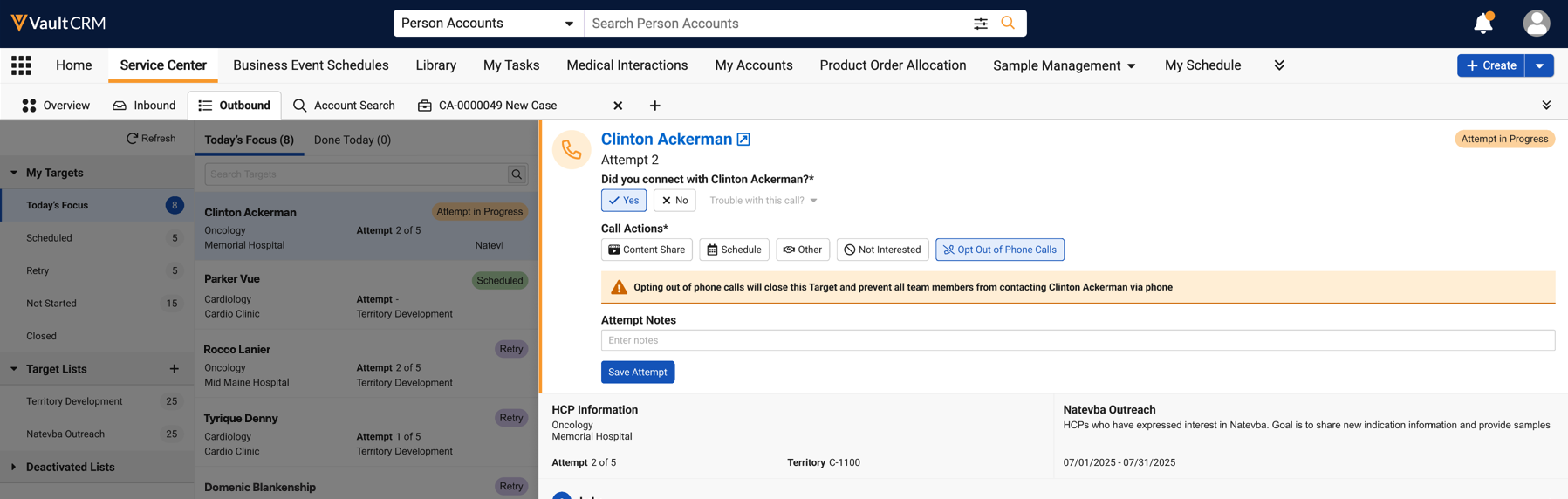
Phone call opt-outs can be captured in Service Center at the end of a connected or attempted call. If an account requests to not be contacted, Service Center reps select the Opt Out of Phone Calls call action. Once an account opts out, they are removed from any active target lists and any future call attempts are blocked.
Restoring Opt-In Records as
Service Center Reps
When an account has opted back in through standard consent capture channels, for example, via Consent Capture during an in-person visit or the HCP visiting an online portal to manually opt-in, the former opt-out record is automatically expired. The Service Center rep can then check the account’s consent status and restore their opt-in record to allow phone calls.
To restore an account’s opt-in record:
- Navigate to the Outbound tab.
- Select the target, indicated by the No Consent label.
- Select Check Phone Consent to recheck the account’s consent.
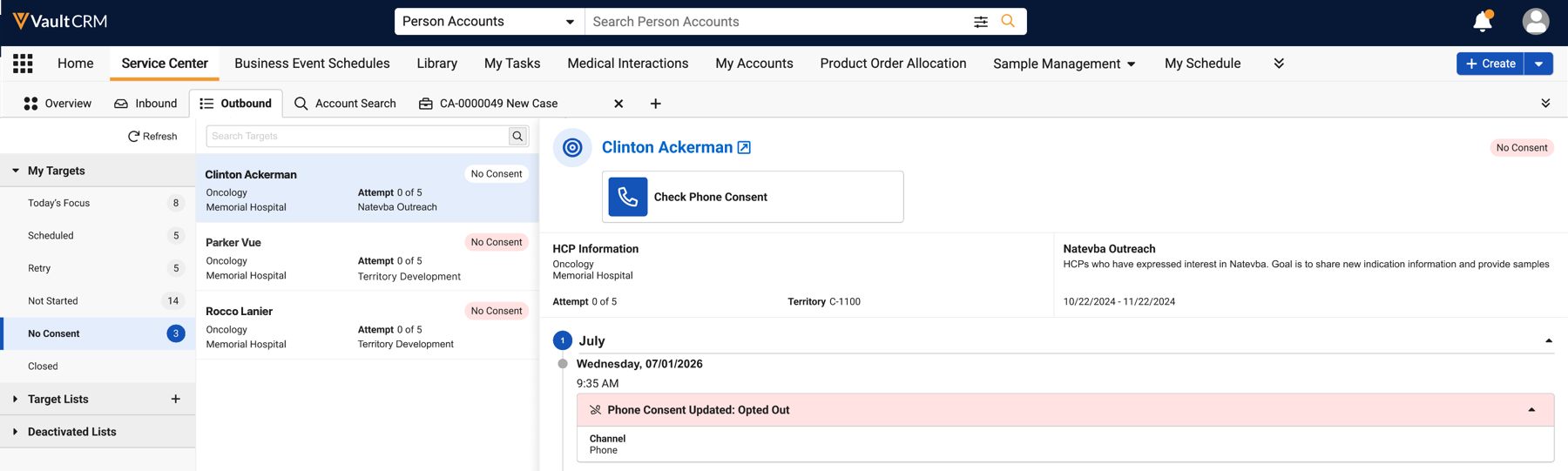
- If successful, the account is restored to the Not Started view, or the Retry view if previous call attempts were made
- If unsuccessful, the account remains in the No Consent state

