Deploying Pages to Vault CRM Using X-Pages Studio
Content creators can use X-Pages Studio to deploy pages to their sandbox Vault to test how the pages display, or to their production Vault to make the pages available for end users.
Who can use this feature?
- Content Creators - Browser
- Deploying X-Pages Studio Content
- Editing a Deployed Page
- Users do not require an additional license
Configuring Deploying Pages to Vault CRM Using X-Pages Studio for
 Content Creators
To configure this feature, ensure Configuring X-Pages Studio is complete.
Deploying X-Pages Studio Content as
Content Creators
X-Pages Studio pages can not be deployed to Vaults that are actively in Configuration Mode, see About Configuration Mode for more information.
Content creators can deploy a page when it is ready or to use in Vault CRM.
Before deploying Compass Integration pages or templates after a sandbox refresh has been performed, you should rerun all table queries to refresh the table data.
To deploy a page:
- Ensure Configuring X-Pages is complete.
- Ensure Configuring X-Pages Studio is complete.
- Log into X-Pages Studio as an integration user.
- Select the page you want to deploy.
- Select the Deploy tab.
- Select New for the appropriate connection.
- Populate the New Deployment modal fields:
- Object Type - The page’s entry point in Vault CRM
- Platform - The appropriate platform(s) the page displays on
- Context Object Type - The specific records or object layouts the entry point displays for
- Visibility Criteria - Filters X-Page visibility on a record-by-record basis
- Sharing Group - Filters X-Page visibility by teams, roles, or regional groups
- Sort Order - Specifies the X-Pages display order when multiple X-Pages are active
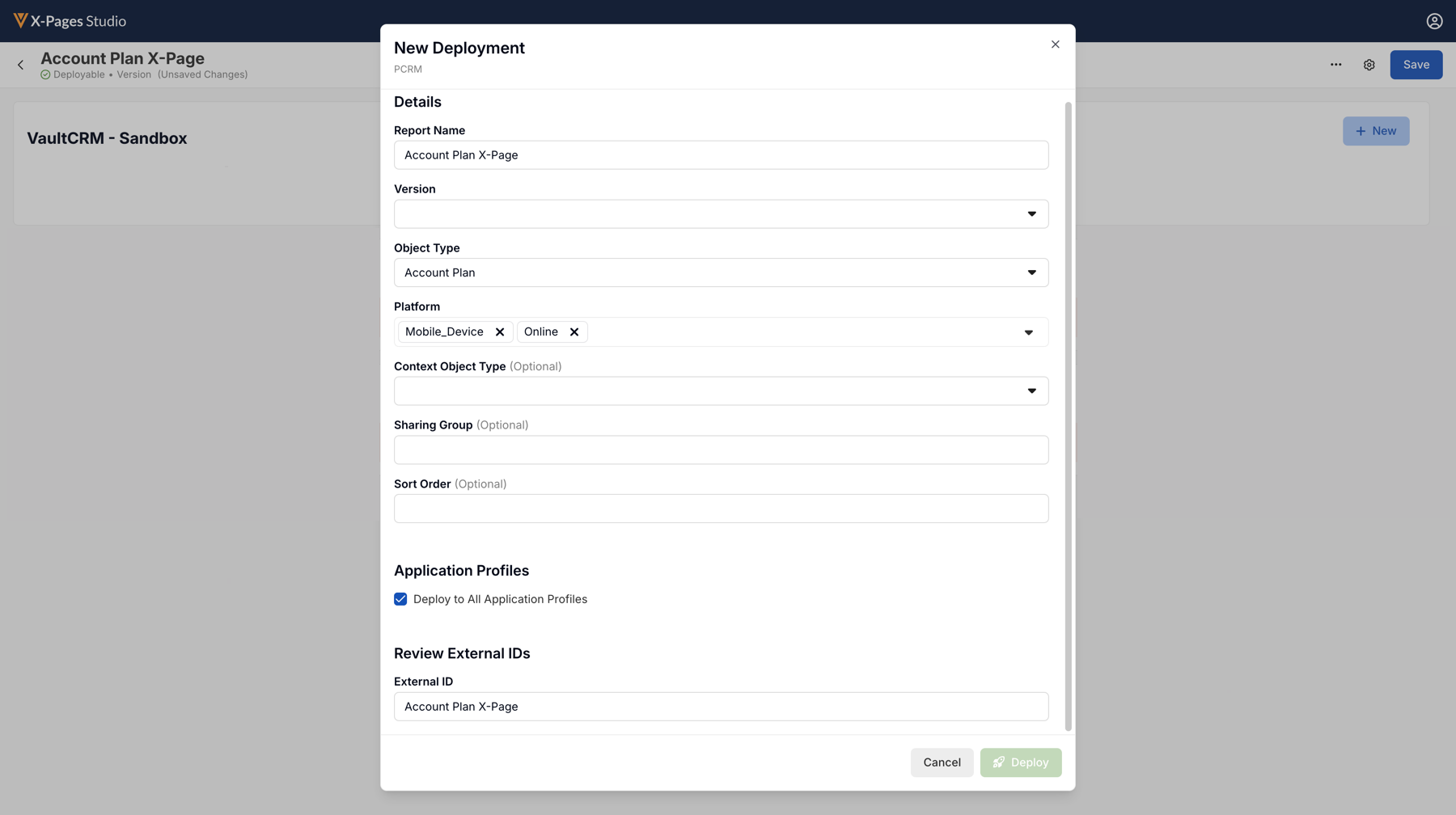
- Select Deploy.
Optional Configuration
- Edit the Report Name.
- Select the Object Type if applicable. See Configuring X-Pages Studio for a list of available Page Types and Object Types.
- Select the Context Object Type if applicable, to specify the record being displayed. For example, an Account page can only display Professional account records.
- Select the Visibility Criteria if applicable, to specify the requirements necessary to display the X-Page:
- Account
- Case Category
- Speaker
- Enter the Sharing Group. Drives customer-specific sharing rules.
- Select the Deploy to All Application Profiles checkbox. If more than one application profile is used, a separate html_report__v record is generated for each application profile.
Editing a Deployed Page as
Content Creators
To edit a deployed page:
- Sign into X-Pages Studio as an integration user.
- Select the page you want to edit.
- Select the Deploy tab.
- Select Edit from the All Actions menu of the deployment you want to edit.
- Update the available fields as desired.
- Select Deploy.
Redeploying content from X-Pages Studio updates the appropriate html_report__v and attachment records for the Vault.

