Using the Commercial HCP Template
The Commercial HCP template helps content creators to quickly create an X-Page that allows end users to view HCP account level data, including call interactions, key messages, and call samples all in one place. Content creators can customize the template using X-Pages Studio.
For information on using X-Pages Studio templates and configuring content creators to use templates, see Using X-Pages Studio Template Library.
Who can use this feature?
- Content Creators - Browser
- Using the Commercial HCP Template
- End Users - Browser, iPad, iPhone, Windows
- Using the Commercial HCP Template
- Users do not require an additional license
Configuring the Commercial HCP Template for
 Content Creators
To configure this feature, ensure Configuring X-Pages Studio is complete and the user has deployment permissions.
End Users
To configure this feature:
- Ensure Configuring X-Pages is complete.
- Navigate to Admin > Users & Groups > Permission Sets.
- Select the appropriate permission set.
- Select the Objects tab.
- Grant the following permissions:
Object
Object Permission
Object Types
Fields
Field Permission
call2__v
R
n/a
- account__v
- clm__v
- call_channel__v
- call_date__v
- call_datetime__v
Read
sent_email__v
R
n/a
- account__v
- email_sent_date__v
- product__v
- approved_email_template__v
- click_count__v
- open_count__v
Read
html_report__v
R
- account_reports__v
- kol_profile__v
- account_profile_override__v
You only need to grant access to the record type for the page you want to deploy.
n/a
n/a
account__v
R
n/a
- mobile_phone_cda__v
- email_cda__v
- specialty_1__v
- specialty_2__v
Read
address__v
R
n/a
- street_address_1_cda__v
- street_address_2_cda__v
- city_cda__v
- state_province__v
- postal_code_cda__v
Read
tsf__v
R
n/a
- account__v
- my_target__v
- address__v
- territory__v
Read
call2_details__v
R
n/a
- call2__v
- product__v
Read
call2_key_message__v
R
n/a
- call2__v
- clm_presentation__v
Read
my_setup_products__v
R
n/a
product__v Read
product__v
R
n/a
- company_product__v
- product_type__v
Read
Using the Commercial HCP Template as
Content Creators
To use the Commercial HCP template:
- Log into X-Pages Studio.
- Select the Studio Templates tab.
- Select the Commercial HCP template.
- Select Use Template.
- Customize the new page as needed. This step is optional.
- Deploy the new page using X-Pages Studio.
End Users
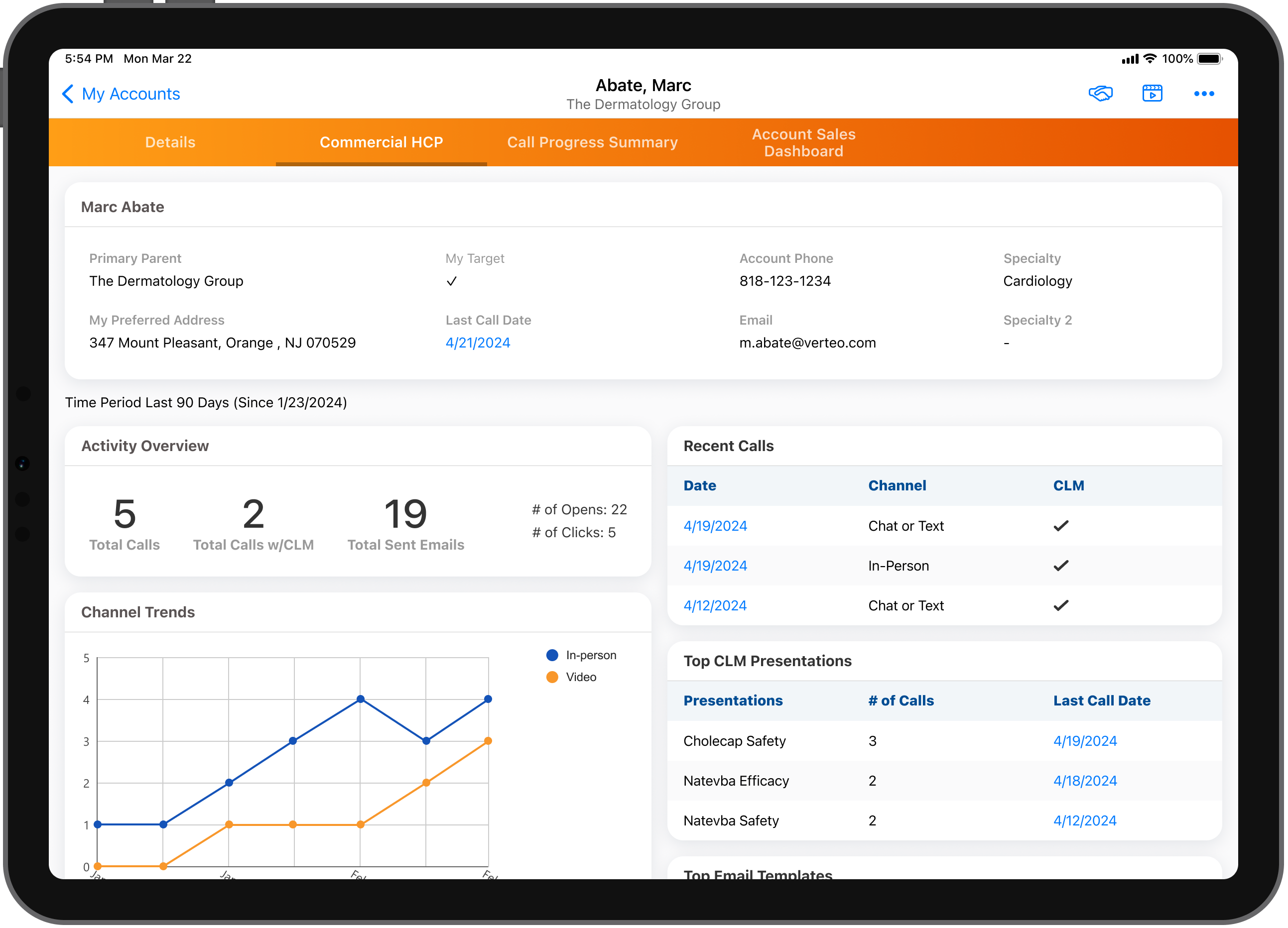
Before any customization, users can view information in the following sections:
- Account Overview - Displays important fields for an HCP Account
- Activity Overview - Displays the number of Calls and Calls with CLM , Emails, Clicks, and Opens recorded for the current HCP account
- Channel Trends - Displays the number Calls and Emails based on the Call Channel and Sent Email objects for the previous 90 days for the current account
- Activity by Product - Displays the user’s MySetup products and number of related Calls and emails submitted for the current account
- Recent Calls - Displays calls from the previous 90 days for the current HCP account
- Top CLM Presentations - Displays the top recent CLM presentations shown during calls for the previous 90 days, the most recent call date, and the number of calls
- Top Email Templates - Displays the top recent emails templates from the previous 90 days submitted, and the number of opens, clicks, and sent emails for the current account

