Using the Territory Feedback Template
The Territory Feedback template helps content creators quickly create an X-Page for end users to view territory feedback information. When content creators create an X-Page from the template using X-Pages Studio, they can modify the new X-Page to add other key information based on their specific business needs, or deploy the new X-Page as is, displaying the most recent territory feedback details. This information enables end users to more easily adhere to guidelines that have been put in place by their leadership teams.
For information on using X-Pages Studio templates and configuring content creators to use templates, seeUsing X-Pages Studio Template Library .
Who can use this feature?
- Content Creators - Browser
- Using the Territory Feedback Template
- End Users - Browser, iPad
- Using the Territory Feedback Template
- Users do not require an additional license
Configuring the Territory Feedback Template for
 Content Creators
To configure this feature:
- Ensure Configuring X-Pages Studio is complete.
- Ensure Embedding X-Pages in Feedback is configured.
End Users
To configure this feature:
- Ensure Configuring X-Pages is complete.
- Ensure Configuring Align is complete.
- Navigate to Admin > Users & Groups > Permission Sets.
- Select the appropriate permission set.
- Select Objects.
- Grant the following permissions:
Object
Object Permission
Object Types
Fields
Field Permission
html_report__v
R territory_feedback__v n/a n/a
Using the Territory Feedback Template as
Content Creators
To use the Territory Feedback template:
- Log into X-Pages Studio.
- Select the Studio Templates tab.
- Select the Territory Feedback template.
- Select Use Template.
- Customize the new page as needed. This step is optional.
- Deploy the new page using X-Pages Studio.
End Users
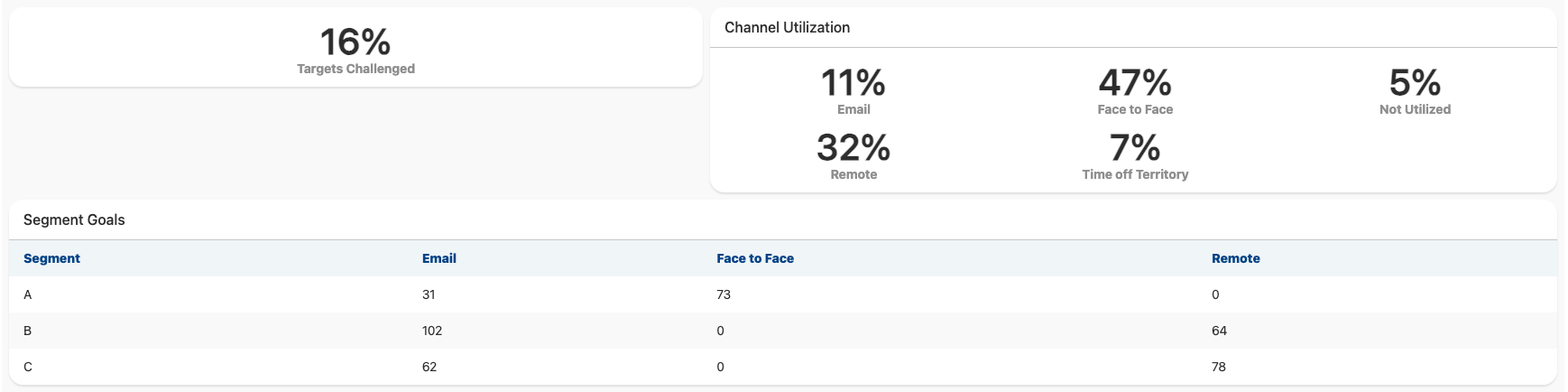
When content creators create an X-Page from the Territory Feedback template, then deploy the page as-is without any modifications, end users can view the most recent territory feedback details including:
- Target Challenges
- Channel Utilization
- Channel Goals