Using the Territory Information Panel
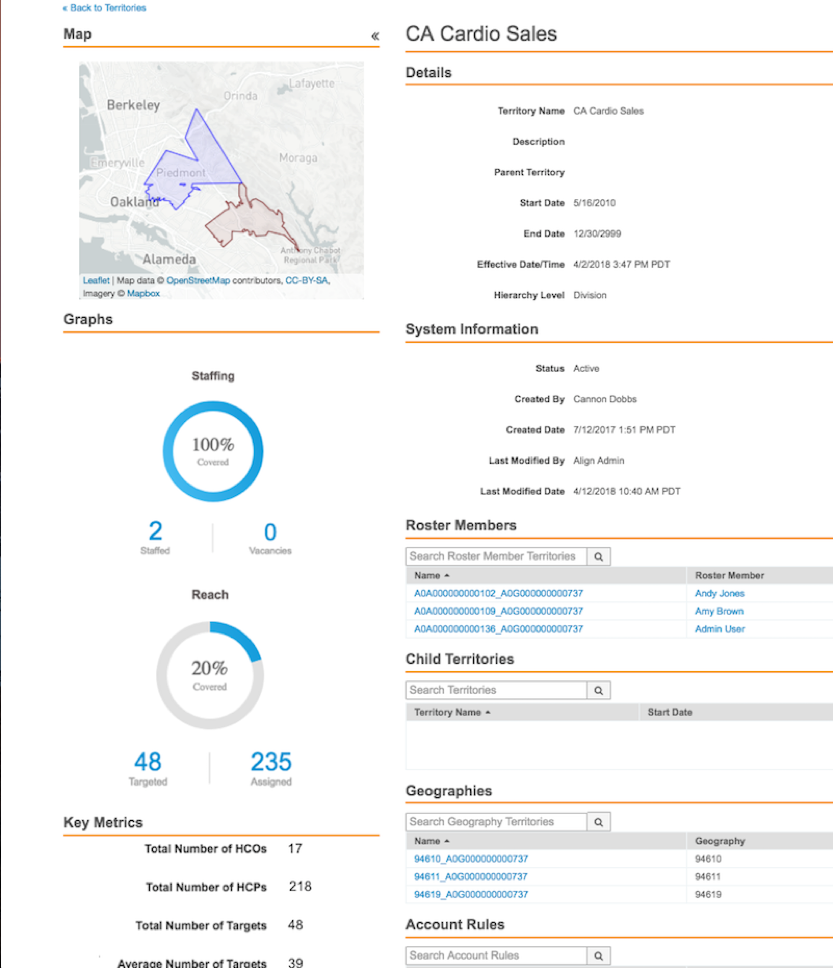
The Territory Information Panel enables users to view a summary of the currently viewed territory. This enables them to assess the value of a territory and its descendants and determine necessary hierarchy changes without manual calculations. This feature provides a pre-calculated, aggregated view of key metrics, including staffing, reach, and geographical boundaries, ensuring efficient decision-making during territory modeling and production management.
The Territory Information Panel can display the following information:
- A simplified aggregate map of the territory
- Staffing and vacancy graphs – The percent of territories staffed for the current or next cycle
- Reach graph – The percent of total accounts in the territory that are also targets
- Total number of HCPs
- Total number of HCOs
- Average targets
Who can use this feature?
- Align Operational Users – Browser
- Using the Territory Information Panel
- Users require an Align License
Configuring the Territory Information Panel for
 Align Operational Users
To configure this feature:
- Ensure Configuring Align is complete.
- Navigate to Admin > Users & Groups > Permission Sets.
- Select the appropriate permission set.
- Select the Objects tab.
-
Grant the following permissions:
Object Object Permission Object Types Fields Field Permission aln_territory__v CRED All -
total_hcos__v
-
total_hcps__v
-
total_targets__v
Edit -
- Navigate to Align Admin > Align Settings.
- Edit the appropriate record. This feature supports both Modeling and Production settings.
- Navigate to the Territory Metric Fields field.
-
Enter a comma-delimited list of the appropriate metrics. Available metrics are:
Metric Description map Displays a geographical thumbnail of the territory and descendants. Selecting the map displays the map in a full-screen. While in full-screen mode, the map displays active geography assignments for Production territories and planned assignments for Model territories based on the publish date. staffing Displays a donut chart of territories with active MC Cycle Plans. reach Displays a donut chart showing the proportion of assigned accounts that are targets. aln_territory__v.total_hcos__v Displays the total number of unique HCO accounts. aln_territory__v.total_hcps__v Displays the total number of unique HCP accounts. aln_territory__v.total_targets__v Displays the total number of unique target accounts. calculated_field.avg_targets Displays the average number of unique target accounts. - Select Save.
Using the Territory Information Panel as
Align Operational Users
To view the Territory Information Panel and its configured metrics:
-
Navigate to Territory Management > Territories.
-
Select the appropriate aln_territory__v record. The Territory Information Panel displays on the left side of the screen.
-
Select the Collapse icon to hide the panel if necessary.
Metrics are not real-time and are calculated during CRM Import and Assignment Preview.

