Monitoring Submitted Records
Agentic Text Monitoring for Home Office intelligently analyzes text in submitted records to identify potential compliance concerns. The agent's powerful AI capabilities act as a force-multiplier for home office oversight by using an LLM to understand natural language in context, enabling fast, detailed review across Vault CRM records and reducing the incidence of false negatives compared to traditional monitoring methods. This agent serves as an intelligent partner for compliance monitoring teams, providing deep, context-aware visibility into submitted records.
The agent retrospectively audits free text entries on submitted records against customer-configured rules. Results are saved as Monitored Text records, meaning Vault platform capabilities can be used to advance the record through human-escalation workflows. If a potential issue is identified, the record is flagged, allowing compliance teams to review and take prompt action.
The Text Monitoring for Home Office Agent does not currently support translated rules, guidelines, or agent outputs. User inputs are supported in any of the Vault CRM Supported Languages, but reasoning and responses are returned in the English language only.
Who can use this feature?
- Compliance Monitors — Browser
- Monitoring Submitted Records
- A Veeva AI license is required
Configuring Monitoring Submitted Records for
 All Users
To configure this feature, ensure Configuring Agentic Text Monitoring for Home Office is complete and Agent Rules are defined. At least one active Agent Rule is required to use Text Monitoring for Home Office.
Monitoring Submitted Records as
Compliance Monitors
When users submit records on the following objects, the agent automatically analyzes text fields containing at least one character other than a space, as defined in Agent Rules:
Account Plan
- Account Plan (account_plan__v)
- Action Item (action_item__v)
- Goal (goal__v)
- SWOT(swot__v)
Stub records are created when users create or edit a record for the above objects.
Call Reporting
- Call Report (call2__v)
- Call Discussion (call2_discussion__v)
- Call Follow-Up Task (call_followup_task__v), if the call__v field on the call_followup_task__v record is populated when the call is submitted
- Call Objective (call_objective__v) - Stub records are created when users create or edit call_objective__v records
- Expense (expense__v), if the call2__v field on the expense__v record is populated when the call is submitted
- Medical Discussion (medical_discussion__v), if the interaction__v field on the medical_discussion__v record is populated when the call is submitted
Insights
- Commercial Insights (commercial_insights__v), as a standalone record or on the call report)
- Medical Insights (medical_insight__v)
Records created through data loading are also monitored. Like records created through other methods, the agent checks the records when they are submitted.
Compliance monitors review text flagged by the agent to make final determinations on potential issues.
Reviewing Flagged Text
To review text flagged by the agent:
- Navigate to a Monitored Text record with issues found by Agentic Text Monitoring:
- The object type is agent_monitored_text__v
- The issues_found__v field value is True
-
Review the Monitored Text record to understand the potential issue. Complete Agent Request and Complete Agent Response attachments are available for full context.
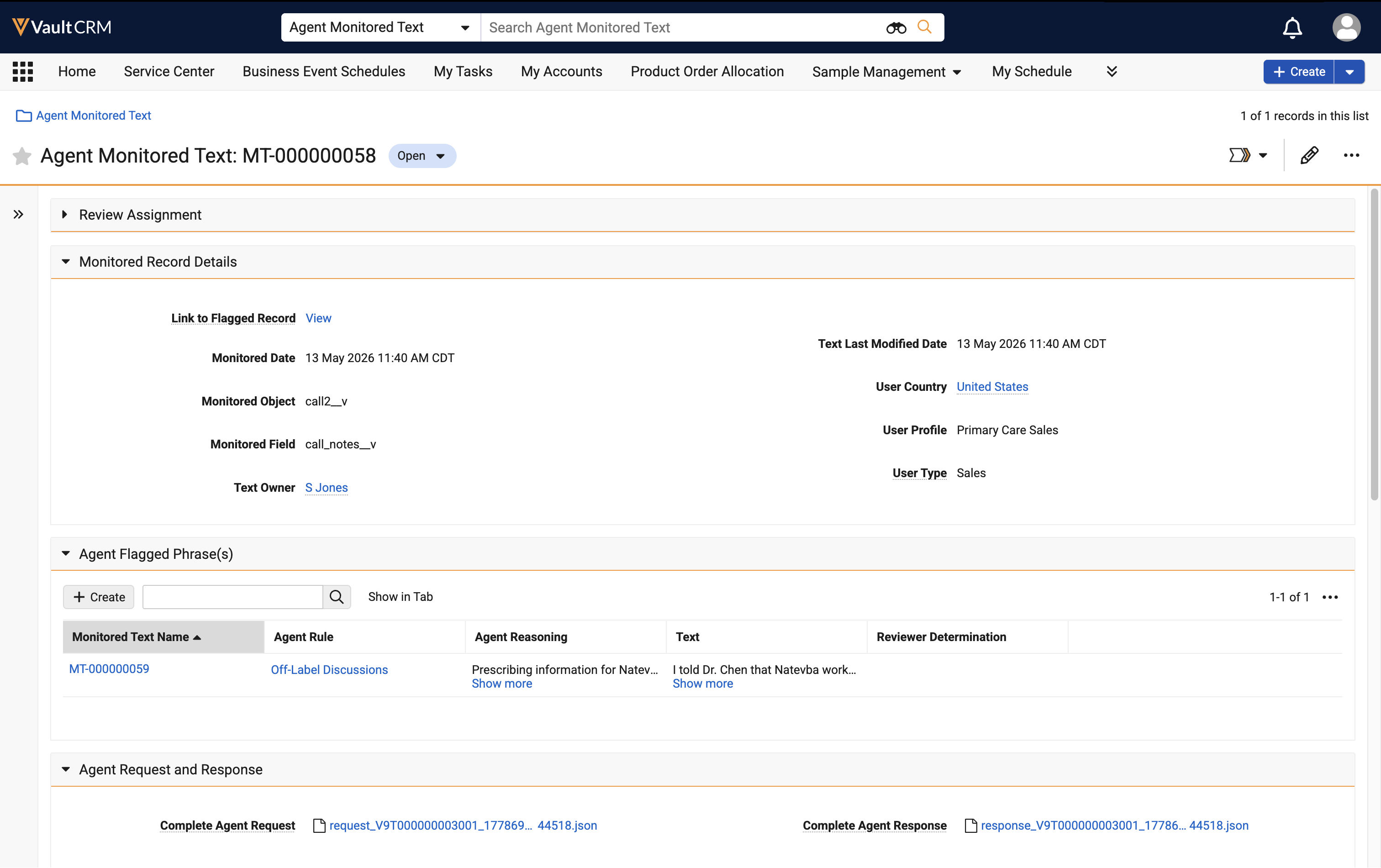
-
Select the Agent Flagged Phrase record to review the specific text identified by the agent.
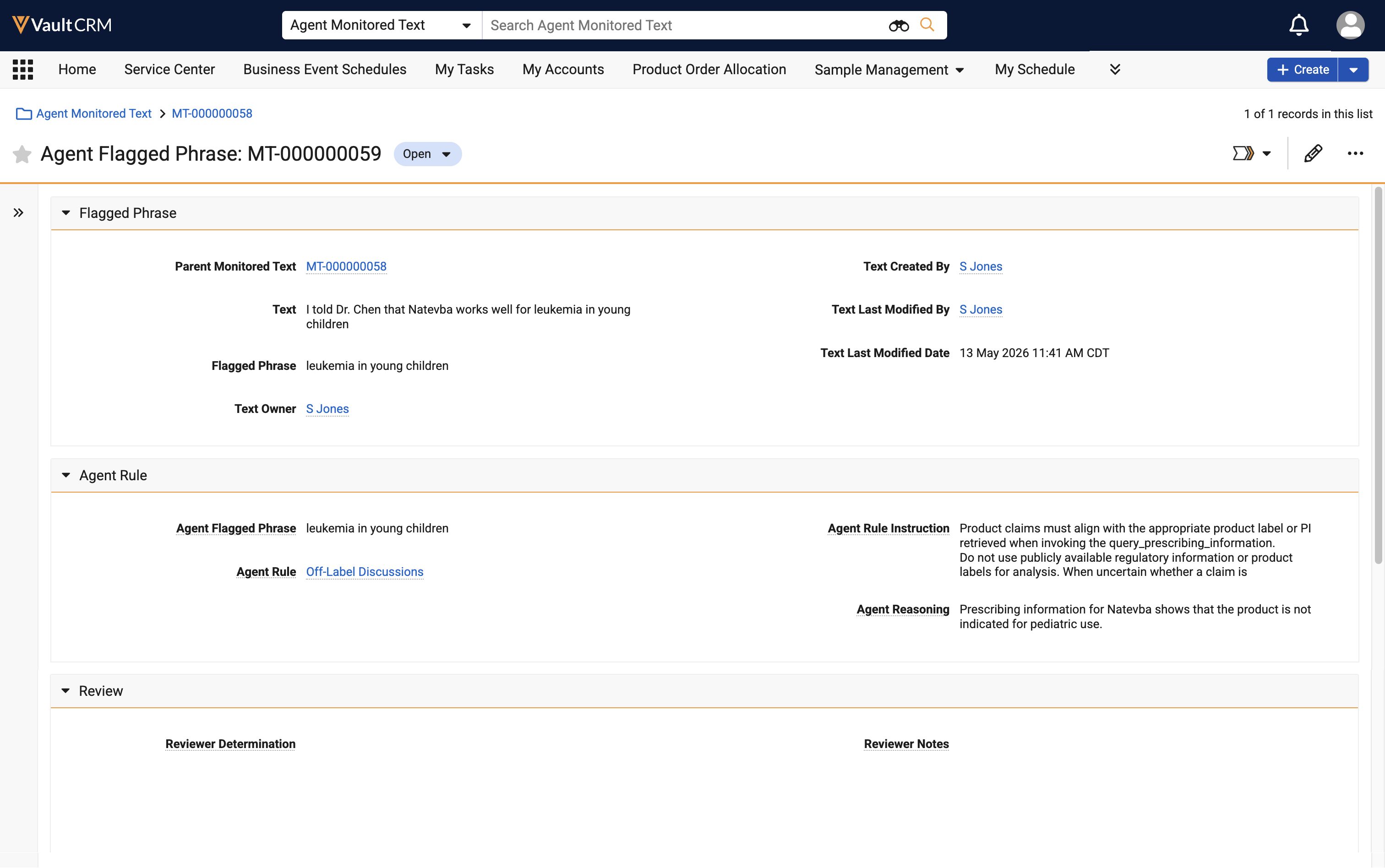
- Select the Edit icon.
- Select the appropriate value from the Reviewer Determination picklist. By default, the following determinations are available:
- Accepted Agent Finding - Agent finding is accurate
- False Positive - Agent incorrectly flagged an issue. This option updates the Flagged Text field on the original record to False Positive, effectively un-flagging it; if there are multiple Agent Flagged Phrases for a record, they must all be marked False Positive in order to unflag the original record.
- Enter details in the Reviewer Notes field to document the decision.
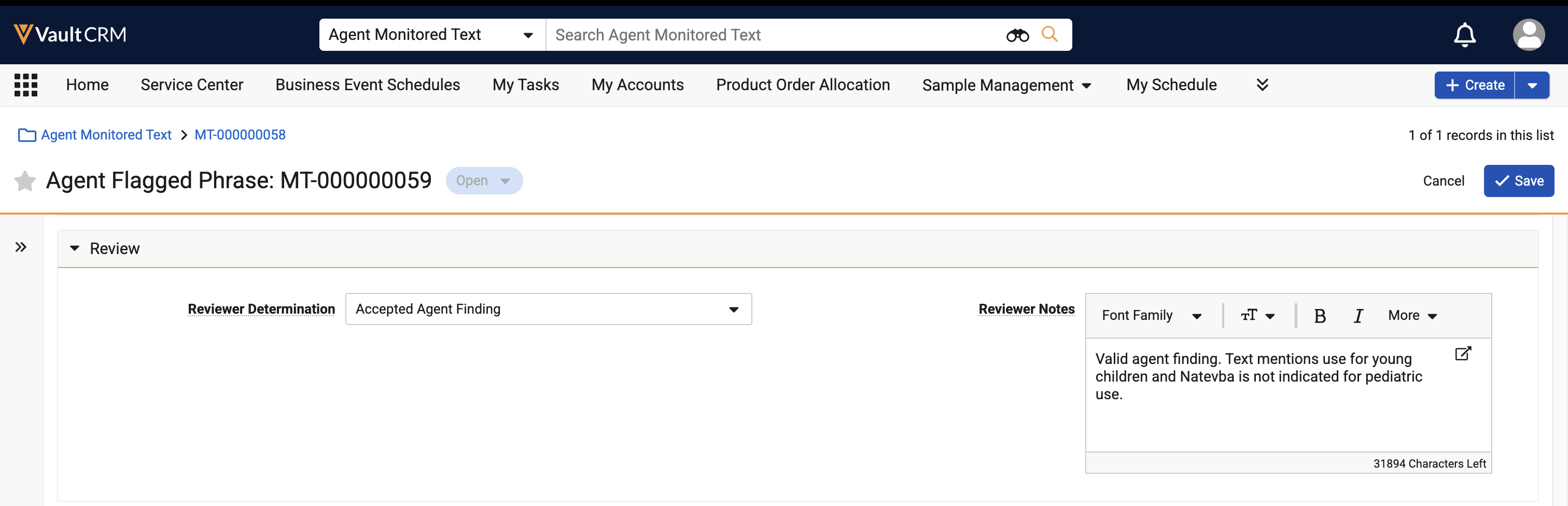
- Select Save.
If a lifecycle or workflow is available for the Monitored Text object, Compliance Monitors can advance the record through the lifecycle or workflow according to their organization’s compliance monitoring processes. These lifecycles and workflows vary depending on the organization. For more information on using lifecycles and workflows, see Lifecycles & Workflows on the Vault platform help site.

