Using Cycle Capacity Planning in Align
Align admin users can compare expected utilization (i.e. total activity goals) of a Multichannel Cycle to a territory’s capacity. Capacity planning enables Align operational users to ensure that territories are optimized in terms of their utilization.
Who can use this feature?
- Align Operational Users - Browser
- Defining Daily Activity Goals for Multichannel Cycles
- Reviewing a Multichannel Cycle's Planned Capacity
- Users require an Align License
Configuring Capacity Planning for
 Align Operational Users
To configure this feature:
-
Ensure the following features are configured:
- Navigate to Admin > Configuration > Objects > mc_cycle__v > Layouts.
-
Place the following fields on the appropriate layouts:
- aln_upper_utilization_threshold__v
- aln_lower_utilization_threshold__v
- Navigate to Admin > Configuration > Objects > mc_cycle_channel__v > Layouts.
- Place the aln_daily_activity_goal__v field on the appropriate layouts.
Defining Daily Activity Goals for Multichannel Cycles as
Align Operational Users
The Daily Activity Goal of a channel is used to determine the capacity of each territory. Capacity for a given channel is calculated as Days in Cycle multiplied by Daily Activity Goal. To define a Multichannel Cycle's daily activity goals:
- Edit the appropriate mc_cycle__v record.
-
Populate the following fields:
- aln_upper_utilization_threshold__v – The utilization percentage where a cycle plan has too many activities
- aln_lower_utilization_threshold__v – The utilization percentage where a cycle plan has too few activities
- Select Save.
- Navigate to the Multichannel Cycle Channels section.
- Edit the appropriate mc_cycle_channel__v record.
-
Populate the aln_daily_activity_goal__v field with the number of channel activities that a user is expected to perform each day.
It is recommended to only populate Daily Activity Goal for channels where the number of activities that can be achieved per day is constrained by the time it takes to perform each one, such as face-to-face activities.
- Select Save.
Reviewing a Multichannel Cycle's Planned Capacity as
Align Operational Users
Align operational users can view the following pages to review various capacity-related metrics.
Multichannel Cycle Detail Pages
Navigate to the appropriate mc_cycle__v record to view the following metrics:
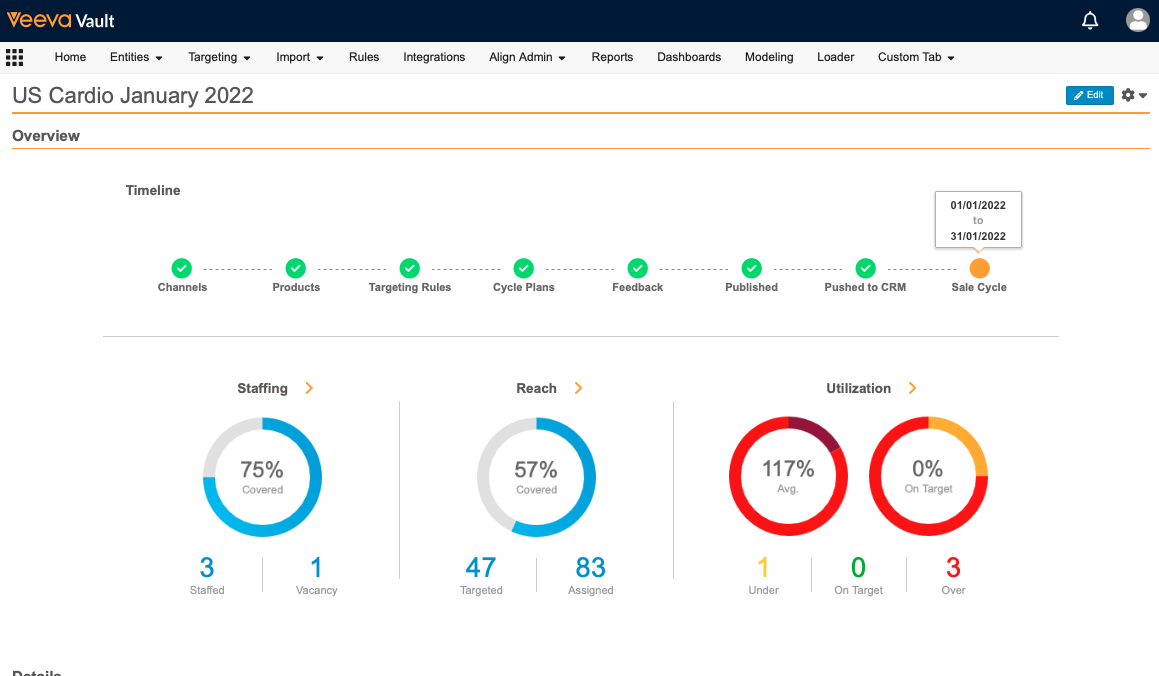
- Timeline – Displays the Multichannel Cycle's progress through the planning section, beginning with Channel assignment and ending with pushing the Multichannel Cycle to Vault CRM before the cycle begins
- Staffing – Displays the percentage of territories in the Multichannel Cycle currently assigned to one or more roster members
- Reach – Displays the percentage of accounts in the Multichannel Cycle currently designated as targets
- Utilization – Displays the average utilization of all territories in the Multichannel Cycle as well as the percent of territories considered On Target. This section also displays the number of territories that are under utilized, over utilized, and On Target.
Multichannel Cycle Utilization Page
Select the Utilization option from an mc_cycle__v record's More Actions menu to display the Multichannel Cycle Utilization page. The top section of this page displays the following details about the Multichannel Cycle:
- Field Force
- Days in Cycle
- Upper Utilization Threshold
- Lower Utilization Threshold
- Average utilization of all territories on the Multichannel Cycle
- Percent of territories that are considered On Target
The Multichannel Cycle Utilization page also displays the territory hierarchy of the Multichannel Cycle as a table. Each row of the table contains:
- Territory Name
- Cycle Plan Name
- Roster Member – Displays as Vacant if no roster member is assigned
- Reach Percentage – The percent of accounts in the territory that are targeted by the Cycle Plan
- Capacity
- Activity Goal
- Utilization Percent
- For child territories, this section displays with a shaded area representing the zone between the Lower and Upper Utilization Thresholds with a percentage bar representing the territory utilization. This bar is color coded based on the territory's utilization (yellow for under utilized, green for On Target, and red for over utilized).
- For parent territories, this section displays a stacked bar representing the number of under utilized, On Target, and over utilized territories under that parent
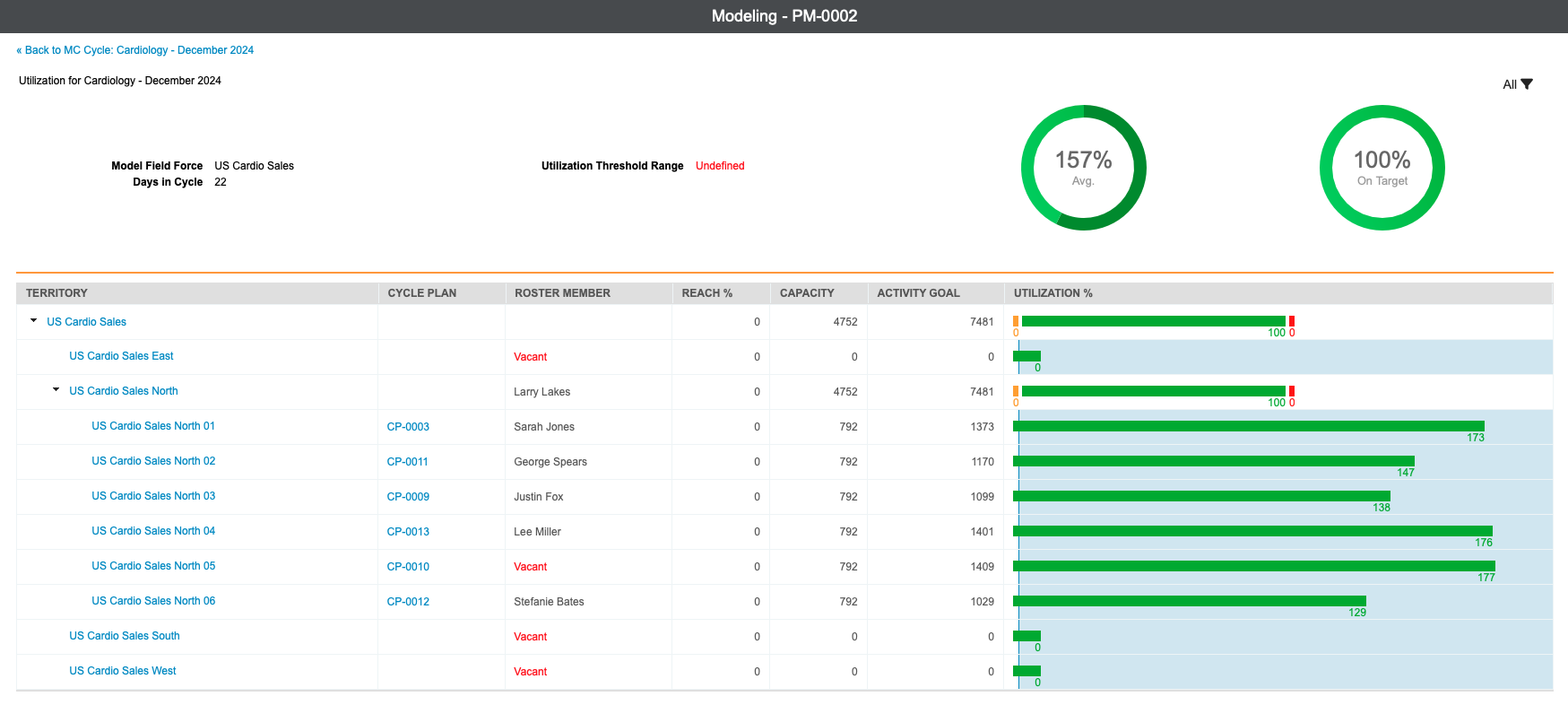
Users can filter the information to only display child territories over or under utilized by selecting the All drop-down menu and then selecting the appropriate filter.
Selecting the Cycle Plan Name for any row in this table displays the appropriate Multichannel Cycle Plan Capacity Page.
Multichannel Cycle Plan Capacity Page
Selecting an MCCP from the Multichannel Cycle Utilization page displays the Cycle Plan Capacity page which enables users to view all targets in a specific MCCP along with the activity goals for those targets.
This page also displays a table of all accounts in the MCCP along with information regarding an account's targeting status, specialty, segment, and activity goals.
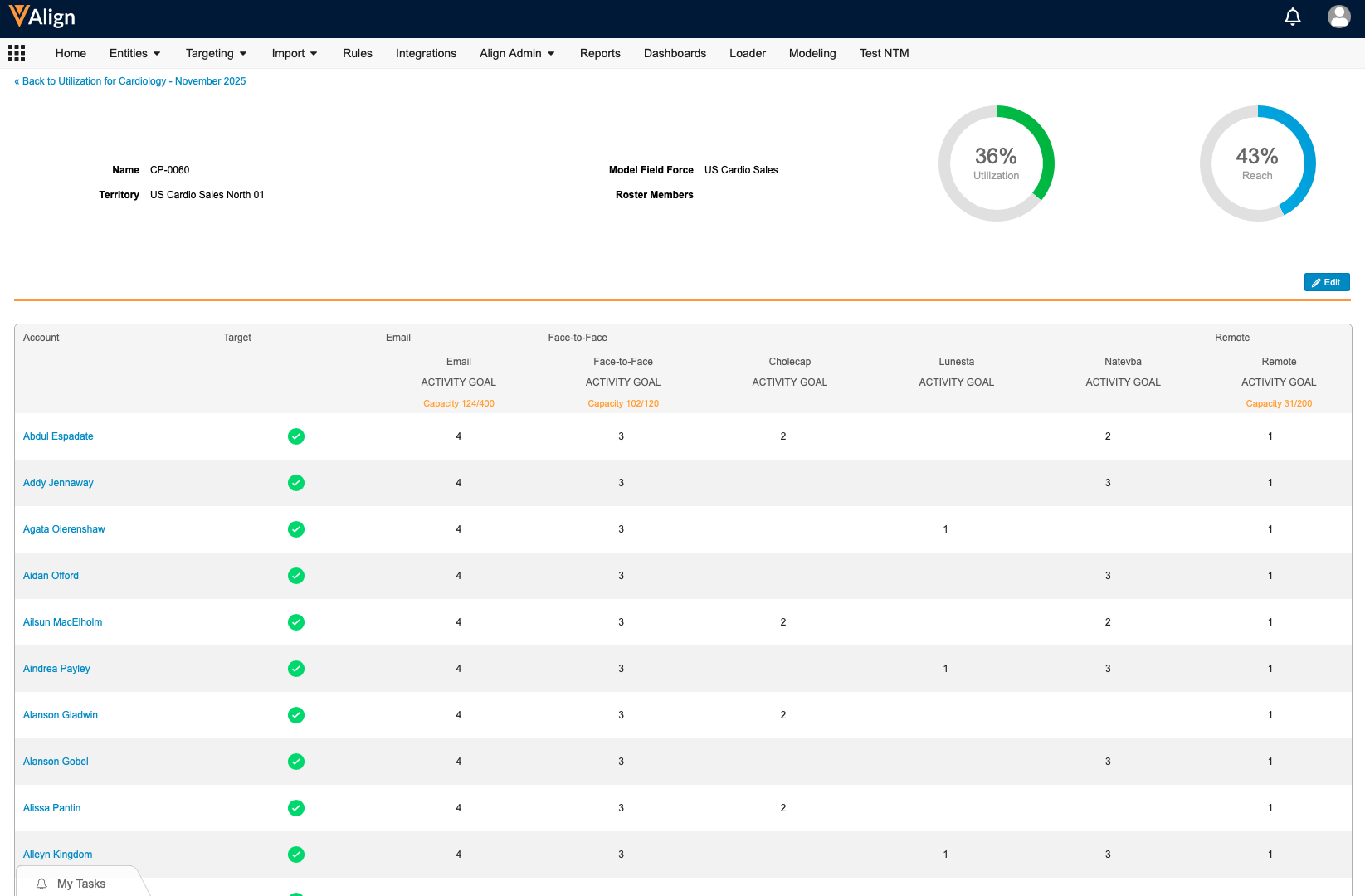
Align operational users can use this information to make adjustments to the MCCP within the Capacity page:
- Select Edit.
- Select the appropriate activity goal on the appropriate account.
-
Modify the activity goal. The Utilization and Reach percentages are updated after each activity goal is modified.
An error displays if the newly entered activity goal is larger than the activity maximum, the team activity goal, or the activity goal for the cycle plan product's channel.
- Select Save after making all adjustments.

