Managing In-Person Consent Confirmation Methods
Business admin users can configure the in-person consent confirmation methods required when an end user captures consent for HCPs. This provides granular control over how consent is captured in Vault CRM and allows organizations to satisfy various regulatory requirements.
There are two in-person consent confirmation methods available for end users:
- Signature – The HCP uses the end user’s mobile device to sign and confirm their consent. This option is not available on Browser.
- Paper Consent – The HCP provides a paper consent ID to confirm their consent. This option is available on Browser, iPad, iPhone, and Windows.
Who can use this feature?
- Business Admin Users – Browser
- Managing In-Person Consent Confirmation Methods
- End Users – Browser, iPad
- Confirming In-Person Consent
- Users do not require an additional license
Configuring In-Person Consent Confirmation Methods for
 All Users
To configure this feature:
- Ensure Configuring Consent Capture is complete.
- Navigate to Admin > Users & Groups > Permission Sets.
- Select the appropriate permission set.
- Select the Objects tab.
- Grant the following permissions:
Object
Object Permission
Object Type Access
Field
Field Permission
consent_type__v
R
All applicable object types
signature_capture__v
Read
multichannel_consent__v
CRE
All applicable object types
- signature_data__v
- signature_datetime__v
- signature_id__v
Edit
- Navigate to Admin > Configuration > Message Catalog.
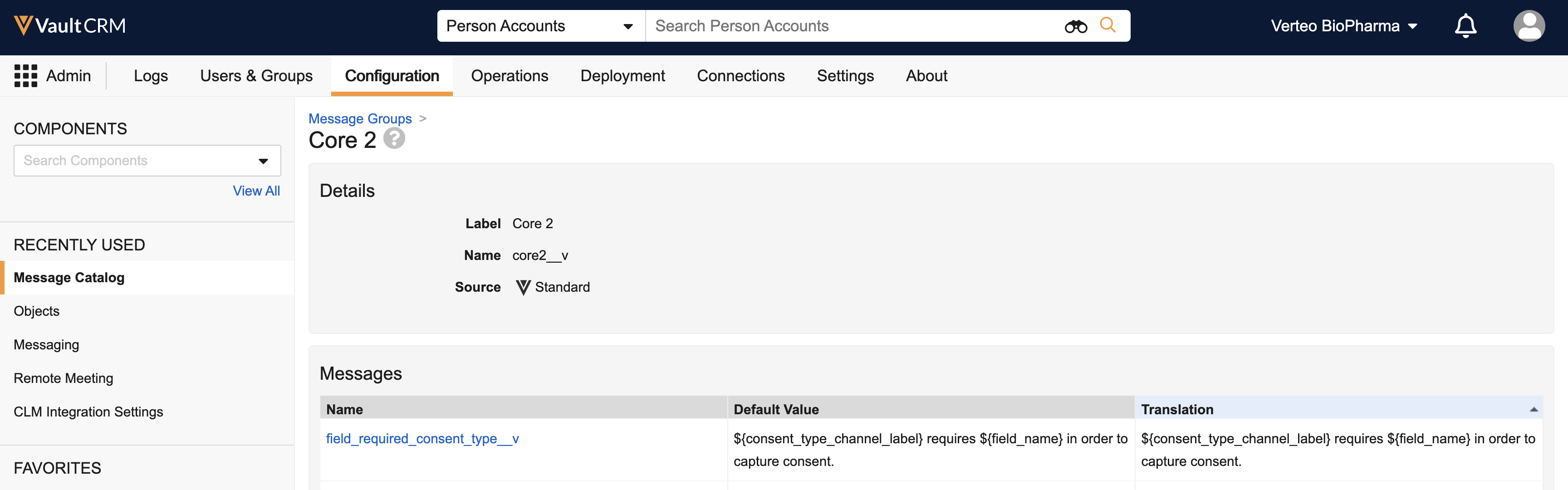
- Ensure the field_required_consent_type Vault Message in the Core2 group is active, if custom validation rules are active.
Managing In-Person Consent Confirmation Methods as
Business Admin Users
To manage the in-person consent confirmation methods available to end users:
- Navigate to Admin > Configuration > Objects > Consent Type > Layouts.
- Select the appropriate Consent Type layout.
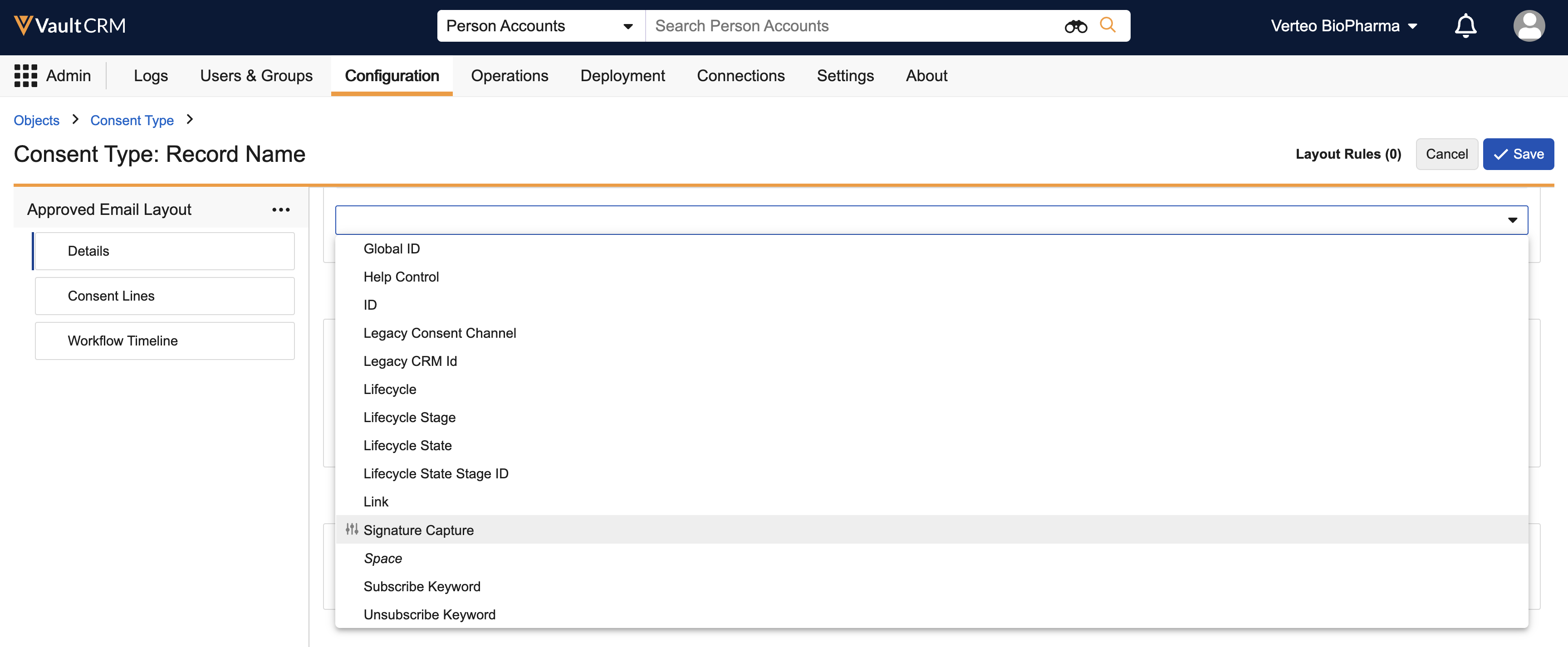
- Place the Signature Capture object control on the layout.
- Navigate to Admin > Configuration > Objects > Multichannel Consent > Layouts.
- Select the appropriate Multichannel Consent layout. The object type must correspond to the object type of the Consent Type layout you just edited.
- Place the signature_datetime__v or signature_id__v fields on the layout. Mark one or both of these fields as Required on the layout to require confirmation via the desired method.
To ensure end users confirm consent, mark one or both of the fields as Required on the object type. A sync error occurs if end users capture consent without confirming via the required methods.
Supported Configurations for Opt-In Consent Confirmation
The following tables describe the layout requirements for the supported configurations of these two confirmation methods when capturing opt-in consent. Any configuration not listed below is not supported.
Option 1
On mobile platforms, Paper Consent ID is available but signature capture is required.
On Browser, Paper Consent ID is available, but not required. Signature capture is required, but since this method is not supported on Browser, end users cannot capture consent.
|
Layout Properties |
signature_datetime__v |
signature_id__v |
|---|---|---|
|
On Layout |
|
|
|
Marked as Required |
|
|
Option 2
Paper Consent ID is not available. On mobile platforms, signature capture is available, but not required.
|
Layout Properties |
signature_datetime__v |
signature_id__v |
|---|---|---|
|
On Layout |
|
|
|
Marked as Required |
|
n/a |
Option 3
Paper Consent ID is available, but not required.
|
Layout Properties |
signature_datetime__v |
signature_id__v |
|---|---|---|
|
On Layout |
|
|
|
Marked as Required |
n/a |
|
Option 4
Paper Consent ID is required.
|
Layout Properties |
signature_datetime__v |
signature_id__v |
|---|---|---|
|
On Layout |
|

|
|
Marked as Required |
n/a |
|
Option 5
On mobile platforms, Paper Consent ID and signature capture are both available, and either is required.
On Browser, Paper Consent ID is required.
|
Layout Properties |
signature_datetime__v |
signature_id__v |
|---|---|---|
|
On Layout |
|
|
|
Marked as Required |
|
|
Option 6
On mobile platforms, Paper Consent ID and signature capture are both available, but neither is required.
On Browser, Paper Consent ID is available, but not required.
|
Layout Properties |
signature_datetime__v |
signature_id__v |
|---|---|---|
|
On Layout |
|
|
|
Marked as Required |

|
|
Option 7
On mobile platforms, Paper Consent ID is required. Signature capture is not available.
On Browser, Paper Consent ID is required.
|
Layout Properties |
signature_datetime__v |
signature_id__v |
|---|---|---|
|
On Layout |
|
|
|
Marked as Required |
|
|
Confirming In-Person Consent as
End Users
When capturing only opt-in consent for one or more consent types, end users must confirm consent using the required confirmation methods for each consent type.
When capturing only opt-out consent, end users do not need to confirm and the confirmation methods are not available. However, if Requiring Signatures on Opt-Out is configured:
- End users must confirm consent using the required confirmation methods
- If neither confirmation method is marked as required:
- On Browser, Paper Consent ID is required
- On mobile platforms, either Paper Consent ID or signature capture is required
When capturing opt-in and opt-out consent for the same consent type at the same time, end users must confirm consent using the required opt-in confirmation methods for the consent type.

