What's New in Align 26R1.0
The 26R1.0 release includes features for:
Release Dates
- Sandbox Release - April 16, 2026
- Production Release - April 30, 2026
New Fields are also included.
Align
Managing Target Exclusions - Available on iPad
End users can use Territory Feedback to review and re-add removed targets, enabling greater flexibility and end user control during the feedback process. End users can also review accounts that have been explicitly excluded from their territory, enabling them to understand why an account has been excluded and helping them avoid attempting to add the accounts to their territory.
Recommended Targets in Align - Available on iPad
Align operations users can designate certain high-impact accounts as recommended targets in a model territory. These recommended targets are displayed to end users in Territory Feedback, where they can add the account as a target and define target goals, improving the efficacy of the territory during the Multichannel Cycle.
Cloning Multichannel Cycle Feedback - Available on Browser
Align operational users can clone a Multichannel Cycle’s feedback when running an Assignment Preview on a cloned Cycle. This ensure end users do not need to provide the same account feedback cycle to cycle, while preserving the flexibility to modify a cloned Cycle’s Targeting Rule, Channels, and Products.
User Visible and Behavior Changes (UVCs)
|
Platform |
Description |
Before |
After |
|---|---|---|---|
|
iPad |
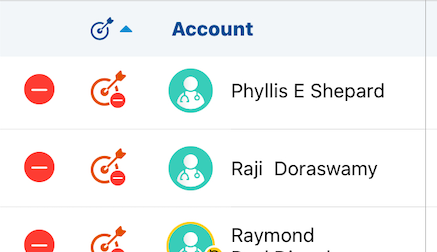
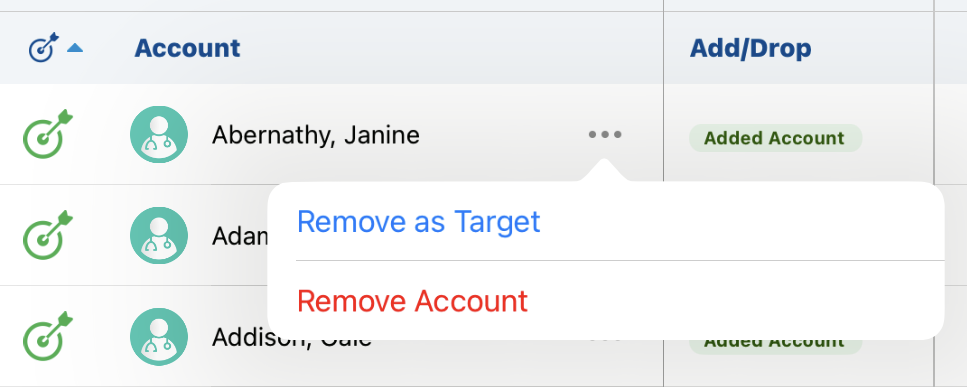
The Edit Alignments table was updated to provide a more useful interface when creating challenges against accounts. |
|
|
|
Browser |
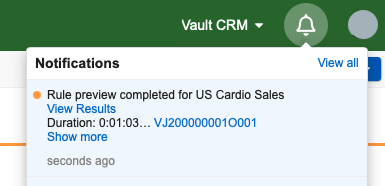
Vault Notifications now display when the following Align processes complete:
|
n/a |
|
|
Browser |
Users can now add the following criteria to assignment rules to match accounts based on the first part of a postal code:
|
n/a |
n/a |
26R1.0 Feature Enablement and Availability
The following table provides an explanation of feature enablement and user impact.
|
Vault CRM Feature Availability and Enablement |
|||||||
|---|---|---|---|---|---|---|---|
|
Feature |
User |
Configuration |
Browser |
CRM Desktop |
iPad |
iPhone |
Windows |
|
No |
Yes |

|
|
|
|
|
|
|
No |
Yes |
|
|
|
|
|
|
|
No |
Yes |
|
|
|
|
|
|

New Objects
The table below contains all new objects added in Align 26R1.0.
| Object Name | Object Label | Description |
|---|---|---|
| aln_recommended_target_model__v | Model Recommended Target | Designates an account as a recommended target for a territory. |
New Fields
The table below contains all fields added in Align 26R1.0. The fields are organized by object.
| Object Name | Field Name | Field Label | Description | Type |
|---|---|---|---|---|
| aln_recommended_target_model__v | account__v | Account | The account recommended as a target | Object |
| aln_recommended_target_model__v | account_id__v | Account Id | The global id of the account. Provides a persistent record of which territory model an account was a recommended target for, even if the account record is deleted | String |
| aln_recommended_target_model__v | attempted_to_add__v | Attempted to Add? | Indicates whether the field user attempted to add the account as a target during feedback | Yes/No |
| aln_recommended_target_model__v | created_by__v | Created By | The user who created the record. | Object |
| aln_recommended_target_model__v | created_date__v | Created Date | The date the record was created. | Date |
| aln_recommended_target_model__v | external_id__v | External ID | The external ID of the record. | String |
| aln_recommended_target_model__v | global_id__sys | Global ID | The global ID of the record. | String |
| aln_recommended_target_model__v | link__sys | Link | The record link. | String |
| aln_recommended_target_model__v | location__v | Location | The location at which the account is recommended as a target (applicable when Location Based Targeting is in use) | Object |
| aln_recommended_target_model__v | mc_cycle__v | MC Cycle | The cycle to which the recommended target applies | Object |
| aln_recommended_target_model__v | modified_by__v | Last Modified By | The user who last modified the record. | Object |
| aln_recommended_target_model__v | modified_date__v | Last Modified Date | The date the record was last modified. | Object |
| aln_recommended_target_model__v | name__v | Name | The record name. | String |
| aln_recommended_target_model__v | object_type__v | Recommended Target Type | The object type of the record. | Picklist |
| aln_recommended_target_model__v | status__v | Status | The record's status. | Picklist |
| aln_recommended_target_model__v | territory_model__v | Model Territory | The model territory against which the account is recommended as a target | Object |
| aln_roster_member__v | country_code__v | Country Code | The country code of the roster member | Object |
Removed Fields
The table below contains all fields removed in Vault CRM 26R1.0. The fields are organized by object.
|
Object |
Field Name |
Field Label |
Description |
Type |
|---|---|---|---|---|
| aln_roster_member__v | crm_country_code__v | CRM Country Code | The country code of the corresponding CRM user | Picklist |

