Account Hot Lists
Business admins can define Hot Lists to communicate to users which accounts are the highest priority for a specific territory and date range.
End users can access these Hot Lists on a dedicated tab to focus their work on the highest-priority accounts. This tab provides a list of accounts ranked by the customer, so users can act more efficiently and confidently in the field, knowing they are spending their time on the engagements that count the most.
The Hot List tab displays metrics for engaging with each account, for example, prescribing potential and last time contacted dates, and the reason the account was included in the list. It also provides action buttons so users can quickly schedule calls or other engagements with each high-priority account. Hot Lists are
Who can use this feature?
- Business Admin Users — Browser
- Data Loading Hot Lists
- End Users — Browser, iPad (iPhone, Windows coming soon)
- Viewing and Interacting with Hot Lists
- Using Hot Lists in Other Modules
- Users do not require an additional license
Configuring Hot Lists for
 Business Admin Users
To configure this feature:
- Ensure Configuring Accounts is complete.
- Navigate to Admin > Users & Groups > Permission Sets.
- Select the appropriate permission set.
- Select Objects.
- Grant the following permissions:
Object Object Permission Object Type Fields Field Permission account__v
CRE
All object types
- name__v
- city_cda__v
- primary_state_province__v
Edit
account_list__v CRE n/a - access__v
- external_id__v
- created_date__v
- name__v
- type__v
- territory__v
- start_date__v
- end_date__v
Edit account_list_item__v CRE All object types - account__v
- account_list__v
- acknowledged__v
- external_id__v
- last_touch__v
- rank__v
- reason__v
- actual_advocacy__v
- potential_advocacy__v
Edit child_account__v CRE All object types - name__v
- job_title__v
Edit user_territory__v CRE All object types - territory__v
- user__v
Edit tsf__v CRE All object types - account__v
- preferred_account__v
- territory__v
Edit
End Users
To configure this feature:
- Ensure Configuring Accounts is complete.
- Navigate to Admin > Users & Groups > Permission Sets.
- Select the appropriate permission set.
- Select Objects.
- Grant the following permissions:
Object Object Permission Object Type Fields Field Permission account__v
R
All object types
- name__v
- city_cda__v
- primary_state_province__v
Read
account_list__v R n/a - access__v
- external_id__v
- created_date__v
- name__v
- type__v
- territory__v
- start_date__v
- end_date__v
Read account_list_item__v RE All object types - account__v
- account_list__v
- external_id__v
- last_touch__v
- rank__v
- reason__v
- actual_advocacy__v
- potential_advocacy__v
Read acknowledged__v Edit child_account__v R All object types - name__v
- job_title__v
Read user_territory__v R All object types - territory__v
- user__v
Read tsf__v R All object types - account__v
- preferred_account__v
- territory__v
Read
Additional Configuration for iPad
The following additional configuration is needed for iPad users.
- Navigate to Business Admin > Objects > Veeva Messages.
- Add HotLists to the TAB_NAV_DISPLAY Veeva Message to display the Hot Lists tab for iPad users. If the TAB_NAV_DISPLAY message is not configured, the Hot List tab displays next to My Accounts by default.
- Enable the following VMOCs for the appropriate platform:
- account_list__v - WHERE ownerid__v = @@USER_ID@@ OR type__v = 'hot_list__v'
- account_list_item__v - WHERE account_list__vr.ownerid__v = @@USER_ID@@ OR account_list__vr.type__v = 'hot_list__v'
The columns on the Hot List tab cannot be rearranged or edited, but admins can hide some columns by removing corresponding field permissions. Some columns, such as Account Name, display even if the user does not have field permissions, but no value displays in the column.
Data Loading Hot Lists as
Business Admin Users
Business admins can provide end users with updated priority lists via Data Load, to align with weekly or monthly strategies.
Business admins must Data Load the following information for Hot Lists:
-
account_list_item__v records, with the account information and metrics, that make up each individual Hot List
When Data Loading individual Hot Lists, be sure each account_list_item__v record has a Start Date and End Date to ensure visibility for end users, and that the status__v field on the account_list__v object is set to active__v
-
account_list__v records
Example Account List Items
|
account_list__v |
account__v |
rank__v |
actual_advocacy__v |
potential_advocacy__v |
acknowledged__v |
reason__v |
|---|---|---|---|---|---|---|
|
V4W000000005001 |
V4T000000006925 |
1 |
412 |
500 |
false |
Prescribing for Natevba has dropped by 15% over the last two months despite a high patient volume in the oncology clinic. Immediate outreach is required to discuss recent clinical trial data and address potential competitive switching. |
|
V4W000000005001 |
V4T000000006926 |
2 |
120 |
480 |
false |
This HCP has a significant number of new patient starts in the respiratory class but remains a split-user. A proactive visit is recommended to provide updated efficacy comparisons and ensure our brand remains top-of-mind for first-line therapy. |
Example Account List
|
id |
name__v |
access__v |
type__v |
territory__v |
start_date__v |
end_date__v |
|---|---|---|---|---|---|---|
|
V4W000000005001 |
Northeast |
territory__v |
hot_list__v |
VCR000000003004 |
2025-11-17 |
2026-11-17 |
For information on Data Loading in Vault CRM, see Vault Loader Overview.
Using Hot Lists as
End Users
Users can access the Hot List tab to view their most critical accounts for the current period, as defined by the business admin, and to perform actions for engaging with those accounts.
Viewing and Interacting with Hot Lists
To view account Hot Lists, navigate to the Hot List tab on iPad, or the subtab on the My Accounts tab on Browser.
Users can select a territory if they are assigned to multiple territories and any of those territories is assigned active Hot Lists. The first territory in the list, sorted alphabetically, displays when users access Hot Lists.
A Hot List is active when the current date falls between the Start Date and End Date defined for the list, and the status__v field on the account_list__v record is set to active__v. The most recently created Hot List displays if there is more than one active Hot List for the territory. If multiple Hot Lists have the same created date, the name__v field is used to sort them.
A “No Hot List Available” message displays if there are no active Hot Lists for the selected territory, or if there are no accounts in the selected Hot List.
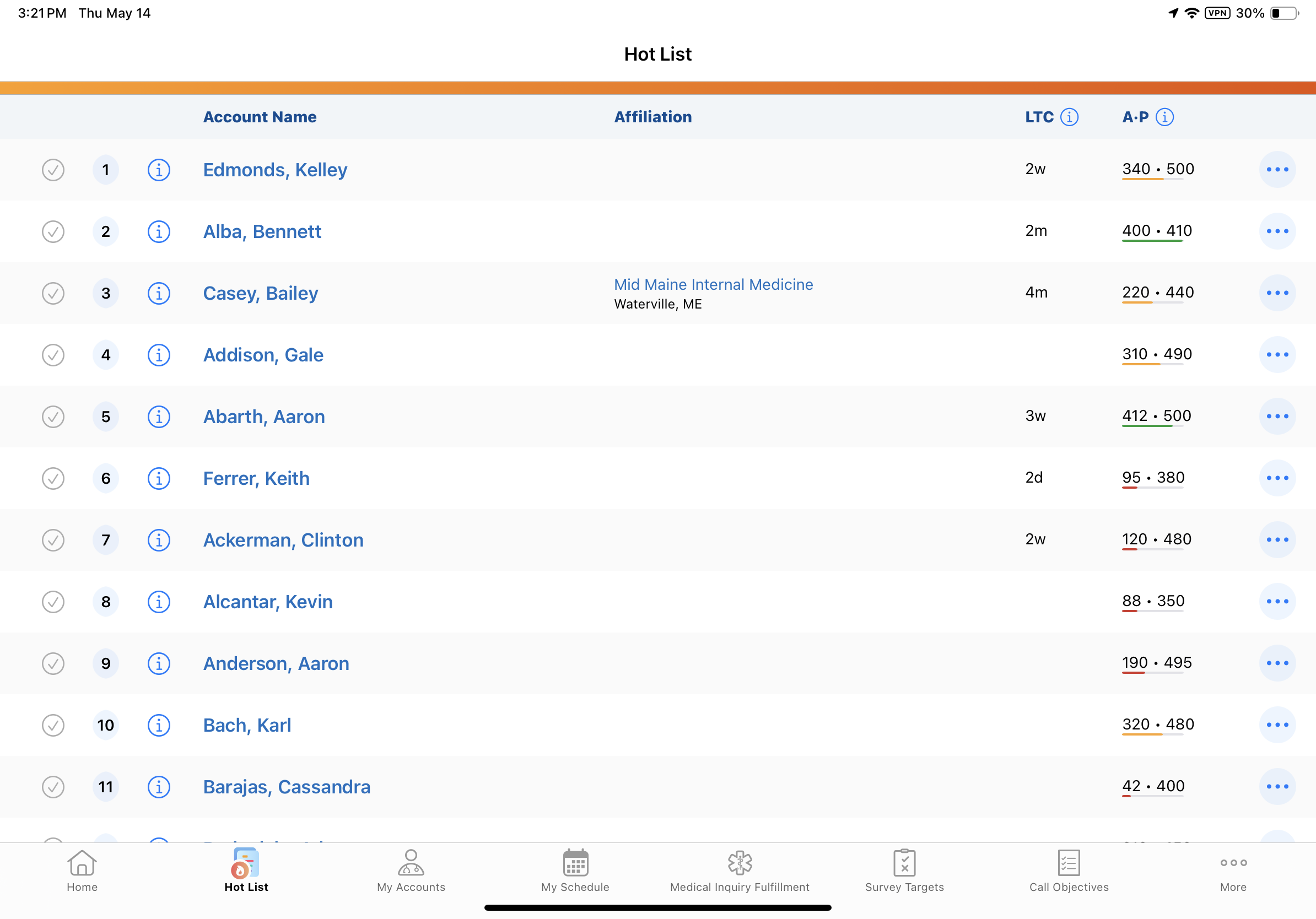
The Hot List displays the prioritized list of accounts, with information organized into the following columns:
- Acknowledged - Select this checkbox to indicate completion of an outreach task. This selection persists if the user navigates away from the Hot List. Selected rows are dimly lit to indicate they have been acknowledged.
- Rank - Accounts are ranked from 1 to 30, where 1 is most important and 30 is least important. The Hot List is sorted by this ranking, and changing the sorting is not supported.
- Reason - Select the Info icon to view why an account is on the list
- Account Name - Select the hyperlink to view the Account Detail view in a new tab. The Job Title displays beneath the Account Name.
- Affiliation - Select the hyperlink to view the Primary Parent in a new tab. The City and State display beneath the Parent account name. The affiliation is derived from the preferred_account__v field on the tsf__v record for the territory assigned to the Hot List.
- LTC - The Last Time Contacted metric. Displays an estimate of the time passed since the last engagement with the account.
This value does not change from the data loaded value.
Actual Days
Display
Logic
0-6 days
[x]d
Days (for example, 3d)
7-27 days
[x]w
Weeks (for example, 2w)
28-330 days
[x]m
Months (for example, 2m)
>330 days
[x]y
Years (for example, 1y)
- A•P - The Actual and Potential metrics for the account. Actual is the amount of prescriptions within a defined period. Potential is the number of total possible prescriptions in that same period of time.
The progress bar displays the percentage breakdown of the progress (Actual Advocacy divided by Potential Advocacy).
- Red if <50%
- Yellow if >= 50% and < 80%
- Green if >=80%
- Gray bar if either or both numbers are null
- Actions - Create calls, medical interactions, and medical inquiries, or send emails directly from the Hot List
Using Hot Lists in Other Modules
Active Hot Lists are included with other Account Lists when selecting accounts in the following areas of the application:
- Attendee Selection in Events Management
- My Schedule
- Survey Targets
- Cycle Plans
For example, users can add accounts from a Hot List to a schedule in My Schedule, or to an event attendee list. Hot Lists display below the standard lists for the module.
When Conversational AI (Early Adopter) is enabled, Hot Lists are used to identify and surface high-priority accounts in response to user requests.
Hot Lists are not included in standard Account Views and Lists, and users cannot add accounts to Hot Lists where Add to List functionality is available.

