What's New in Vault CRM 25R3.2
The 25R3.2 release includes features for:
Release Dates
- Sandbox Release - January 22, 2026
- Production Release - January 29, 2026
New Fields, New Objects, Updated Fields, and Removed Fields are also included.
Announcements
25R3.2 Release Notes Podcast
We’ve added an AI-generated podcast that walks you through the highlights of the 25R3.2 release.
Give it a listen and let us know what you think using the feedback button.
Core
Account Management
Displaying Territory Fields for Child Accounts - Available on Browser and iPad
End users can better understand specific engagement targets and status within a territory by viewing Territory Specific Field (TSF) information at the child account level. This information displays on the Child Account Detail screen, providing specific, territory-aligned data for each HCP at a specific HCO location.
Entering Child Account Information in the Parent Account Wizard - Available on Browser and iPad
Users can save time by entering required information for a child account record directly within the Parent Account Wizard when creating a new account. This eliminates the need to create and edit the child account information separately.
Account Planning
Integrating Account Plans with Microsoft Teams - Available on Browser
Key Account Managers (KAMs) and their account team members can streamline collaboration by creating and linking to dedicated Microsoft Teams channels directly from Account Plan records in Vault CRM. The integration simplifies managing channel membership by automatically adding or removing users in Microsoft Teams when the Account Team Member list is updated in Vault CRM, ensuring that the right people always have access.
Call Sampling
Capturing Sample Opt-In from the Account Detail Page - Available on iPad and Windows
To easily capture consent for sample opt-in, users can now capture HCP sample opt-in signatures or paper consent from the Account Detail page, in addition to the call report.
CLM
Displaying CLM Content Using Presenter View - Now available on Windows
Windows users can display presentations in Presenter View, enhancing the presentation experience by providing more context for each slide. Presenter View displays the current slide and its slide notes, the navigation bar, and a preview of the next slide.
Supporting Additional Options in the Action Menu for CLM as Document Model - Available on iPad
End users can use the Sign, Create Medical Inquiry, and Survey options in the action menu to capture sample signatures, create a medical inquiry, and execute a survey directly from the media player, increasing user efficiency during calls.
General
Supporting Roll-up Fields - Now available on Windows
Roll-up fields are supported on Windows, allowing different types of calculations to be performed for the child records of a given record, including child records of number, currency, date, and datetime field types.
Supporting the @@SYNCED_ACCOUNTS@@ MetaVQL Parameter for VMOC WHERE Clauses - Available on Browser
To easily filter object records when syncing, customers can use specific MetaVQL parameters in VMOC WHERE clauses. Vault CRM supports the @@SYNCED_ACCOUNTS@@ parameter to sync records related to a user's synced accounts.
Integration
Network Hierarchy Explorer - Available on Browser
End users can access Veeva Network Hierarchy Explorer seamlessly within Vault CRM to view and explore complex hierarchies from a top-down approach. This also eliminates the need for users to leave Vault CRM and sign-on separately to Veeva Network.
Submitting Call Expenses to SAP Concur - Now available on Windows
For users on the Windows platform, expenses from submitted call reports can be automatically sent to a connected SAP Concur app, eliminating the need for manual entry in both systems. This streamlines the expense reporting process and saves time for end users.
Medical
Capturing Standing Requests for Medical Using Documented Interest - Now available on Browser
Browser users can now use Documented Interest agreements to enhance relationships between Medical Science Liaisons (MSLs) and Key Opinion Leaders (KOLs) by providing pre-approval for proactive engagement with HCPs. This enables timely, targeted communication about specific product topics. Medical Affairs teams use Documented Interest to collect scientific interest data from HCPs.
Recording a Call from a Medical Inquiry - Available on Browser, iPad, Windows
To improve communication, support compliant fulfillment, and enhance the overall HCP engagement experience, Medical Science Liaisons (MSLs) can record a call directly from a submitted Medical Inquiry record. This allows MSLs to quickly acknowledge or fulfill Medical Inquiries directly from Vault CRM.
Responding to Medical Inquiries Using Approved Email - Available on Browser, iPad, Windows
Medical Science Liaisons (MSLs) can now respond to Medical Inquiries using Approved Email. In addition, MSLs can respond to multiple product inquiries from the same Medical Inquiry. This streamlines the process for MSLs when acknowledging or fulfilling Medical Inquiries directly from Vault CRM, improves communication, supports compliant fulfillment, and enhances the overall HCP engagement experience.
Medical Interactions - Now available on iPhone
iPhone users can now create and use Medical Interactions, a comprehensive method of planning and tracking interactions with medical professionals.
Medical Interactions on My Schedule - Now available on iPhone
iPhone user can now create Medical Interactions from My Schedule, and view those entries alongside other scheduled events, for example, Time Off Territory, streamlining their planning and execution process.
Order Management
One-Tap Order Navigation from CLM - Available on iPad
End users can now navigate to an order from a CLM presentation by selecting an Order icon instead of navigating through the standard menu. This reduces the need for multiple taps to access the Order screen directly from a CLM presentation, streamlining the user experience for placing orders.
Sample Management
Streamlining Record Access for Sample Management - Available on Browser
To streamline record access in Sample Management, Vault CRM now automatically assigns access to Sample Receipt, Sample Lot Item, and Sample Inventory Item records based on a user’s existing access to the related Sample Lot and Sample Inventory records. Additionally, the new Owner ID field on Sample Transactions enables admins to ensure higher-level users—for example, managers or regional leads—automatically inherit access to Sample Transaction records via the record’s ownership hierarchy. This replaces the need for manual sharing rules or custom sharing configurations.
Suggestions
Suggestions Tab - Available on Browser and iPad
Field users can use the Suggestions tab to view recommendations and insights to help them plan their interactions with Health Care Professionals (HCPs). The Suggestions tab provides a modern interface for viewing, filtering, sorting, and acting on suggestions. This allows users to quickly understand a recommendation and take the appropriate action, for example, scheduling a call or sending an email, directly from the suggestion. Content creators can build their own Suggestions X-Pages in X-Pages Studio to replace the default Suggestions tab.
Sync
Improved Sync for Add to Territory in GAS - Available on iPad
When users add an account to their territory from Global Account Search (GAS), the sync process includes any affiliation__v, sample_limit_transaction__v, sample_limit__v, tsf__v, and account_authorization__v object records associated with the account for compliance. This helps users keep their mobile devices up-to-date and reduces the need to perform database refreshes or incremental syncs. These sync improvements also apply when users add accounts to their territory from other entry points, including Network Account Search, Account Hierarchy, and Stakeholder Navigator.
Improved Sync for Add to Territory in NAS - Available on iPad
When users add an account to their territory from Network Account Search (NAS), the sync process includes any affiliation__v, sample_limit_transaction__v, sample_limit__v, tsf__v, and account_authorization__v object records associated with the account for compliance. This includes records directly from Vault CRM in addition to Veeva Network. This helps users keep their mobile devices up-to-date and reduces the need to perform database refreshes or incremental syncs. These sync improvements also apply when users add accounts to their territory from other entry points, including Global Account Search, Account Hierarchy, and Stakeholder Navigator.
X-Pages
Content developers can now add custom scopes to control an application’s access to a user's account. Custom scopes are appended to the SSO IDP access token request by entering them in a new Custom Scopes field on the SSO configuration object. This new field is added to the xpages_sso_configuration__v object default layout.
getLifecycleStates() Method - Available on Browser
Content developers can now use the getLifecycleStates() method to query Lifecycle State label translations for a given object. This is useful for building dynamic filters, legends, or status selectors, allowing content developers to better support business scenarios for Opportunity Management and Patient CRM.
X-Pages Studio
New Data Expressions - Available on Browser
Content creators can now use the Duration data type and three new expressions in X-Pages Studio to calculate, format, and display time periods between dates or date-times, providing users with clear, locale-aware time insights to support better decision-making and performance tracking. Users can view the precise time elapsed between two events, for example, the time taken for Case Closure, directly within an X-Page.
Querying the Lifecycle State Field - Available on Browser
Content creators who query the Lifecycle State field can also utilize the automatically included translated state labels in standard CRM queries. This is useful when creating dynamic filters, legends, or status selectors, allowing content creators to better support business scenarios for Opportunity Management and Patient CRM. The Lifecycle State translation displays the translated label on Browser only.
Suggestions Display Element - Available on Browser
Content Creators can use X-Pages Studio to create a page displaying relevant suggestions using the Suggestions display element. End users can view, expand, and act on these suggestions, for example, by executing, completing, or dismissing them, from the Account Overview or Territory Overview page.
Suggestions Entry Point - Available on Browser
X-Pages content creators can now create and deploy content for the Suggestions entry point using X-Pages Studio.
Campaign Manager
Updates to the Target List Builder - Available on Browser
Marketing users can create more precise and efficient target lists for their campaigns by leveraging an expanded set of filtering options. These options include custom fields, lookup fields, Date, and DateTime fields, as well as fields representing Product Metrics and Dynamic Attributes.
Viewing Field Action Performance - Available on Browser
Marketing users can track real-time engagement metrics for campaigns that utilize Field Actions. The Campaign Performance Summary section of the Campaign Overview tab displays high-level metrics once a campaign is activated.
Events Management
Sending Local Events Management Content via Approved Email - Available on Browser and iPad
To enable improved content sharing, end users can add attachments associated with their event to Approved Emails. This enables users to send documents to non-Vault CRM users, for example, event attendees and speakers, without the need to first add the content to a PromoMats or MedComms Vault.
Providing Comment Reasons for Event Business Rules - Available on Browser and iPad
Business admin users can configure a picklist of reasons for end users to select when end users trigger violations of an Event Business Rule. This enables end users to still provide necessary context for the violation, while mitigating the compliance risks associated with unrestricted free text fields.
To enable more granular control over when end users are warned about missing event materials, business admin users can configure Required Event Material Rules to only apply to events with certain statuses or program types. This ensures warnings display at the most relevant point in the event workflow.
Filtering by My Attendees - Available on iPad
To improve efficiency when updating attendees, Event Team Members can filter the event attendee list to quickly view attendees they are responsible for based on record ownership or territory alignment. This is useful when managing attendees for large events and collaborating with other team members.
Filtering Approved Email Recipients - Available on iPad
To improve efficiency when sending invitations, Event Team Members can filter the event attendee list to quickly view attendees they are responsible for based on record ownership or territory alignment. This is useful when managing attendees for large events and collaborating with other team members.
Reconciling Walk-in Attendees to Child Accounts - Available on Browser and iPad
End users can reconcile walk-in attendees to child accounts, which represent a specific account-organization (HCP-HCO) combination, rather than just the HCP’s account.
Service Center
Creating Collaboration Spaces for Microsoft Teams - Available on Browser
To streamline Microsoft Teams administration for Service Center, business admin users now create Collaboration Spaces and an initial Microsoft Team in Vault CRM, as part of Microsoft Teams configuration. This establishes a single space and team to contain all future case channels created by Service Center reps, simplifying navigation and administrative overhead. When creating the Collaboration Space, business admin users are also able to define a Teams space name for display in Microsoft.
Data Model Changes for Service Center - Available on Browser
To prepare for future enhancements improving the user experience, Outbound Target Lists are updated to use the new Outbound Target and Outbound Target List objects, instead of Campaign and Target objects.
Send to Fax
Restricted Words - Available on Browser, iPad, and iPhone
Restricted Words for Send to Fax enables administrators to enforce compliance by defining specific terms or phrases to prevent end users from sending fax communications containing inappropriate or non-compliant content.
Validation Rules - Available on Browser and iPad
Validation rules on the sent_fax__v object are applied when a user sends a fax, ensuring the fax content and the selected recipients are valid.
Vault AI in CRM
Using Agentic Voice with AI Chat Disabled - Available on iPad
Admins can provide access to Agentic Voice without displaying the AI Chat window, allowing greater control over which Vault AI in CRM features are available to users.
Flightpath
Flightpath is an educational tool where you'll find overviews and examples to walk you through how to leverage Vault CRM features and functionality. The following Flightpaths are added with the 25R3.2 release:
Videos
The following videos are added with the 25R3.2 release:
User Visible and Behavior Changes (UVCs)
Most new functionality requires some configuration, however users are able to use the following functionality immediately. Select the thumbnail to view a larger image.
Account Management
|
Platform |
Description |
Before |
After |
|---|---|---|---|
|
Browser |
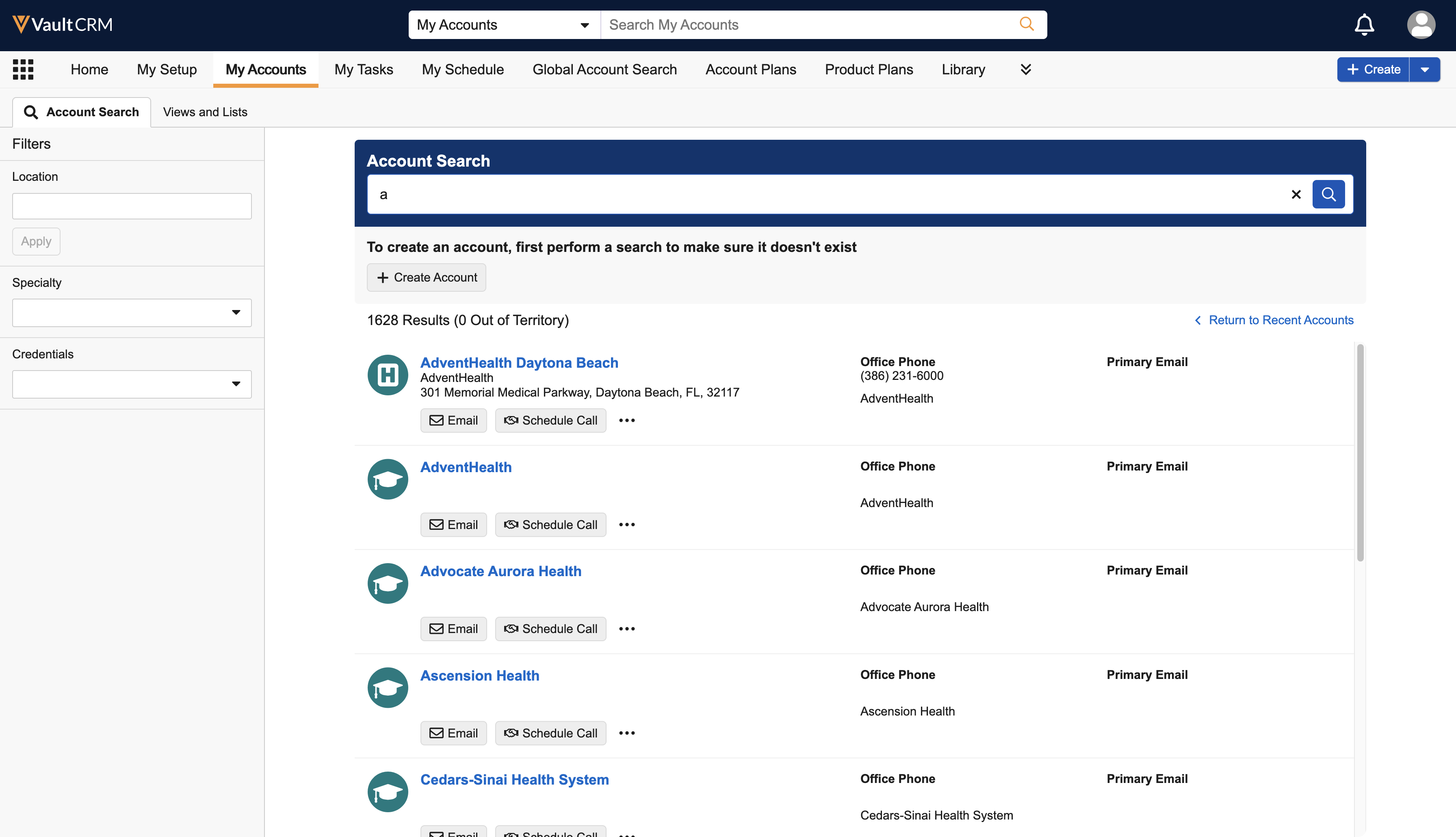
Searches from the My Accounts tab or Global Search prioritize in-territory accounts. Out-of-territory results display in a separate section below, with their count displayed in parentheses after the total. Users can select Return to Recent Accounts to navigate back to the list of recent accounts without reloading the page. |
n/a |
|
Campaign Manager
|
Platform |
Description |
Before |
After |
|---|---|---|---|
|
Browser |
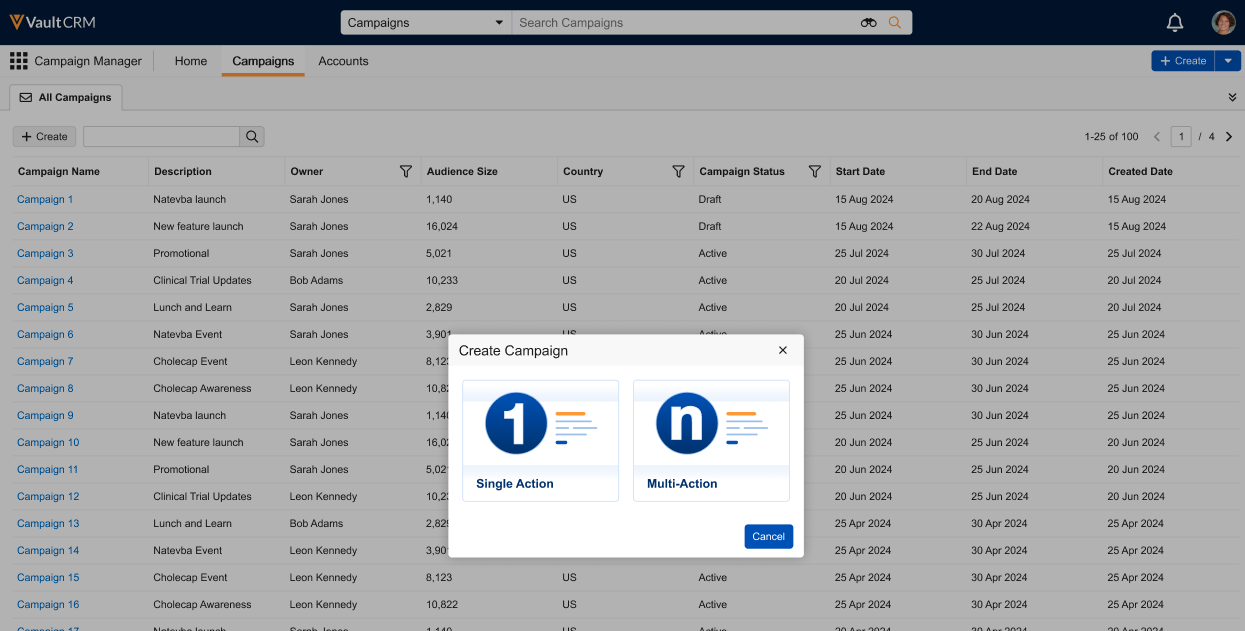
When creating a new campaign from the All Campaigns tab, marketing users are now prompted to select the type of campaign they want to create. |
n/a |
|
|
Browser |
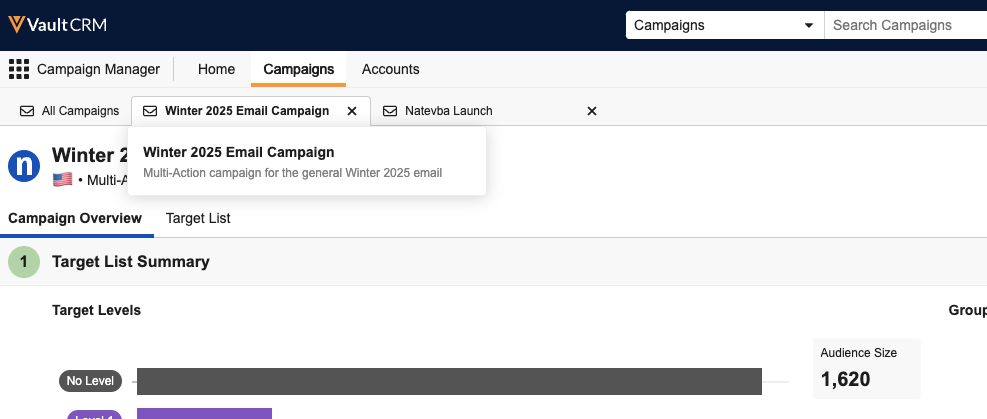
Hovering over campaign sub-tabs in the Campaign Manager tab now displays the campaign’s description in a pop-over. |
n/a |
|
|
Browser |
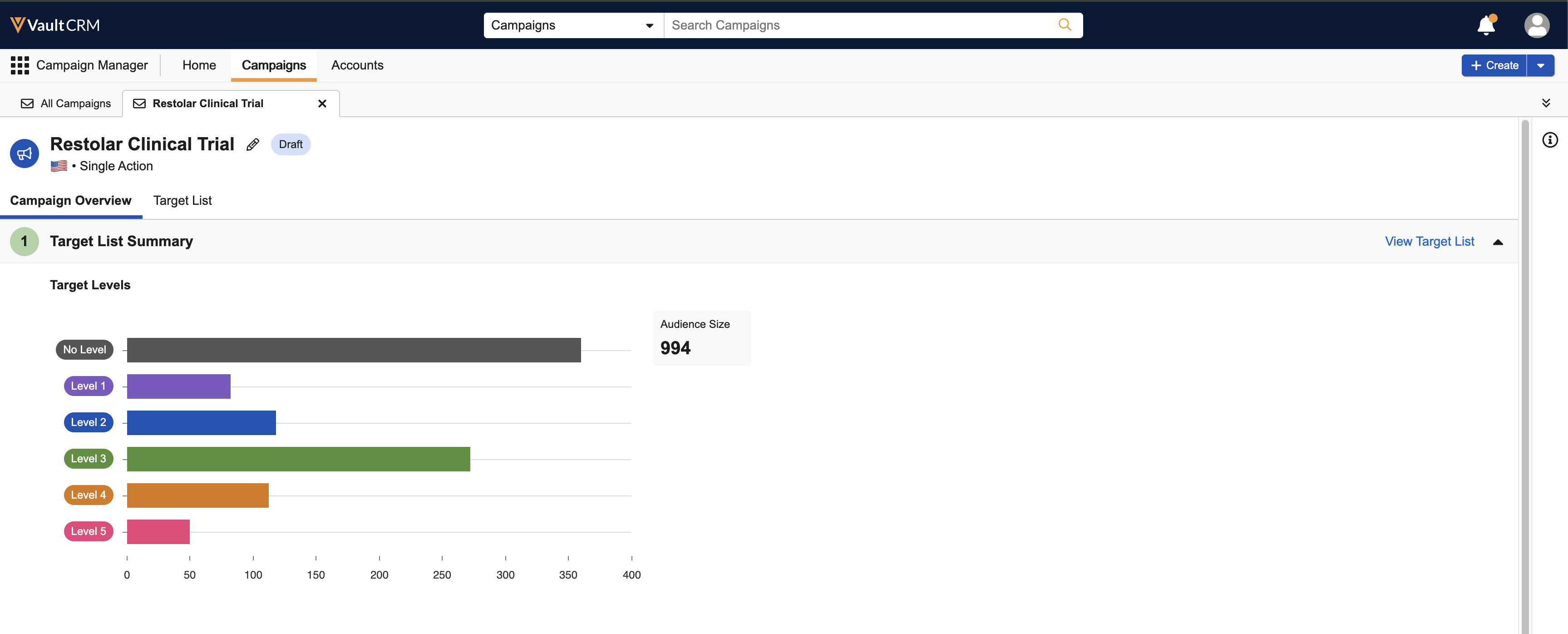
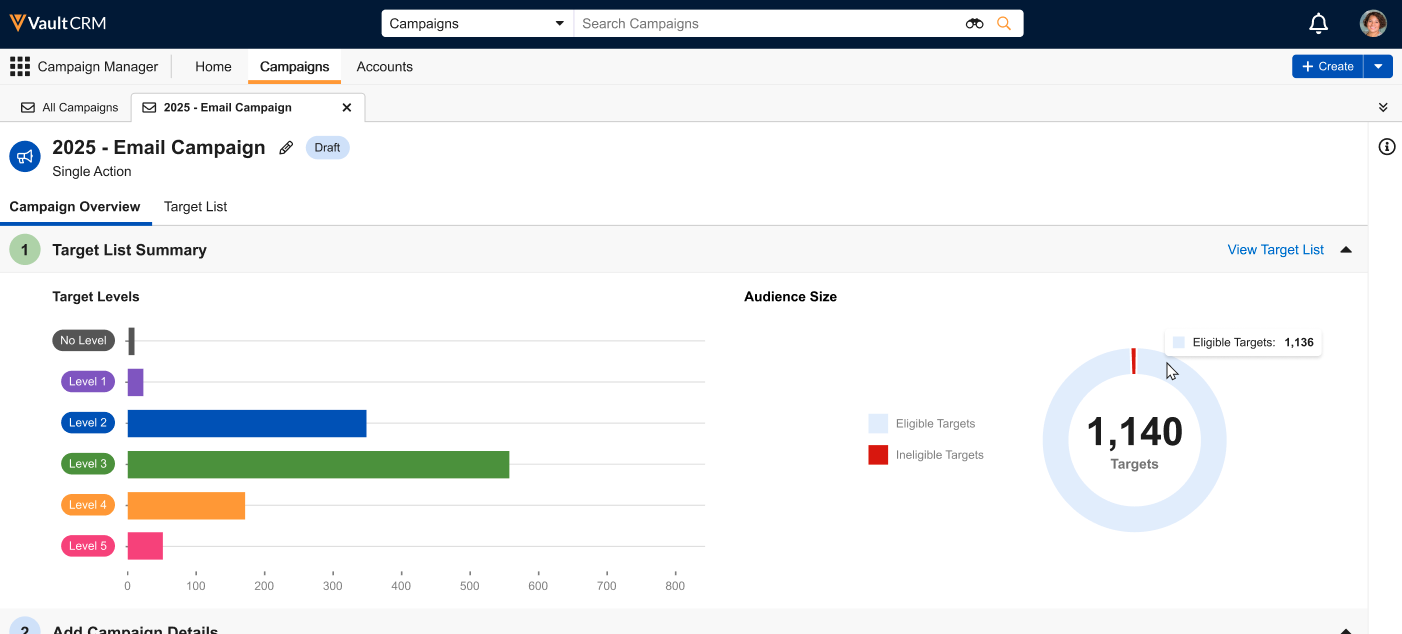
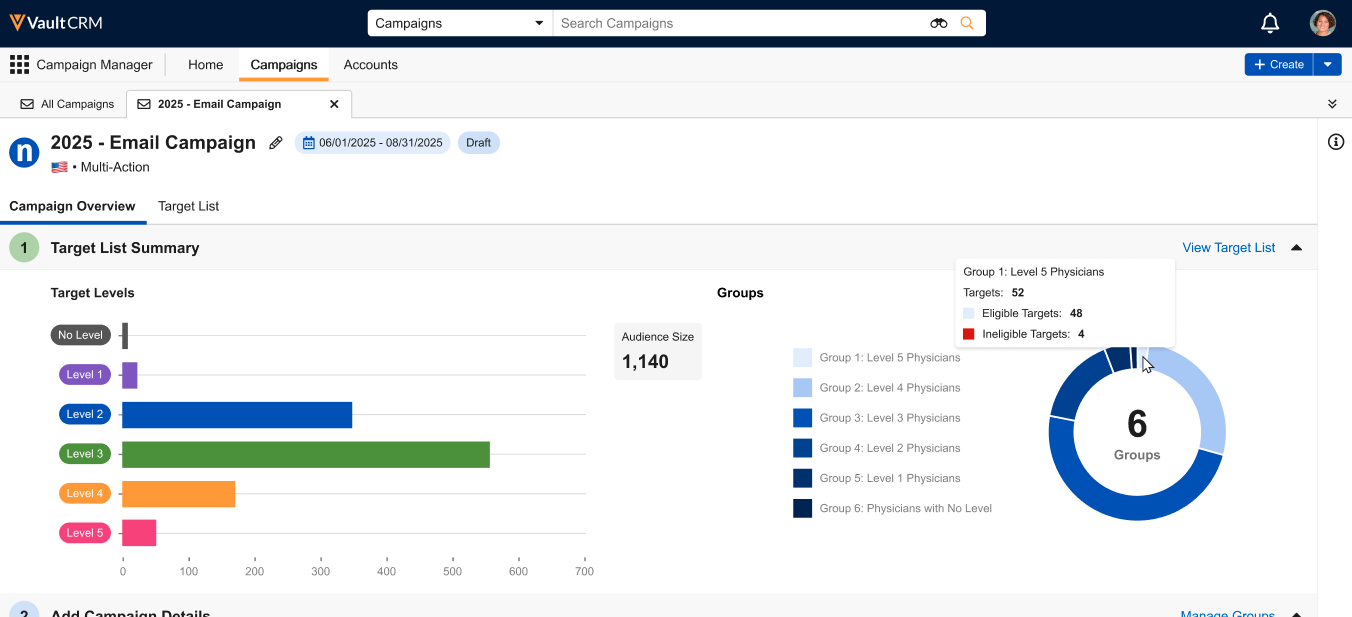
The Target List Summary section of campaigns now includes a donut chart, providing further information about the campaign’s targets based on the campaign type:
|
|
|
Events Management
|
Platform |
Description |
Before |
After |
|---|---|---|---|
|
Browser, iPad |
Attachments under an em_event__v record now consolidate into a zip file once there are over 90 files attached. See Grouping Event Attachments into Zip Files for more information. |
n/a |
n/a |
|
Browser, iPad |
To enable organizations to distinguish between signatures captured via digital sign in on an iPad versus those captured via QR Code®, the signature_method__v field on the following objects now stamps with the appropriate signature method:
See Using QR Codes® to Sign into an Event, Signing in as an Attendee, and Capturing Event Team Member Signatures for more information. |
n/a |
n/a |
Multichannel Cycle Plans
|
Platform |
Description |
Before |
After |
|---|---|---|---|
|
Browser |
When the Integration User has the correct permissions, MCCP channel activities are accurately reflected. Channel activities are counted towards users' actual goals based on the user timezone, not the UTC timezone. |
n/a |
n/a |
Service Center
|
Platform |
Description |
Before |
After |
|---|---|---|---|
|
Browser |
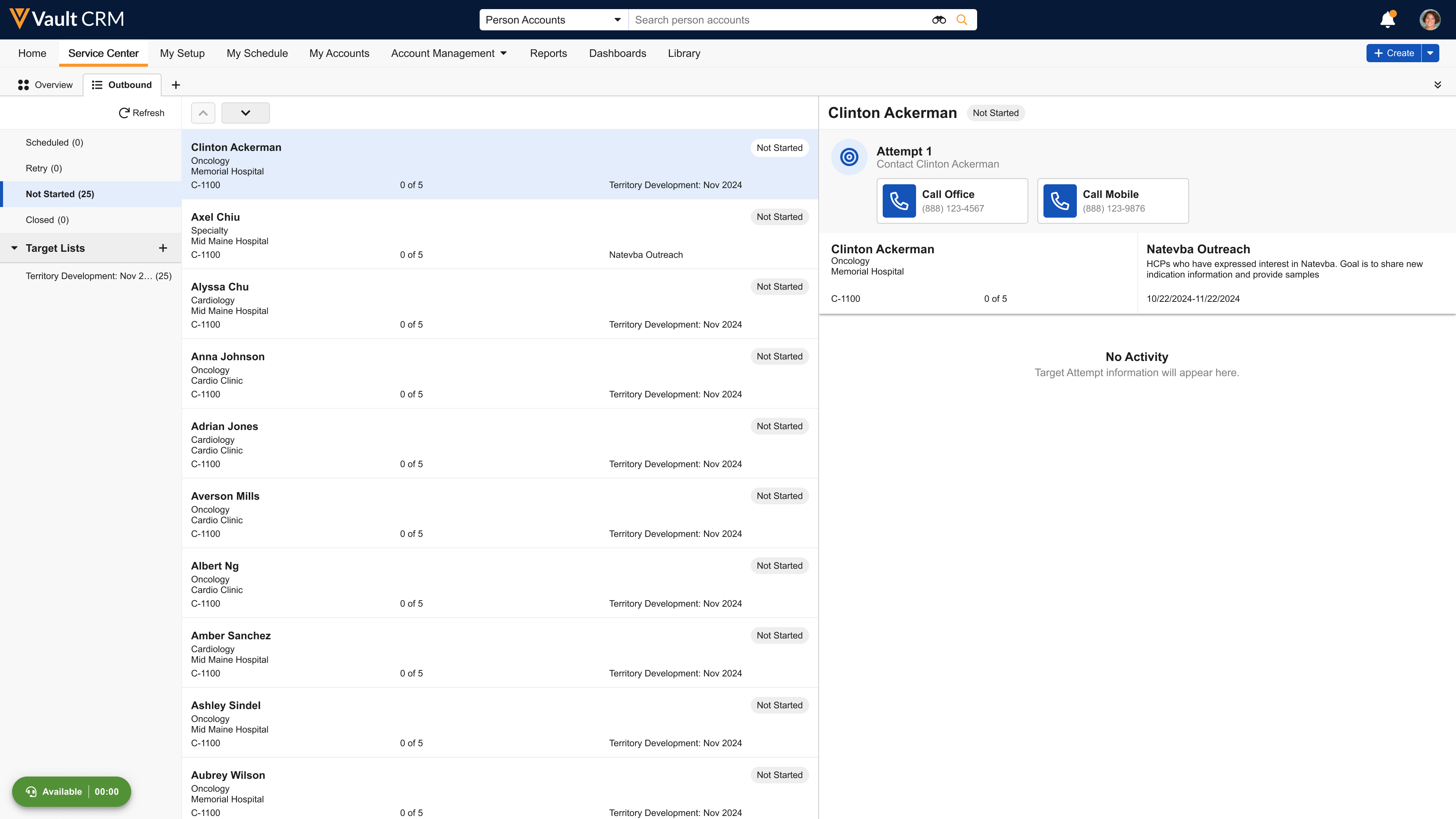
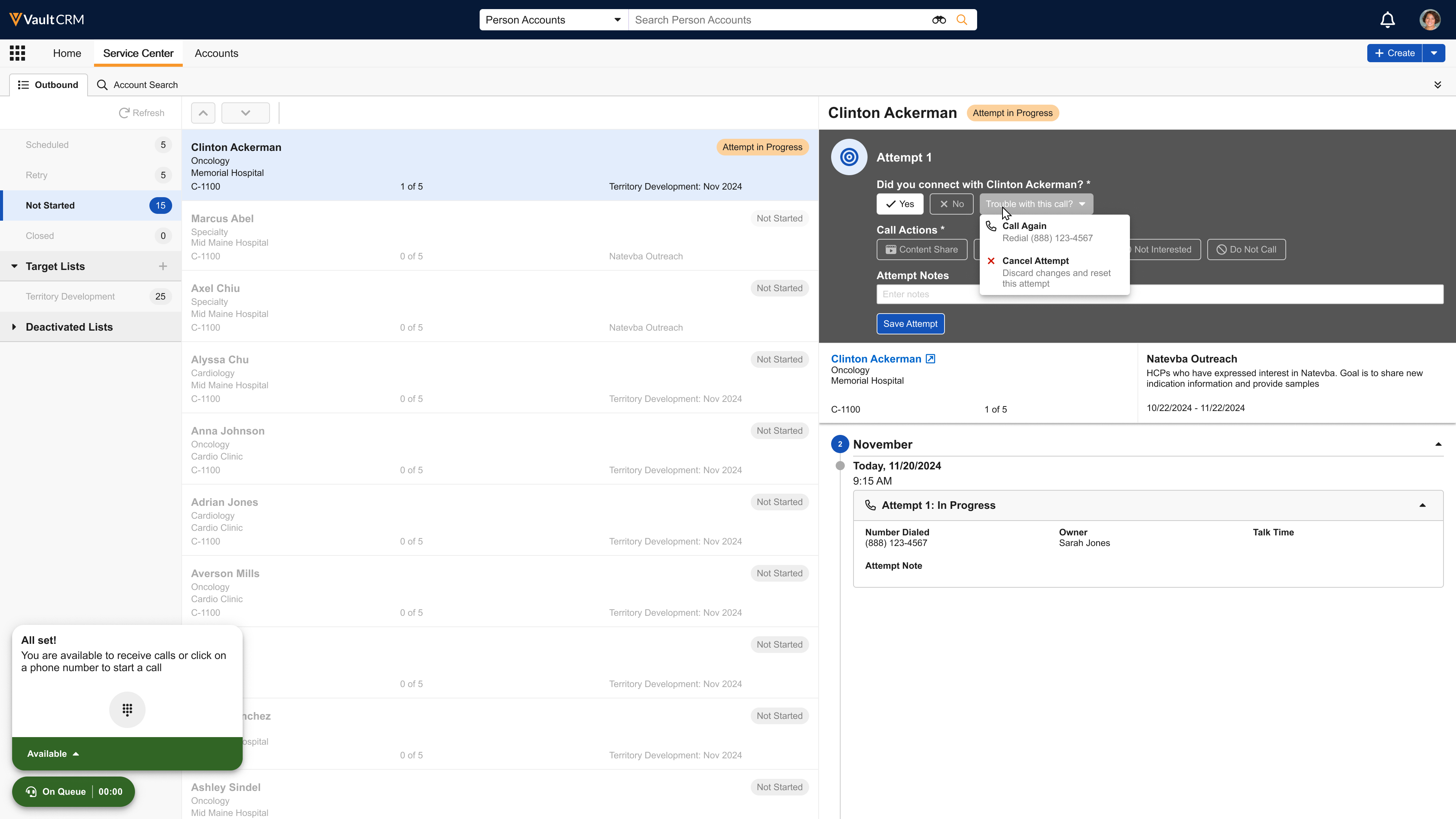
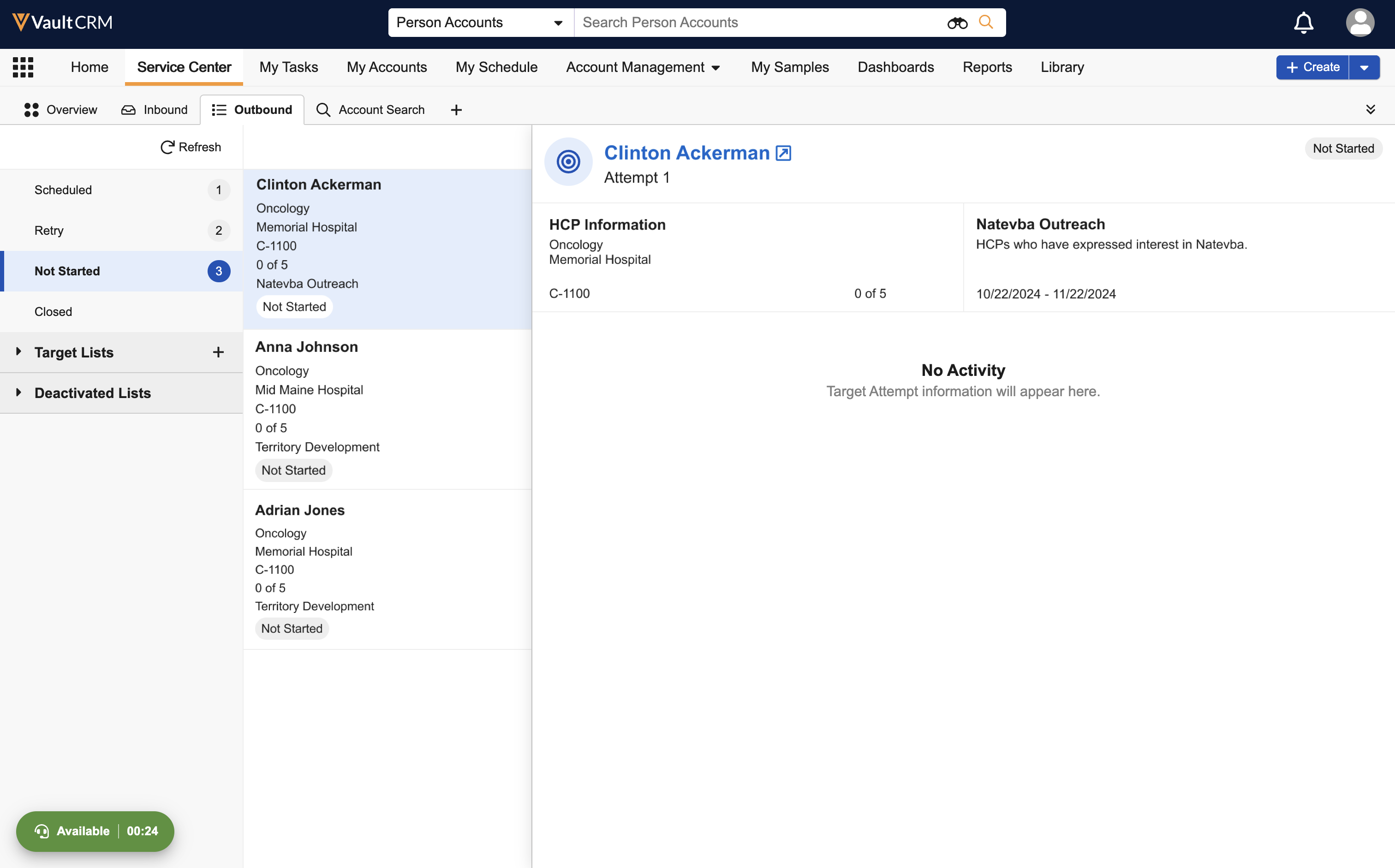
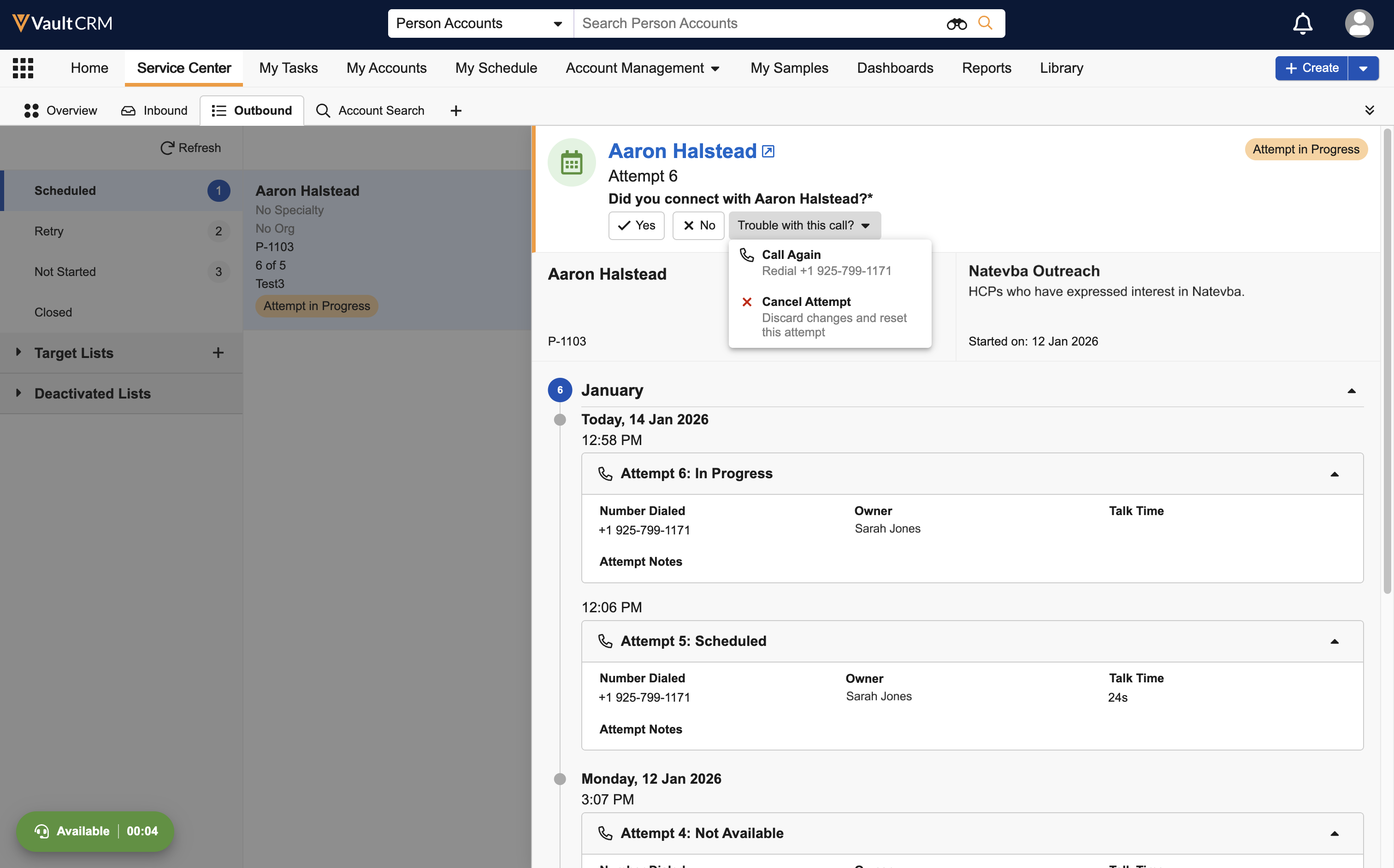
For an improved user experience, the Outbound tab’s user interface is redesigned:
|
|
|
Suggestions
|
Platform |
Description |
Before |
After |
|---|---|---|---|
|
iPad |
For a consistent user experience, selecting the Suggestions tab or Home Page tile on the iPad navigates to the new Suggestion tab, rather than the previous list view. |
|
|


Territory Management
|
Platform |
Description |
Before |
After |
|---|---|---|---|
|
Browser, iPad, iPhone |
To ensure territory security and performance, the following limits are now enforced:
See Territory Management Limits and Best Practices for more information. |
n/a |
n/a |
Vault AI in CRM
|
Platform |
Description |
Before |
After |
|---|---|---|---|
|
iPad |
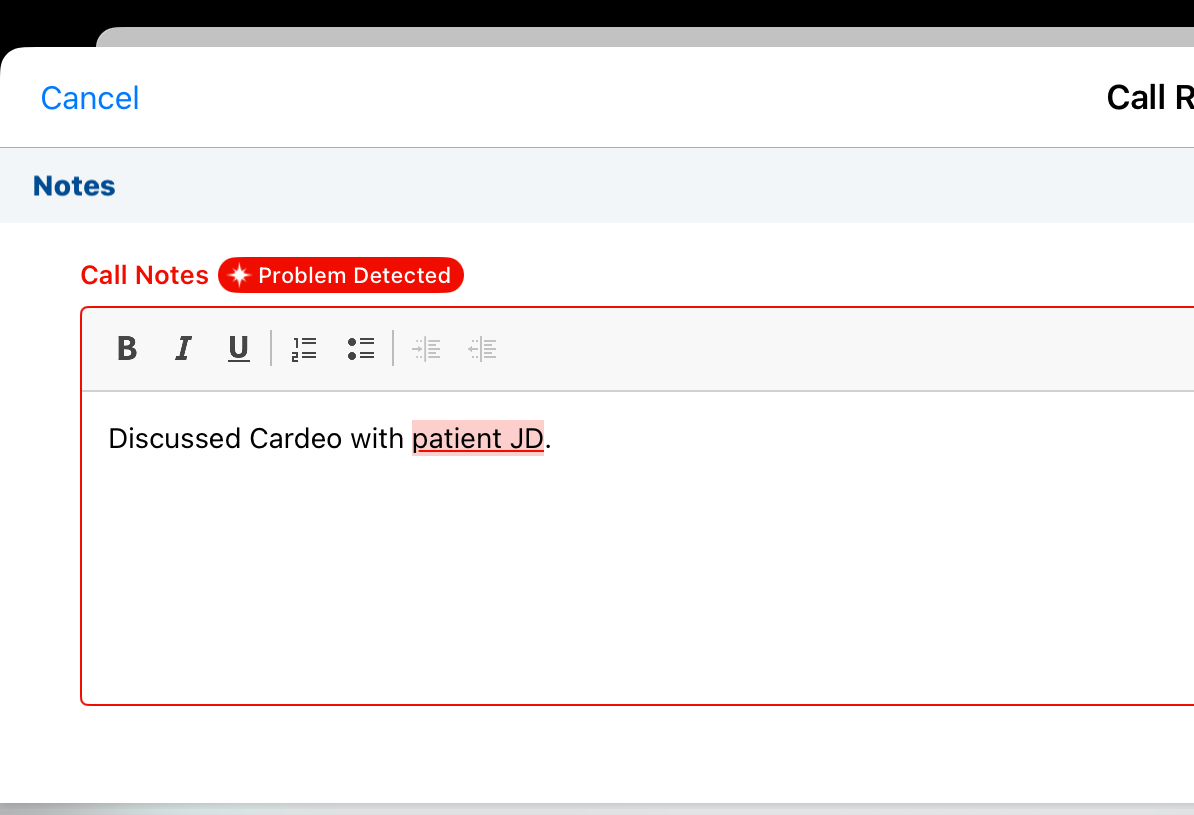
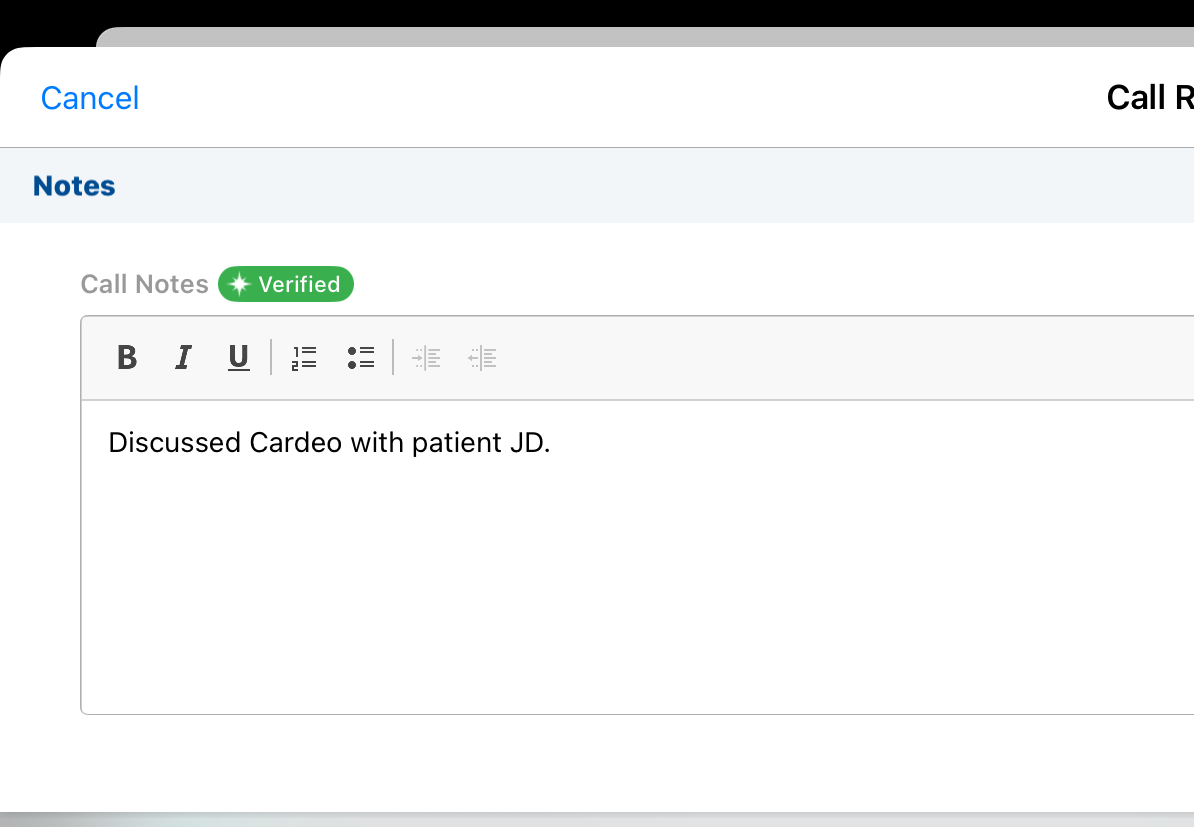
Agentic Text Monitoring’s interpretation of international context and local regulations is improved for Medical user profiles and non-U.S. regulatory contexts. |
|
|
25R3.2 Feature Enablement and Availability
The following table provides an explanation of feature enablement and user impact.


*Parity items do not typically require configuration if you are using this functionality on another platform. In some cases, VMOCs must be enabled for the added platform.
New Objects
The table below contains all new objects added in Vault CRM 25R3.2.
|
Object |
Label |
Description |
|---|---|---|
|
outbound_target__v |
Outbound Target |
An object that stores outbound targets for console applications including Service and Patient Center. |
| outbound_target_list__v | Outbound Target List |
An object that stores outbound target lists of outbound targets for console applications including Service and Patient Center. |
New Fields
The table below contains all fields added in Vault CRM 25R3.2. The fields are organized by object.
| Object | Field Name | Field Label | Description | Type |
|---|---|---|---|---|
| account__v | data_source__v | Data Source | Identifies the authoritative source of the HCP/HCO identity for an Account record. It indicates whether the record originated from Veeva, IQVIA, another third-party provider, or is self-managed. | Picklist |
| account_plan__v | collaboration_channel__v | Microsoft Teams Channel | Reference to the Teams channel associated to the Account Plan. | Object |
| account_plan__v | collaboration_space_configuration__v | Collaboration Space Configuration | Reference to the Collaboration Space Configuration associated with the Teams channel. | Object |
| account_plan__v | microsoft_teams_channel_link__v | Microsoft Teams Channel Link | The link to launch the Teams Channel in Microsoft Teams. | String |
| account_team_member__v | collaboration_resource_member__v | Collaboration Resource Member | Reference to the Channel member associated to the Account Team Member. | Object |
| account_team_member__v | collaboration_space_configuration__v | Collaboration Space Configuration | Reference to the Collaboration Space Configuration associated to the Account Team Member. | Object |
| account_team_member__v | collaboration_space_resource__v | Collaboration Space Resource | Reference to the Teams Channel associated to the Account Team Member. | Object |
| address__v | data_source__v | Data Source | Identifies the authoritative source of the HCP/HCO identity for an Address record. It indicates whether the record originated from Veeva, IQVIA, another third-party provider, or is self-managed. | Picklist |
| case_conversation__v | collaboration_channel__v | Collaboration Channel | Reference to the case's Microsoft Teams collaboration channel. | Object |
| case_conversation__v | collaboration_configuration__v | Collaboration Configuration | Reference to the Microsoft Teams' parent configuration record. | Object |
| child_account__v | data_source__v | Data Source | Identifies the authoritative source of the HCP/HCO identity for a Child Account record. It indicates whether the record originated from Veeva, IQVIA, another third-party provider, or is self-managed. | Picklist |
| collaboration_resource_member__v | collaboration_space_resource__v | Collaboration Space Resource | Parent resource to which the team member belongs. | Object |
| collaboration_resource_member__v | integration_status__v | Integration Status | Status of the channel member creation in Microsoft. | Picklist |
| collaboration_resource_member__v | integration_status_details__v | Integration Status Details | Details of the Integration Status Errors. | String |
| collaboration_resource_member__v | member_type__v | Member Type | Tracks whether the user is an owner or a member of the Team or Channel. | Picklist |
| collaboration_resource_member__v | microsoft_user_id__v | Microsoft User ID | ID of the user who is added to a resource in Microsoft. | String |
| collaboration_resource_member__v | name__v | Name | The record's name. | String |
| collaboration_resource_member__v | status__v | Status | The record's status. | Picklist |
| collaboration_resource_member__v | user__v | User | Reference to the CRM User record for added team members. | Object |
| collaboration_space_configuration__v | connection_status__v | Connection Status | The connection status between Microsoft and Vault CRM. When Connected, this means that the system is able to create Teams as needed when reaching Channel limits. | Picklist |
| collaboration_space_configuration__v | country__v | Country | Country associated to the Team. This will determine which records get added to the child Teams. | Object |
| collaboration_space_configuration__v | default__v | Default | Default Collaboration Space Configuration for records without a country configuration defined. | Yes/No |
| collaboration_space_configuration__v | name__v | Name | The record's name. | String |
| collaboration_space_configuration__v | space_name__v | Teams Space Name | Label displayed for the Team name in Microsoft Teams interfaces. | String |
| collaboration_space_configuration__v | status__v | Status | The record's status. | Picklist |
| collaboration_space_resource__v | collaboration_space_configuration__v | Collaboration Space Configuration | Label displayed for the Team name in Microsoft Teams interfaces. | String |
| collaboration_space_resource__v | collaboration_space_resource__v | Collaboration Space | Reference to the parent collaboration_space_resource__v record that contains the Team information. | Object |
| collaboration_space_resource__v | country__v | Country | Country of the Collaboration Space Configuration. | Object |
| collaboration_space_resource__v | integration_status__v | Integration Status | Status of the Team or Channel creation in Microsoft. | Picklist |
| collaboration_space_resource__v | integration_status_details__v | Integration Status Details | Details of the Integration Status. | String |
| collaboration_space_resource__v | microsoft_resource_id__v | Microsoft Resource ID | Unique identifier of the Team or Channel provided by Microsoft. | String |
| collaboration_space_resource__v | name__v | Name | The record's name. | String |
| collaboration_space_resource__v | number_of_channels__v | Number of Channels | Total number of channels created in the Team. | Number |
| collaboration_space_resource__v | status__v | Status | The record's status. | Picklist |
| collaboration_space_resource__v | teams_channel_url__v | Teams Channel URL | URL to the Teams Channel. When clicked, this opens the Teams Channel in the native Teams app. | String |
| collaboration_space_resource__v | type__v | Type | Tracks the type of Team or Channel from Microsoft. | Picklist |
| content_group_content__v | fax_template__v | Fax Template | The corresponding fax template. | Object |
| content_group_content__v | fax_template_unbound__v | Fax Template (unbound) | n/a | Number |
| em_attendee__v | signature_method__v | Signature Method | The method used to capture the signature. | Picklist |
| em_business_rule__v | comment_reason__v | Comment Reason | Stores standard responses for soft warnings when a comment is required or optional. | Picklist |
| em_business_rule__v | comment_type__v | Comment Type | Determines whether comments are from a picklist versus free text. | Picklist |
| em_business_rule_configuration__v | program_type__v | Program Type | The program type the business rule applies to. | String |
| em_event_override__v | comment_reason__v | Comment Reason | Stores standard responses for soft warnings when a comment is required or optional. | Picklist |
| em_event_speaker__v | signature_method__v | Signature Method | The method used to capture the signature. | Picklist |
| em_event_team_member__v | signature_method__v | Signature Method | The method used to capture the signature. | Picklist |
| events_management_settings__v | recipient_filter_type__v | Recipient Filter Type | Controls the display and behavior of recipient filter when sending Approved Emails within Events Management. | Picklist |
| mc_cycle__v | aln_field_force__v | Field Force | The corresponding Align field force. | Object |
| mc_cycle__v | aln_field_force_model__v | Field Force Model | The corresponding Align model field force. | Object |
| mc_cycle__v | mobile_id__v | Mobile ID | System field used by mobile products to aid synchronization. | Text |
| mc_cycle__v | source__v | Source | The source of the record. | Picklist |
| mc_cycle_channel__v | mobile_id__v | Mobile ID | System field used by mobile products to aid synchronization. | Text |
| mc_cycle_channel__v | source__v | Source | The source of the record. | Picklist |
| mc_cycle_plan__v | mobile_id__v | Mobile ID | System field used by mobile products to aid synchronization. | Text |
| mc_cycle_plan__v | source__v | Source | The source of the record. | Picklist |
| mc_cycle_plan_channel__v | mobile_id__v | Mobile ID | System field used by mobile products to aid synchronization. | Text |
| mc_cycle_plan_channel__v | source__v | Source | The source of the record. | Picklist |
| mc_cycle_plan_product__v | mobile_id__v | Mobile ID | System field used by mobile products to aid synchronization. | Text |
| mc_cycle_plan_product__v | source__v | Source | The source of the record. | Picklist |
| mc_cycle_plan_summary__v | mobile_id__v | Mobile ID | System field used by mobile products to aid synchronization. | Text |
| mc_cycle_plan_target__v | aln_end_date__v | End Date | The end date of the MCCP target in Align. | Date |
| mc_cycle_plan_target__v | aln_source__v | Target Source | Designates the target as an Align target. | Picklist |
| mc_cycle_plan_target__v | aln_start_date__v | Start Date | The start date of the MCCP target in Align. | Date |
| mc_cycle_plan_target__v | mobile_id__v | Mobile ID | System field used by mobile products to aid synchronization. | Text |
| mc_cycle_plan_target__v | source__v | Source | The source of the record. | Picklist |
| mc_cycle_product__v | mobile_id__v | Mobile ID | System field used by mobile products to aid synchronization. | Text |
| mc_cycle_product__v | source__v | Source | The source of the record. | Picklist |
| network_settings__v | network_hierarchy_widget_id__v | Hierarchy Explorer Widget ID | The unique ID for the Hierarchy Explorer widget to be embedded in Vault CRM Online. | String |
| network_settings__v | network_hierarchy_widget_name__v | Hierarchy Explorer Widget Name | The name of the Hierarchy Explorer widget that will be embedded in Vault CRM Online. | String |
| network_settings__v | network_widget_url__v | Network Widget URL | The base URL used to display widgets in Vault CRM. | String |
| outbound_target__v | account__v | Account | Reference to the Account Object record. | Object |
| outbound_target__v | done_focus__v | Done Focus | Indicates if the target should be removed from the Today's Focus view. This field is stamped when an Outbound Target Activity is completed for an Outbound Target in Today's Focus. | DateTime |
| outbound_target__v | last_outbound_activity__v | Last Outbound Activity | The date and time the most recent Outbound Target Activity was completed. | DateTime |
| outbound_target__v | name__v | Name | System managed name of the Outbound Target record. | Text |
| outbound_target__v | notes__v | Notes | Notes related to the target record. | Text |
| outbound_target__v | on_focus__v | On Focus | Indicates if the Target should be displayed in the Today's Focus view. The field is stamped when the Outbound Target is added to the Today's Focus view. If the Outbound Target remains in Today's Focus until done_today__v is stamped. | DateTime |
| outbound_target__v | ownerid__v | Target Owner | Reference to the user who owns or is responsible for the target and target activities. | Object |
| outbound_target__v | target_list__v | Target List | Reference to the Campaign, from which the target was added to Service or Patient Center. | Object |
| outbound_target__v | target_process_state__v | Target Process State | The workflow state of the outbound target record. | Picklist |
| outbound_target__v | target_status__v | Target Status | Status of the Target in relation to it's referenced Target List (Campaign) | Picklist |
| outbound_target_activity__v | outbound_target__v | Target | Target Account to which the target activity is related. | Object |
| outbound_target_list__v | campaign__v | Campaign | Marketing Campaign related to the Outbound Target List | Object |
| outbound_target_list__v | detail_group__v | Product Group | Product Detail Group to which the Outbound Target List applies. | Object |
| outbound_target_list__v | end_date__v | End Date | Ending date for the Outbound Target List | DateTime |
| outbound_target_list__v | name__v | Outbound Target List Name | The name given to the Outbound Target List | Text |
| outbound_target_list__v | ownerid__v | Owner | Outbound Target List owner. | Object |
| outbound_target_list__v | product__v | Product | Product to which the Outbound Target List applies. | Object |
| outbound_target_list__v | scheduled_activation_time__v | Scheduled Activation Time | Date and Time on which the Outbound Target List is set to be activated. | DateTime |
| outbound_target_list__v | start_date__v | Start Date | Date and Time on which Outbound Target List activities began. | DateTime |
| outbound_target_list__v | target_list_description__v | Description | Internal field used by Service and Patient Center users to describe the purpose of the Outbound Target List | Text |
| outbound_target_list__v | target_list_status__v | Target List Status | Indicates the current status of the Outbound Target List | Picklist |
| outbound_target_list__v | vcountry__v | Country | Country covered by the Outbound Target List | Object |
| veeva_distribution__v | cdn_path_contains_vault_id__v | CDN Path Contains Vault ID | Indicates whether published content belongs to the current Vault. | Yes/No |
| veeva_settings__v | clm_order_navigation_mode__v | CLM Order Navigation Mode | The navigation mode between a CLM Presentation and its associated order. | String |
Updated Fields
The table below contains all fields updated in Vault CRM 25R3.2. The fields are organized by object.
|
Object |
Field Name |
Field Label |
Change Description |
Type |
|---|---|---|---|---|
| mc_cycle_plan_channel__v | channel_attainment__v | Channel Attainment |
The maximum value is updated from 9.99 to 9999999.99. |
Percent |
| mc_cycle_plan_channel__v | product_attainment__v | Product Attainment |
The maximum value is updated from 9.99 to 9999999.99. |
Percent |
|
mc_cycle_plan_channel__v |
team_channel_attainment__v |
Team Channel Attainment |
The maximum value is updated from 9.99 to 9999999.99. |
Percent |
|
mc_cycle_plan_channel__v |
team_product_attainment__v |
Team Product Attainment |
The maximum value is updated from 9.99 to 9999999.99. |
Percent |
|
mc_cycle_plan_product__v |
product_attainment__v |
Product Attainment |
The maximum value is updated from 9.99 to 9999999.99. |
Percent |
|
mc_cycle_plan_product__v |
team_product_attainment__v |
Team Product Attainment |
The maximum value is updated from 9.99 to 9999999.99. |
Percent |
|
mc_cycle_plan_summary__v |
percent_all_goals__v |
% of All Goals |
The maximum value is updated from 9.99 to 9999999.99. |
Percent |
|
mc_cycle_plan_summary__v |
attainment__v |
Attainment |
The maximum value is updated from 9.99 to 9999999.99. |
Percent |
|
mc_cycle_plan_summary__v |
team_attainment__v |
Team Attainment |
The maximum value is updated from 9.99 to 9999999.99. |
Percent |
Removed Fields
No fields were removed in Vault CRM 25R3.2.

